|
VOOZH | about |
|
VOOZH | about |
Ridge Regression ( or L2 Regularization ) is a variation of Linear Regression. In Linear Regression, it minimizes the Residual Sum of Squares ( or RSS or cost function ) to fit the training examples perfectly as possible. The cost function is also represented by
Here:
The modified cost function is:
Here:
During gradient descent, Ridge Regression adds an L2 penalty term to the cost function, which reduces the magnitude of the model weights and prevents them from becoming excessively large. By shrinking the weights toward zero, the model becomes simpler, more generalized and less prone to overfitting.
The strength of this regularization is controlled by the hyperparameter λ, which shrinks all weights uniformly.
Hence, λ should be chosen carefully between these extremes to balance bias and variance.
The required libraries are imported for different tasks such as numerical computations using NumPy, data handling and processing using Pandas, data visualization using Matplotlib and splitting the dataset into training and testing sets using train_test_split.
A custom Ridge Regression model is created using gradient descent. The model includes L2 regularization to reduce overfitting and improve generalization.
The salary dataset is loaded using Pandas. The input feature (X) contains years of experience, while the target variable (Y) contains salary values. The dataset is then split into training and testing sets.
You can download the dataset from here.
An instance of the Ridge Regression model is created and trained using the training dataset.
The trained model predicts salary values for the test dataset. The predicted values are then compared with the actual salary values.
Output:
Predicted Values : [ 40773.44 123061.09 65085.7 ]
Actual Values : [ 37731. 122391. 57081.]
Weight : 9350.87 Bias : 26747.13
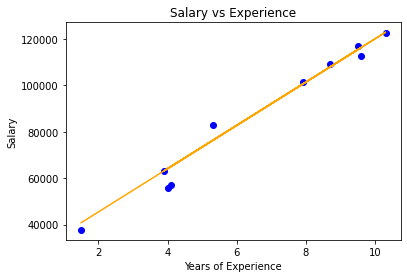
A graph is plotted to visualize the actual test data and the regression line generated by the Ridge Regression model.
You can download the source code from here.
Ridge regression leads to dimensionality reduction which makes it a computationally efficient model.