|
VOOZH | about |
|
VOOZH | about |
Model evaluation is the process of assessing how well a machine learning model performs on unseen data using different metrics and techniques. It ensures that the model not only memorises training data but also generalises to new situations. By applying various techniques, we can identify whether a model has truly learned patterns or not.
Cross-validation ensures that the model is tested on multiple subsets of data making it less likely to overfit and improving its generalisation ability.
In the Holdout method the dataset is split into train and test sets (commonly 7:3 or 8:2). Let's implement it where:
Output:
Training set size: 120
Testing set size: 30
In K-Fold Cross-Validation the dataset is divided into k folds. Each fold is used once as a test set and the model is trained on the remaining k-1 folds. Lets implement it where:
Output:
Cross-validation scores: [1. 1. 0.93333333 0.93333333 0.93333333]
Average CV Score: 0.9600000000000002
Classification models assign inputs to predefined labels. Their performance can be measured using accuracy, precision, recall, F1 score, confusion matrix and AUC-ROC. We’ll demonstrate these metrics using a Decision Tree Classifier on the Iris dataset.
We will calculate the accuracy,
- TP: True Positives
- TN: True Negatives
- FP: False Positives
- FN: False Negatives
accuracy_score() computes the proportion of correct predictions.
Output:
Accuracy: 0.9333333333333333
Precision: Precision measures how many predicted positives are actually positive.
Recall: Recall measures how many actual positives are correctly predicted.
Output:
Precision: 0.9435897435897436
Recall: 0.9333333333333333
For more details regarding Precision and Recall please refer to: Precision and Recall in Machine Learning
We will calculate the F1 score which is Harmonic mean of precision and recall. Balances both metrics.
Output:
F1 score: 0.9327777777777778
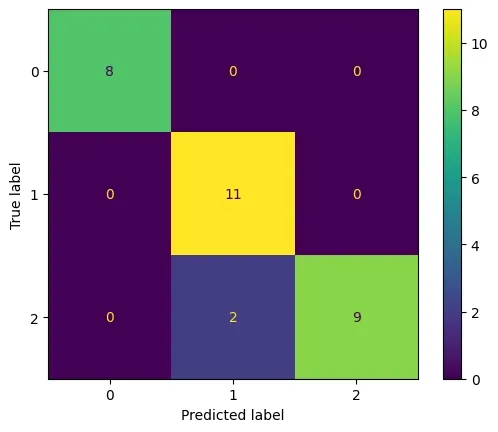
We will create a confusion matrix:
Output:
AUC -ROC Curve measures the area under the ROC curve, indicating the model’s ability to distinguish classes.
Output:
AUC: 0.9473684210526316
Regression predicts continuous values (e.g., temperature). We use error-based metrics to measure accuracy.
We will use the weather dataset which can be downloaded from here.
Mean absolute error is average difference between actual and predicted values.
Output:
MAE: 2.2349999999999977
We will calculate the mean squared error which is average squared difference between predicted and actual values.
Output:
MSE: 6.470558999999991
We will calculate RMSE which is Square root of MSE. Converts error back to original units.
Output:
RMSE: 2.54372934881052
MAPE expresses the prediction error as a percentage of the actual value.
Output:
MAPE: 0.03925255003024494