Text Generation using Gated Recurrent Unit Networks - ML
Last Updated : 9 Oct, 2025
Gated Recurrent Unit (GRU) are a type of Recurrent Neural Network (RNN) that are designed to handle sequential data such as text by using gating mechanisms to regulate the flow of information. Unlike traditional RNNs which suffer from vanishing gradient problems, GRUs offer a more efficient way to capture long-range dependencies in sequences. In this article, we will learn to build a Text Generator using a GRU network to generate creative text based on the learned patterns.
random: For generating random starting points in text.
2. Loading the data into a string
Here we are using a dataset of poems to train our GRU model. You can download dataset from here. We load the text lines into a pandas Data Frame, join all lines into one string and preview the first 500 characters.
Output:
Through the forest deep, where shadows linger long, the night sings its song......whisper of hope in the silence
3. Creating Character Mappings
We will extract unique characters in the text and create mappings from characters to indices and back.
set(text): Converts the text into a set to find unique characters.
vocabulary: A sorted list of all unique characters in the text.
char_to_indices: Maps each character to a unique index.
indices_to_char: The reverse mapping, mapping each index back to its corresponding character.
4. Prepare Input and Output Sequences
We will split the text into overlapping sequences of length 100. For each sequence, the next character is the label. Then we also One-hot encode inputs and outputs.
max_length: Defines the length of each input sequence (100 characters).
steps: Defines the step size by which the sliding window moves (5 characters).
sentences: List of subsequences of length max_length.
next_chars: List of the character that follows each subsequence.
X and y: Arrays to hold the one-hot encoded input and output data.
X[i, t, char_to_indices[char]] = 1: One-hot encodes each character in the input sequence.
y[i, char_to_indices[next_chars[i]]] = 1: One-hot encodes the next character for the output.
5. Building the GRU network
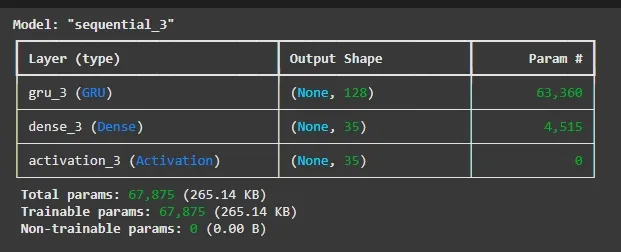
We will create a single GRU layer with 128 units with the following:
GRU(128): Adds a GRU layer with 128 units which will process the input sequences and retain memory of previous inputs.
Dense(len(vocabulary)): The output layer with a number of units equal to the size of the vocabulary where each unit corresponds to a unique character.
Activation('softmax'): The softmax activation function ensures the output is a probability distribution over all characters.
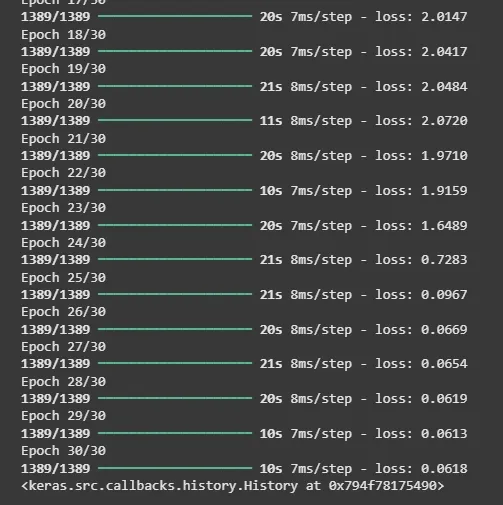
RMSprop(learning_rate=0.01): Specifies RMSprop optimizer with a learning rate of 0.01.
model.summary(): Displays a detailed summary of the model architecture including layer types, output shapes and number of parameters.
model.compile(): Compiles the model with categorical cross-entropy loss (used for multi-class classification) and the RMSprop optimizer.
sample(preds, temperature): Adjusts model output probabilities with temperature to control randomness, then samples the next character index from the distribution.
generate_text(length, temperature): Starts with a random seed sequence, repeatedly predicts the next character using the model and sample(), updates the input sequence and builds generated text of the specified length.
8. Generate Sample Text
We can generate same text using our trained model now.
, dreams take flight on wings of stars. Love ...........proud and wise. Th
Here we can see model is working fine and now can be used for generating text using GRU.