|
VOOZH | about |
|
VOOZH | about |
Creating a Restaurant app will cover a lot of features of the MERN stack. In this tutorial, we'll guide you through the process of creating a restaurant application using the MERN stack. The application will allow users to browse through a list of restaurants, view their menus, and add items to a shopping cart.
Preview of final output: Let us have a look at how the final output will look like.
Step 1: creating a project folder.
mkdir restaurant-app
cd restaurant-app
Step 2:Backend Setup
Create folder within restaurant-app folder i.e. server
mkdir server
cd server
Step 3: Initialize the Express project and install the required dependencies.
npm init -y
npm i express cors mongoose
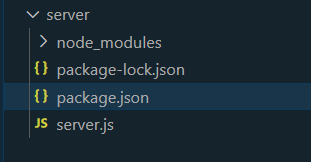
Folder Structure(Backend):
The updated dependencies in package.json file of backend will look like:
"dependencies": {
 "cors": "^2.8.5",
 "express": "^4.18.2",
 "mongoose": "^8.0.4",
 "nodemon": "^3.0.2"
}
Example: Now write the codes in the respective files.
Step 4: Initialize the frontend app and install required dependencies.
npx create-react-app client
cd client
npm i axios
Project Structure (Frontend):
The updated dependencies in package.json file of frontend will look like:
 "dependencies": {
 "@testing-library/jest-dom": "^5.17.0",
 "@testing-library/react": "^13.4.0",
 "@testing-library/user-event": "^13.5.0",
 "axios": "^1.6.5",
 "react": "^18.2.0",
 "react-dom": "^18.2.0",
 "react-query": "^3.39.3",
 "react-router-dom": "^6.21.1",
 "react-scripts": "5.0.1",
 "web-vitals": "^2.1.4"
}
Example: Create the respective folders and files according to the folder strure give and add the following codes.
Step to Run the code by typing the following command
node server.js
npm start
Output: