|
VOOZH | about |
|
VOOZH | about |
To get column names in MySQL use techniques such as the DESCRIBE statement, INFORMATION_SCHEMA.COLUMNS, and SHOW COLUMNS FROM commands.
Here will cover these techniques, with explained examples, and help to get a better understanding on how to get column names in MySQL.
MySQL provides several methods to retrieve column names from a table. Whether you're a beginner or an experienced developer, understanding these methods can strengthen your workflow and improve your database management skills.
MySQL offers simple methods to retrieve column names from tables.
To get column names, we mainly use the DESCRIBE statement. This command returns a list of columns in the specified table, along with their types and other details.
DESCRIBE table_name;
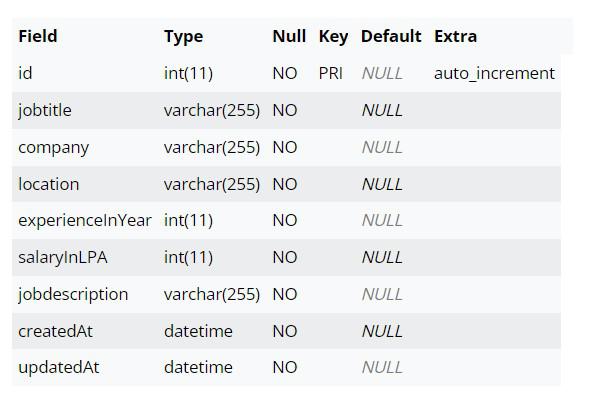
Suppose we have a table named `jobs` with columns `id `, `jobtitle`, `company`, `location`, `experienceInYear `, `salaryInLPA`, and `jobdescription`. Using DESCRIBE, we get:
DESCRIBE jobs;Output:
The output contains follows:
Another approach to retrieve column names is by querying the INFORMATION_SCHEMA.COLUMNS table. This system table contains metadata about columns in all databases accessible to the MySQL server.
SELECT column_name
FROM INFORMATION_SCHEMA.COLUMNS
WHERE table_name = 'write_your_tablename_here';
Alternatively, you can use the INFORMATION_SCHEMA.COLUMNS table. Here's how:
SELECT column_name
FROM INFORMATION_SCHEMA.COLUMNS
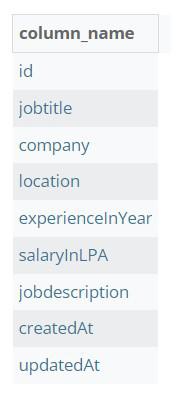
WHERE table_name = 'jobs';
Output:
The output contains a single column named column_name, which holds the names of columns from the jobs table. Each row in the result set represents a column name (`id`, `jobs` with columns `id `, `jobtitle` , `company` , `location` , `experienceInYear `, `salaryInLPA`, `jobdescription`) from the specified table.
Another way to get the column names of a table, you use the SHOW COLUMNS FROM command in MySQL. DESCRIBE and these commands (both) return a result set with the columns. It is Similar to the DESCRIBE statement, which offers a quick way to display column information for a specified table.
SHOW COLUMNS FROM table_name;
To get the column names of the `jobs` table using SHOW COLUMNS FROM, you can execute in the following way:
SHOW COLUMNS FROM jobs;Output:
The output contains the same as the DESCRIBE Statement.
In conclusion, retrieving column names from MySQL tables is essential for effective database management. The DESCRIBE statement, INFORMATION_SCHEMA.COLUMNS and SHOW COLUMNS FROM commands offer convenient methods for accessing column names.
Whether obtaining details about table structure or querying metadata, these approaches provide users with flexibility and choice, contributing to improved data manipulation and query efficiency in MySQL databases.