 |
VOOZH | about |
|
VOOZH | about |
Creating tables in MySQL is essential for organizing and managing data within a database. Tables store data in rows and columns, similar to a spreadsheet structure.
The MySQL Command Line Client allows you to create a table using the CREATE TABLE statement. This method requires specifying the table name, column names, and their data types.
Syntax:
CREATE TABLE table_name (
 column1_name datatype constraints,
 column2_name datatype constraints,
 ...
 columnN_name datatype constraints
);Follow these steps to create a table using the MySQL Command Line Client.
Run the following command to log in to MySQL:
mysql -u your_username -pReplace your_username with your MySQL username. After running the command, you will be asked to enter your password.
Once logged in, run the following query to create an employees table.
Query:
CREATE TABLE employees (
 id INT AUTO_INCREMENT PRIMARY KEY,
 name VARCHAR(100),
 age INT,
 department VARCHAR(100),
 salary DECIMAL(10, 2)
);
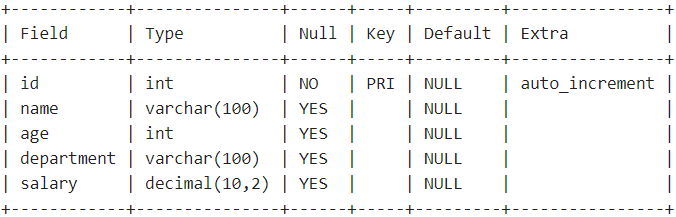
This table stores employee information such as id, name, age, department, and salary.
To verify that the table was created successfully, you can use the DESCRIBEstatement to view the structure of the employees table:
Query:
DESCRIBE employees;Output:
By following these steps, you have successfully created a table using the MySQL Command Line Client. The table is now ready to store data in your database.
For users who prefer a graphical interface, MySQL Workbench provides a simple way to create tables visually. It allows users to design tables without writing SQL commands.
Follow the steps below to create a table using MySQL Workbench.
Launch MySQL Workbench and establish a connection to your MySQL server.
Create a database or schema if you have not already created one.
Select the database where the table will be created.
Enter the table details and create the table.
For example, create a table named information.
Hence, the information table is successfully created using MySQL Workbench.
Once the table is created, you can verify it by using the "DESCRIBE" command in the MySQL Command Line Client.
Query:
DESCRIBE information;Output:
By following these steps, you can create a table using MySQL Workbench and verify its structure using the MySQL Command Line Client.



.png)