|
VOOZH | about |
|
VOOZH | about |
The SUM() function in MySQL is an aggregate function used to calculate the total sum of values in a numeric column. It helps generate overall totals for better data analysis.
Syntax:
SUM(expression)expression: A specified expression which can either be a field or a given formula.
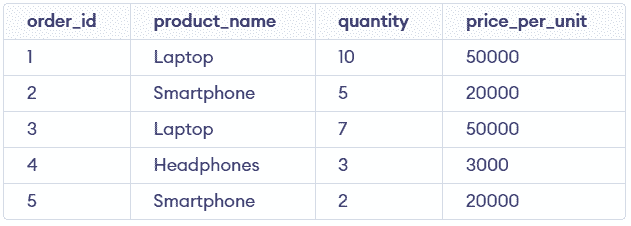
This section demonstrates how the MySQL SUM() function works in different scenarios. First, we will create a demo table on which the SUM() function will be applied:
This example calculates the total quantity of all products present in the table. It shows the basic usage of the SUM() function.
Query:
SELECT SUM(quantity) AS total_quantity
FROM sales;
Output:
This example calculates the total quantity for a specific product using a condition. It filters rows before applying SUM().
Query:
SELECT SUM(quantity) AS total_laptop_quantity
FROM sales
WHERE product_name = 'Laptop';
Output:
This example calculates the total quantity for each product separately. It groups rows and applies SUM() on each group.
Query:
SELECT product_name, SUM(quantity) AS total_quantity
FROM sales
GROUP BY product_name;
Output:
This example filters grouped results based on total quantity. It is used after GROUP BY to apply conditions on aggregated values.
Query:
SELECT product_name, SUM(quantity) AS total_quantity
FROM sales
GROUP BY product_name
HAVING SUM(quantity) > 10;
Output:
This example calculates the sum of only unique values in the column. Duplicate values are ignored before summing.
Query:
SELECT SUM(DISTINCT quantity) AS total_distinct_quantity
FROM sales;
Output: