|
VOOZH | about |
|
VOOZH | about |
MySQL Server is an open-source relational database management system widely used for web applications to store and manage data efficiently. It powers many modern websites by enabling reliable data storage and seamless data exchange.
Queries are commands used to interact with database tables and manipulate data. Some commonly used MySQL queries, operators, and functions are listed below:
Displays all the databases available on the MySQL server, allowing users to view and verify existing databases before performing any operations.
Syntax:
SHOW DATABASES;Sets a specific database as the active database so that all subsequent queries are executed within that database.
Syntax:
USE database_name;
SELECT DATABASE();
Provides detailed information about the structure of a table, including column names, data types, and constraints.
Syntax:
DESCRIBE table_name;Lists all the tables present in the currently selected database, helping users understand the database structure.
Syntax:
SHOW TABLES;Displays the complete SQL statement used to create a specific table, including all constraints and settings.
Syntax:
SHOW CREATE TABLE table_name;Returns the current date and time from the MySQL server, which is useful for time-based operations.
Query:
SELECT NOW();Output:
Allows execution of calculations or evaluation of expressions without referencing any table.
Query:
SELECT 2 + 4;
SELECT 2 + 4, CURDATE();
Output :
Used to include notes or explanations inside SQL queries, improving readability and maintainability of code.
Example:
/* Multi-line comment */
# Single-line comment
-- Single-line comment
Creates a new database where tables and data can be stored and managed.
Syntax:
CREATE DATABASE database_name;Deletes an existing database along with all its tables and data permanently.
Syntax:
DROP DATABASE database_name;Creates a new table in the database with specified columns, data types, and constraints. It defines how data will be structured and stored in the database.
Syntax:
CREATE TABLE table_name (
 column1 datatype constraints,
 column2 datatype constraints,
 ....,
 columnN datatype constraints
);
Query:
CREATE TABLE employee(
 id INT AUTO_INCREMENT PRIMARY KEY,
 name VARCHAR(30) NOT NULL,
 profile VARCHAR(40) DEFAULT 'engineer'
) ENGINE = InnoDB;
Used to automatically generate unique sequential values for a column, typically for primary keys in a table.
Syntax:
column_name INT AUTO_INCREMENTDeletes an existing table from the database along with all its data and structure permanently.
Syntax:
DROP TABLE table_name;Renames an existing table to a new name without affecting its data or structure.
Syntax:
RENAME TABLE old_table_name TO new_table_name;Adds one or more new columns to an existing table, allowing modification of table structure after creation.
Syntax:
ALTER TABLE table_name ADD column_name datatype;Removes a column from an existing table along with all its stored data.
Syntax:
ALTER TABLE table_name DROP COLUMN column_name;Inserts new records into a table by specifying column names and corresponding values. It is one of the most commonly used queries to add data into a database.
Syntax:
INSERT INTO table_name (column1, column2)
VALUES (value1, value2);
Query:
INSERT INTO employee (name, profile)
VALUES ('John', 'Developer');
Output:
Updates existing records in a table based on specified conditions, allowing modification of stored data without deleting it.
Syntax:
UPDATE table_name
SET column1 = value1
WHERE condition;
Query:
UPDATE employee
SET profile = 'Manager'
WHERE id = 1;
Output:
Deletes records from a table based on a given condition. It is used to remove unwanted or outdated data from the database.
Syntax:
DELETE FROM table_name WHERE condition;Retrieves specific records from a table that satisfy a given condition, making it possible to filter data effectively.
Syntax:
SELECT column1 FROM table_name WHERE condition;Query:
SELECT name FROM employee WHERE profile = 'Manager';Output:
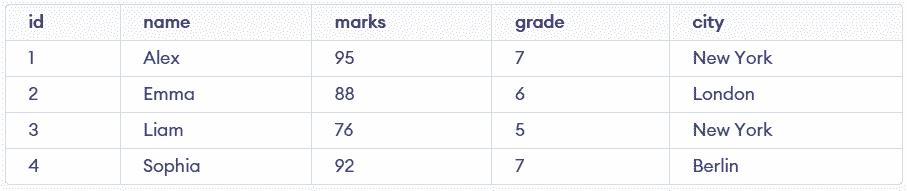
Fetches all columns and all records from a table without specifying individual column names.
Syntax:
SELECT * FROM table_name;Query:
SELECT * FROM Student;Output:
Returns the total number of rows in a table or the number of rows that match a specific condition.
Syntax:
SELECT COUNT(*) FROM table_name;Query:
SELECT COUNT(*) FROM Student;Output:
Returns the maximum (highest) value from a specified column, useful for identifying top values in a dataset.
Syntax:
SELECT MAX(column_name) FROM table_name;Query:
SELECT MAX(marks) FROM Student;Output:
Returns the minimum (lowest) value from a specified column, helping identify the smallest value in a dataset.
Syntax:
SELECT MIN(column_name) FROM table_name;Query:
SELECT MIN(marks) FROM Student;
-- Nested Query
SELECT MIN(marks)
 FROM Student
 WHERE marks > ( SELECT MIN(marks) from Student);
Output:
Restricts the number of rows returned in a query result, helping control output size and improve performance.
Syntax:
SELECT * FROM table_name LIMIT number;Query:
SELECT * FROM Student LIMIT 2;Output:
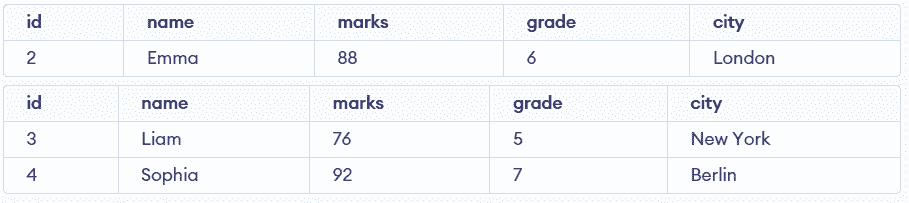
Filters records where a column value falls within a specified range, including both lower and upper limits.
Syntax:
SELECT * FROM table_name WHERE column BETWEEN value1 AND value2;Query:
SELECT * FROM Student WHERE grade BETWEEN 4 AND 6;Output:
Returns only unique values from a column by removing duplicate entries from the result set.
Syntax:
SELECT DISTINCT column_name FROM table_name;Query:
SELECT DISTINCT city FROM Student;Output:
Checks whether a column value matches any value from a specified list, simplifying multiple OR conditions.
Syntax:
SELECT * FROM table_name WHERE column IN (value1, value2);Query:
SELECT * FROM Student WHERE grade IN (6, 7, 8, 9);Combines multiple conditions where all conditions must be true for a record to be included in the result.
Syntax:
SELECT * FROM table_name WHERE condition1 AND condition2;Query:
SELECT * FROM Student WHERE marks > 90 AND grade = 7;Output:
Returns records if at least one of the specified conditions is true, allowing broader filtering.
Syntax:
SELECT * FROM table_name WHERE condition1 OR condition2;Query:
SELECT * FROM Student WHERE city = 'London' OR city = 'Berlin';Output:
Checks whether a column contains NULL (missing or undefined) values in the table.
Query:
SELECT * FROM Student WHERE city IS NULL;Defines a relationship between two tables by linking a column to the primary key of another table.
Syntax:
FOREIGN KEY (column_name) REFERENCES parent_table(column_name);Searches for records that match a specified pattern in a column, commonly used with text data.
Syntax:
SELECT * FROM table_name WHERE column LIKE pattern;Query:
-- Matches names with "m" as the second character
SELECT * FROM Student WHERE name LIKE '_m%';

-- Matches names containing "ia" anywhere in the string
SELECT * FROM Student WHERE name LIKE '%ia%';
Output:
Joins are used to combine data from two or more tables based on a common column, allowing retrieval of related information stored across multiple tables.
Syntax:
SELECT columns
FROM table1
JOIN table2 ON condition;
INNER JOIN (Regular Join):
Returns only the records that have matching values in both tables based on the given condition.
SELECT student.name, department.name
FROM student
JOIN department ON student.department = department.name;
LEFT JOIN:
Returns all records from the left table and the matching records from the right table. If no match is found, NULL values are returned for the right table.
SELECT student.name, department.name
FROM student
LEFT JOIN department ON student.department = department.name;
RIGHT JOIN:
Returns all records from the right table and the matching records from the left table. If no match is found, NULL values are returned for the left table.
SELECT student.name, department.name
FROM student
RIGHT JOIN department ON student.department = department.name;