|
VOOZH | about |
|
VOOZH | about |
MySQL provides the ORDER BY clause to sort the result set based on one or more columns. It is useful for organizing data in ascending or descending order for better analysis and readability.
ASC) or descending (DESC) order. Syntax:
SELECT column1, column2, ...
FROM table
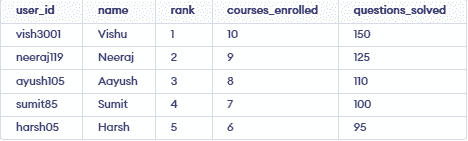
ORDER BY column1 [ASC | DESC], column2 [ASC | DESC], ...;We will use the following table for our ORDER BY clause examples. To create and use this table on your system, execute the following MySQL queries:
👁 Screenshot-2026-03-26-173738Now let's look at some examples of the ORDER BY clause, and understand its workings in different scenarios.
We can use the ASC attribute to sort in ascending order and the DESC attribute to sort in descending order. These are both very useful attributes of the ORDER BY clause.
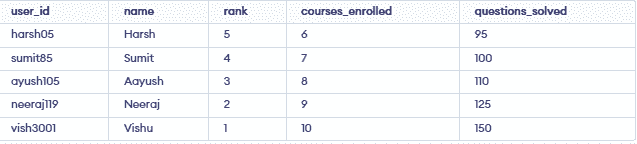
CASE 1: Let's sort the displayed data in the table in ascending order for the "courses enrolled" column, but for this time we are going to use the ASC keyword along with the ORDER BY clause.
SELECT * from
geeksforgeeks ORDER BY courses_enrolled ASC;
Output:
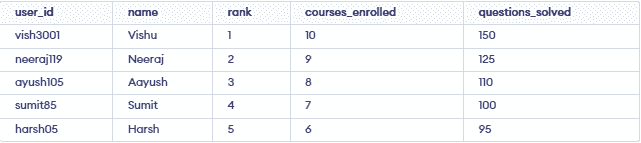
👁 Screenshot-2026-03-26-173900CASE 2: Let's sort the displayed data with respect to the courses enrolled column but this time we are displaying the data in descending order.
SELECT * FROM
geeksforgeeks ORDER BY courses_enrolled DESC;In this example, we will implement the ORDER BY clause on multiple columns in a single query, and for better understanding, we will first add some data with duplicate ranks to the table.
INSERT INTO geeksforgeeks(user_id,name,rank,courses_enrolled,questions_solved)
VALUES('vaibhav455','Vaibhav',05,08,110);

INSERT INTO geeksforgeeks(user_id,name,rank,courses_enrolled,questions_solved)
VALUES('karan565','Karan',05,07,100);
Now let's implement our query of the ORDER BY clause in multiple columns
SELECT * FROM geeksforgeeks
ORDER BY rank, name desc;To implement this example, we will update the rank column to NULL for the users with IDs 'ayush105' and 'harsh05' using the UPDATE statement.
Query:
UPDATE geeksforgeeks
SET rank = NULL
WHERE user_id = 'ayush105' or user_id = 'harsh05';
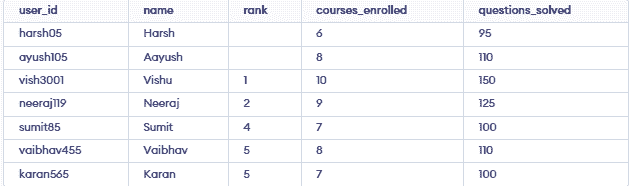
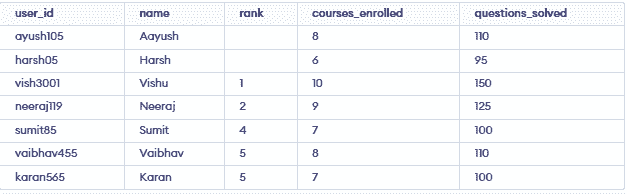
Now let's display our table values in ascending order with respect to the rank column.
SELECT *
from geeksforgeeks ORDER BY rank;
Output:
👁 Screenshot-2026-03-26-181249