|
VOOZH | about |
|
VOOZH | about |
MySQL provides the WHERE clause to filter records based on specified conditions. It is useful for retrieving or modifying only the required data from a table.
Syntax:
SELECT column1, column2, ...
FROM table_name
WHERE condition;
Parameters:
* to select all columns. The following operators can be used in the WHERE clause:
Operator | Description |
|---|---|
| = | Equal |
| > | Greater than |
| < | Less than |
| >= | Greater than or equal |
| <= | Less than or equal |
| <> | Not equal. Note: In some versions of SQL this operator may be written as != |
| BETWEEN | Between a certain range |
| LIKE | Search for a pattern |
| IN | To specify multiple possible values for a column |
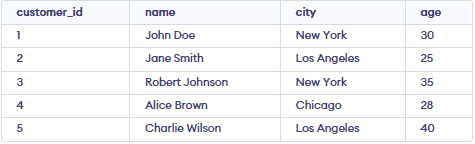
To understand the MySQL WHERE clause, we will create and work with the following table.
👁 Screenshot-2026-03-26-121142Let's see some examples of where clause and understand it's working in MySQL :
Let's find out the records of all those customers who live in "New York".
SELECT * FROM customers WHERE city = 'New York';Let's find out all those customers who live in 'Los Angeles' with ages less than 30.
Query:
SELECT * FROM customers WHERE city = 'Los Angeles' AND age < 30;Let's find out all customers who either live in 'New York' or their age greater than 35.
Query:
SELECT * FROM customers WHERE city = 'New York' OR age > 35;Let's find out all customers who are older than 30 years.
Query:
SELECT * FROM customers WHERE age > 30;Output
👁 Screenshot-2026-03-26-123057Let's find out all customers whose names start with the "J" letter.
Query:
SELECT * FROM customers WHERE name LIKE 'J%';Output:
👁 Screenshot-2026-03-26-123154Let's find out all the customers whose city name is NewYork, Chicago.
Query:
SELECT * FROM customers WHERE city IN ('New York', 'Chicago');👁 Screenshot-2026-03-26-123245Let's find out all records of customers who belong to "NewYork" but the condition is the records must be in descending order by age.
Query:
SELECT * FROM customers WHERE city = 'New York' ORDER BY age DESC;