|
VOOZH | about |
|
VOOZH | about |
The MySQL SELECT statement is used to retrieve data from one or more tables in a database. It helps in fetching specific columns and filtering data based on conditions.
Syntax:
SELECT column1, column2, ...FROM table_nameWHERE conditionORDER BY column_name [ASC | DESC]LIMIT number;Here, column1, column2, ... are the columns you want to retrieve. If you want to retrieve data from all columns/fields, you can use the following
Syntax:
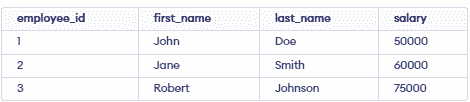
SELECT * FROM table_nameFor this tutorial on MySQL SELECT statement, we will use the following MySQL table.
👁 Screenshot-2026-03-23-112744To quickly create this table on your local MySQL Workbench, enter the following MySQL query:
CREATE TABLE employees (
 employee_id INT PRIMARY KEY,
 first_name VARCHAR(50),
 last_name VARCHAR(50),
 salary DECIMAL(10, 2) );
INSERT INTO employees VALUES
 (1, 'John', 'Doe', 50000),
 (2, 'Jane', 'Smith', 60000),
 (3, 'Robert', 'Johnson', 75000);
Let's explore some examples to learn how to write SELECT statement queries.
This query retrieve only first_name and last_name columns
SELECT first_name, last_name
FROM employees;
Output:
👁 Screenshot-2026-03-23-113149This query will retrieve the entire employee table.
SELECT * from employees;This query performs a mathematical calculation and returns the result.
SELECT 32*32Output:
👁 Screenshot-2026-03-23-113455We can also use SELECT statements to perform, basic mathematical operations.
MySQL SELECT DISTINCT Statement is used to retrieve only distinct data from a field/column. It is very used to remove duplicates from the results.
Syntax:
SELECT DISTINCT column1, column2, ...
FROM table_name
Example: Retrieves unique salary values from the employees table.
SELECT DISTINCT salaryFROM employees;👁 Screenshot-2026-03-23-113901