|
VOOZH | about |
|
VOOZH | about |
MySQL provides the GROUP BY clause to group rows with similar values into summary rows. It is useful for performing calculations on grouped data using aggregate functions.
Syntax:
SELECT column1, aggregate_function(column2)
FROM table_name
WHERE condition
GROUP BY column1;
Where,
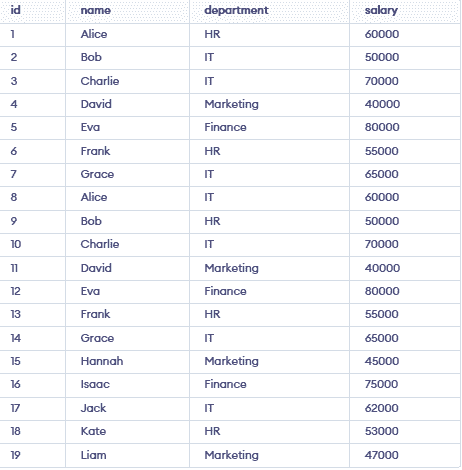
Let’s create a table employees with columns employee_id, name, department, and salary.
Let’s find the average salary in each department in Employees Table.
SELECT department, AVG(salary) AS average_salary
FROM employees
GROUP BY department;Output:
👁 Screenshot-2026-03-27-114845Consider the same employees table , here we will find the average salary for each employee within their department. We can use the GROUP BY clause with multiple columns: department and name.
SELECT department, name, AVG(salary) AS average_salary
FROM employees
GROUP BY department , name;Output:
👁 Screenshot-2026-03-27-115014
Lets see the working of GROUP BY Clause along with the aggregate functions such as SUM, AVG,COUNT,MIN and MAX.
In this example, we will find the count of employees in each department or we can say how many employees are there in each department. We can use the COUNT() function to count the number of rows for each department.
SELECT department, COUNT(*) AS employee_count
FROM employees
GROUP BY department;Output:
👁 Screenshot-2026-03-27-130001Let us calculate the total salary paid to employees in each department. We use the SUM() function in this query:
SELECT department, SUM(salary) AS total_salary
FROM employees
GROUP BY department;Output:
👁 Screenshot-2026-03-27-115112Here, in this example we will calculate the minimum salary in each department using the MIN() function.
SELECT department, MIN(salary) AS min_salary
FROM employees
GROUP BY department;Output:
👁 Screenshot-2026-03-27-120358Here in this example, we will calculate the maximum salary in each department using the MAX() function.
SELECT department, MAX(salary) AS max_salary
FROM employees
GROUP BY department;Output:
Let us calculate the average salary in each department again to reinforce the use of the AVG() function.
SELECT department, AVG(salary) AS average_salary
FROM employees
GROUP BY department;Output:
👁 Screenshot-2026-03-27-120449