|
VOOZH | about |
|
VOOZH | about |
MySQL provides the LIMIT clause to restrict the number of rows returned by a query. It is useful for controlling large result sets and improving query performance.
SELECT statement. Syntax:
SELECT column_name(s)
FROM table_name
LIMIT [offset,] row_count;
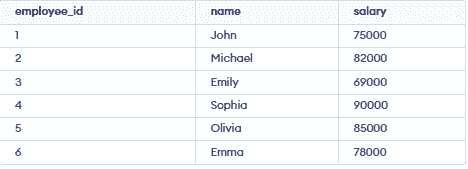
Let’s understand the MySQL LIMIT clause using examples. First, we create a sample table:
👁 Screenshot-2026-03-26-182720In this example, we are using the LIMIT clause to fetch the first 3 records from the employees table. This query returns the earliest entries based on their order in the table.
SELECT * FROM employees
LIMIT 3;
Output:
👁 Screenshot-2026-03-26-183051In this example, we are using the LIMIT clause with an offset to skip the first record and return the next 3 records from the employees table. This allows us to paginate through the results by specifying a starting point.
SELECT * FROM employees
LIMIT 1, 3;
Output:
👁 Screenshot-2026-03-26-183241In this example, we are using the LIMIT clause in combination with ORDER BY to fetch the last 2 records from the employees table. Sorting the results in descending order and limiting the output lets us obtain the most recent entries.
SELECT * FROM employees
ORDER BY employee_id DESC
LIMIT 2;
Output: