|
VOOZH | about |
|
VOOZH | about |
MySQL is a popular open-source relational database management system (RDBMS) that is usually used for developing scalable and high-performance databases. A VIEW serves as a virtual table that interacts with data derived from one or more underlying tables through a defined query.
In this article, We will learn about MySQL Update View Statement, and How to Update View in MySQL by understanding various examples and so on.
Syntax:
UPDATE view_name
SET column1 = value1, column2 = value2 , . . . . , column_n = value_n
WHERE condition1 , condition2, . . . . , condition_n;
Explanation:
It depends on the need of the user whether to use WHERE clause or not. If the WHERE clause is specified then only those rows will get updated which satisfies the conditions and if WHERE clause is not used then all the rows will get updated.
Let's set up an Environment
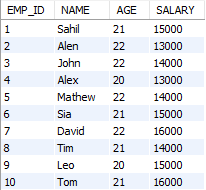
Let’s take an example of the EMPLOYEE table having EMP_ID, NAME, AGE, and SALARY as columns.
CREATE TABLE EMPLOYEE (
 EMP_ID INT PRIMARY KEY,
 NAME VARCHAR(50),
 AGE INT,
 SALARY INT
);
Insert the data on it:
INSERT INTO EMPLOYEE (EMP_ID, NAME, AGE, SALARY) VALUES
(1, 'Sahil', 21, 15000),
(2, 'Alen', 22, 13000),
(3, 'John', 22, 14000),
(4, 'Alex', 20, 13000),
(5, 'Mathew', 22, 14000),
(6, 'Sia', 21, 15000),
(7, 'David', 22, 16000),
(8, 'Tim', 21, 14000),
(9, 'Leo', 20, 15000),
(10, 'Tom', 21, 16000);
After Inserting the EMPLOYEE looks like:
Let's Creating Views
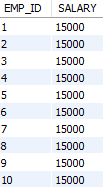
Let's create a view named view1 that displays the EMP_ID and SALARY columns from the EMPLOYEE table.
Query:
CREATE VIEW view1 AS
SELECT EMP_ID, SALARY
FROM
EMPLOYEE;
Output:
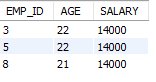
Let's create another view named view2 that displays the EMP_ID, AGE, and SALARY columns from the EMPLOYEE table.
Query:
CREATE VIEW view1 AS
SELECT EMP_ID,AGE, SALARY
FROM
EMPLOYEE;
Output:
To update a view in MySQL, we use the UPDATEstatement with the view name set the columns we want to update, and use a WHERE clause to specify which rows to update.
Syntax:
UPDATE view_name
SET column1 = value1, column2 = value2 , . . . . , column_n = value_n
WHERE condition1 , condition2, . . . . , condition_n;
Let's Update the SALARY column in the view named view1 to 10000 for the employee with EMP_ID equal to 2.
Query:
UPDATE view1
SET SALARY=10000
WHERE EMP_ID=2;
Output:
Table After Performing the UPDATE View Operation:
Explanation: In the example, we update the SALARY of the employee with EMP_ID = 2 to 10000 in view1 using a WHERE clause to specify the condition. This selective update is reflected in both view1 and the underlying EMPLOYEE table.
Let's Update the SALARY column in the view named view1 to 15000 for all employees.
Query:
UPDATE view1
SET SALARY = 15000;
Output:
Table After PerformingExplanation the UPDATE View Operation:
Explanation: In the example, updating the SALARY column in view1 to 15000 without a WHERE clause sets the salary of all employees to 15000. This change is reflected in both the view1 VIEW and the underlying EMPLOYEE table.
Overall, MySQL provides a feature to update the VIEW. There are some restrictions to UPDATE the VIEW such as the view referencing only a single table can be updated, the view while creating should not have the aggregate functions like SUM(), COUNT(), AVG(), etc. It is not compulsory to use WHERE clause as it depends on the user whether to use WHERE clause or not.
Using WHERE clause will UPDATE only the selective records whereas not using WHERE clause will UPDATE all the records. Updating the VIEW will also UPDATE the data in the table.