|
VOOZH | about |
|
VOOZH | about |
In software programming, there are many instances where we need the usage of LinkedHashMap and LinkedHashSet.
LinkedHashSet
Though HashSet is available, if we need the ordered version of HashSet, we need the LinkedHashSet. The advantage is when we iterate the LinkedHashSet, we get the display of the elements in the inserted order. Because of the existence of equals and hashcode methods, duplicate data is not allowed.
LinkedHashMap
Though HashMap is available, if we need the ordered version of HashMap, we need the LinkedHashMap. The advantage is when we iterate the LinkedHashMap, we get the display of the elements in the inserted order. Though duplicate keys are allowed, overwriting will occur with the new values in place of old values. Via a sample maven project, let us see the whole project. Let us take "GeekArticles" as a bean class containing a few attributes namely
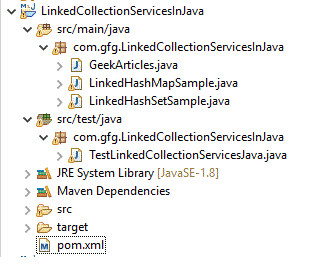
Project Structure:
Maven Project and hence the required dependencies are specified in
pom.xml
Bean class
GeekArticles.java
Here are two important methods we need to note: Because of the existence of the "equals" method which checks the similarity of articleName and it finds out whether duplicates are there are not. Moreover, hashCode() gives the checked articleName hashCode. With this, it disallows duplicates. In case they are commented out, it allows duplicates in the case of LinkedHashSet. Hence it is a must to add these 2 methods without fail.
LinkedHashMapSample.java
LinkedHashSetSample.java
Now it is time to test whether our assumptions are correct or not. Automated testing like JUnit's always helpful to justify the same. Let us see from the below set of code.
TestLinkedCollectionServicesJava.java
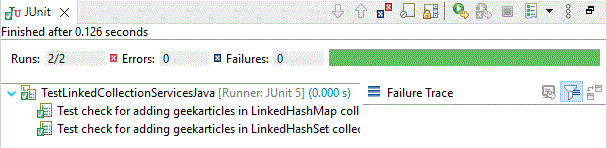
Before running the above code, make sure that the "GeekArticles" class contains the "equals" and "hashCode" methods. With that, we can get all assert to be correct. In the case of LinkedHashMap, when the duplicate key is present, the old value is updated with the new value. Thus at a time, duplicate keys are not possible. In the case of LinkedHashSet, when duplicate data is tried to get inserted, it is not accepted because of the existence of the "equals" and "hashCode" method. Thus the output will be success
As indicated earlier, commenting out equals and hashCode() methods and trying to execute the same
/* Commenting out to show that duplicates are accepted in LinkedHashSet and hence our existing JUNIT will
provide false results
// We need to override 2 methods namely
// equals and hashcode whenever we no need
// to store two author objects
// if their names are same
@Override
public boolean equals(Object o) {
 if (o instanceof GeekArticles) {
 GeekArticles other = (GeekArticles) o;
 return articleName.equals(other.getArticleName());
 }

 return false;
 }

 @Override
 public int hashCode() {
 return articleName.hashCode();
 }
*/
Now running the code again
Depending upon business requirements, we can go either LinkedHashMap/HashMap or LinkedHashSet/HashSet. But for all 4 collections, make sure that when we are inserting a class object like GeekArticle, equals and hashcode methods are overridden.