|
VOOZH | about |
|
VOOZH | about |
ViewResolver in Spring MVC is a component responsible for mapping logical view names returned by controllers to actual view resources like JSP or HTML files. It helps in separating business logic from the presentation layer by handling view resolution automatically. This makes the application more flexible and easier to maintain.
- Eclipse (EE version)/STS IDE
- Spring JAR Files
- Tomcat Apache latest version
Note: We are going to use Spring Tool Suite 4 IDE for this project. Please refer to this article to install STS in your local machine.
Step-by-step implementation of ViewResolver in Spring MVC involves configuring DispatcherServlet, creating controllers and views, and setting up ViewResolver to map logical view names to actual JSP paths.
Create a Dynamic Web Project in your STS IDE.
Download the spring JARs file and place them in the src > main > webapp > WEB-INF > lib folder.
Configure the Apache Tomcat Server and link it to the application.
The DispatcherServletis a critical component in Spring MVC. It acts as the front controller and manages the flow of requests. Now we are going to configure Dispatcher Servlet with our Spring MVC application, Go to the src > main > webapp > WEB-INF > web.xml file.
web.xml:
Now go to the src > main > webapp > WEB-INF and create an XML file. Actually, this is a Spring Configuration file like the beans.xml file. And the name of the file must be in this format.
YourServletName-servlet.xml
For example, for this project, the name of the file must be
viewresolver-dispatcher-servlet.xml
So either you can create a Spring Configuration File or you can just create a simple XML file and add the below lines of code inside that file.
viewresolver-dispatcher-servlet.xml:
Now, let's create some controllers. Go to the src/main/java and create a new controllers package (For ex. com.demo.controllers) as per your choice. And inside that create a Java class and name the class as DemoController. Now how to tell the Spring that this is our controller class. So the way we are going to tell the Spring is by marking it with a @Controller annotation.
@Controller
public class DemoController {}
Note: Spring will automatically initialize the class having a @Controller annotation and register that class with the spring container.
Now let us create a simple method inside the Controller class and use the @RequestMapping annotation before the method something like this.
Now in the return statement, we have to return some views (web pages), so whenever the endpoint '/hello' is invoked we can see our result on the web page. So let's create our first View.
Go to the src > main > webapp > WEB-INF > right-click > New > Folder and name the folder as views. Then views > right-click > New > JSP File and name your first view. Here we have named it a demo.jsp file. Below is the code for the demo.jsp file. We have created a simple web page inside that file.
demo.jsp:
Now go to the DemoController class and inside the helloWorld() method we have to return a value something like this.
return "/WEB-INF/views/demo.jsp";
We have just been given the path for our view.
DemoController.java:
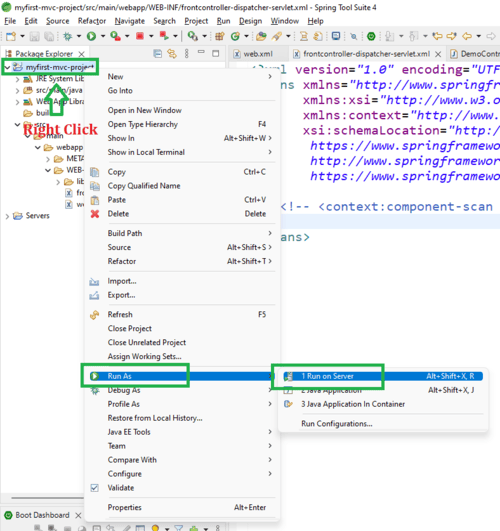
To run our Spring MVC Application right-click on your project > Run As > Run on Server. And run your application as shown in the below image as depicted below as follows:
After that use the following URL to run your controller
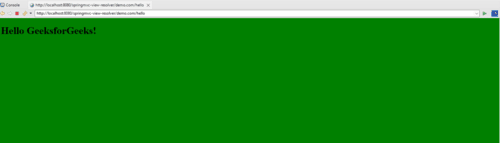
http://localhost:8080/springmvc-view-resolver/hello
Output:
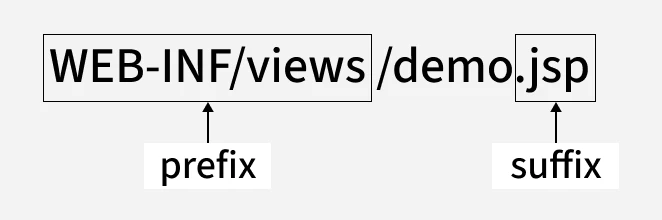
So what's the problem with the above project? Just go to the DemoController.java file again and the problem lies in this line of code:
return "/WEB-INF/views/demo.jsp";
And we call them prefixes and suffixes accordingly.
Go to the DemoController.java file and modify the code as shown in the below snippet.
Modified DemoController.java:
Here we have only returned the page name, nothing else.
Note: The return file name and the View name must be same because we are returning that web page from the controller handler method.
Configure ViewResolver inside the Spring Configuration File (i.e. viewresolver-dispatcher-servlet.xml).
Add the below lines of code as follows:
<bean id = 'viewResolver' class = "org.springframework.web.servlet.view.InternalResourceViewResolver">
<property name="prefix" value="/WEB-INF/views/"/>
<property name="suffix" value=".jsp"/>
</bean>
This is the thing we have discussed above and it's completely the concept of Setter Based Dependency Injection in the spring framework.
viewresolver-dispatcher-servlet.xml:
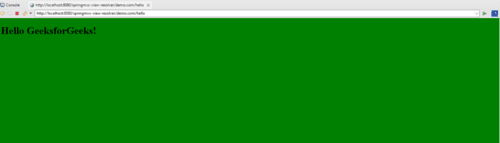
Now inside this "value" property, you can change according to the requirements as many times as you want. Now run your spring application and the output will be as follows.
Output: