|
VOOZH | about |
|
VOOZH | about |
The AVG() function in MySQL is used to calculate the average (mean) value of a specified numeric expression or column. It helps summarize data by returning a single average value from multiple rows.
Syntax :
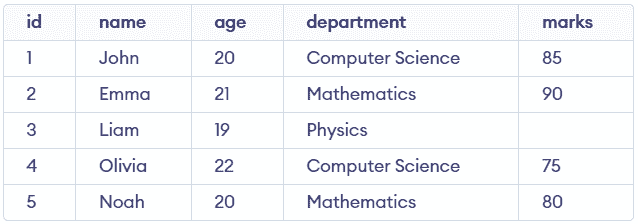
AVG(expression)The following examples show how the AVG() function works with different columns and conditions. First, we will create a demo table on which the AVG() function will be applied:
This example calculates the average marks of all students. It provides a quick summary of overall performance.
Query:
SELECT AVG(marks) AS average_marks
FROM students;
Output:
marks column. NULL values automatically during computation. This example calculates the average of more than one numeric column. It helps compare different metrics in a single query.
Query:
SELECT AVG(marks) AS avg_marks,
 AVG(age) AS avg_age
FROM students;
Output:
This example filters students based on the average marks. It shows how AVG() can be used inside a subquery for comparison.
Query:
SELECT *
FROM students
WHERE marks > (SELECT AVG(marks) FROM students);
Output:
This example calculates the average marks for each department. It helps analyze performance across different groups.
Query:
SELECT department, AVG(marks) AS avg_marks
FROM students
GROUP BY department;
Output: