 |
VOOZH | about |
|
VOOZH | about |
SQL (Structured Query Language) is a robust tool for managing relational databases. It allows us to store, retrieve, and manipulate data efficiently, making it indispensable for database management and analysis. One common requirement is to fetch the latest records in a one-to-many relationship, a scenario where each parent record in one table is linked to multiple child records in another.
In this article, we will explain how to retrieve the last records in a one-to-many relationship using SQL joins, along with practical examples.
Relationships in SQL refer to the associations or connections between tables in a relational database. These relationships are established using foreign keys, which are columns in a table that refer to the primary key in another table. Relationships help organize and structure data, allowing for efficient data retrieval and maintaining data integrity.
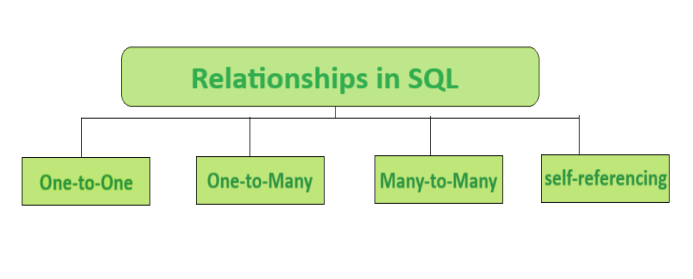
There are different types of relationships: one-to-one, one-to-many, many-to-many, and self-referencing.
CREATE TABLE users (
 user_id INT PRIMARY KEY,
 username VARCHAR(50)
);

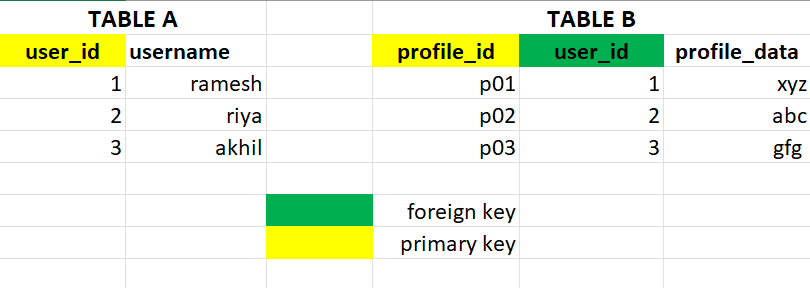
CREATE TABLE user_profiles (
 profile_id INT PRIMARY KEY,
 user_id INT UNIQUE,
 profile_data VARCHAR(255),
 FOREIGN KEY (user_id) REFERENCES users(user_id)
);
-- Insert data into Table A
INSERT INTO TableA (user_id, username) VALUES
(1, 'ramesh'),
(2, 'riya'),
(3, 'akhil');

-- Insert data into Table B
INSERT INTO TableB (profile_id, user_id, profile_data) VALUES
('p01', 1, 'xyz'),
('p02', 2, 'abc'),
('p03', 3, 'gfg');
Output
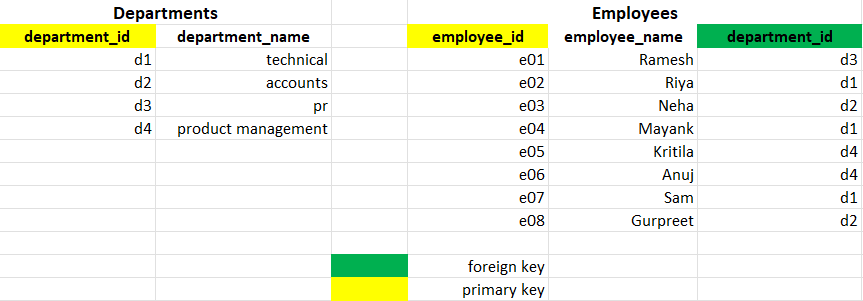
CREATE TABLE departments (
 department_id INT PRIMARY KEY,
 department_name VARCHAR(50)
);

CREATE TABLE employees (
 employee_id INT PRIMARY KEY,
 employee_name VARCHAR(50),
 department_id INT,
 FOREIGN KEY (department_id) REFERENCES departments(department_id)
);
-- Insert data into Departments Table
INSERT INTO Departments (department_id, department_name) VALUES
('d1', 'technical'),
('d2', 'accounts'),
('d3', 'pr'),
('d4', 'product management');

-- Insert data into Employees Table
INSERT INTO Employees (employee_id, employee_name, department_id) VALUES
('e01', 'Ramesh', 'd3'),
('e02', 'Riya', 'd1'),
('e03', 'Neha', 'd2'),
('e04', 'Mayank', 'd1'),
('e05', 'Kritila', 'd4'),
('e06', 'Anuj', 'd4'),
('e07', 'Sam', 'd1'),
('e08', 'Gurpreet', 'd2');
Output
CREATE TABLE students (
 student_id INT PRIMARY KEY,
 student_name VARCHAR(50)
);

CREATE TABLE courses (
 course_id INT PRIMARY KEY,
 course_name VARCHAR(50)
);

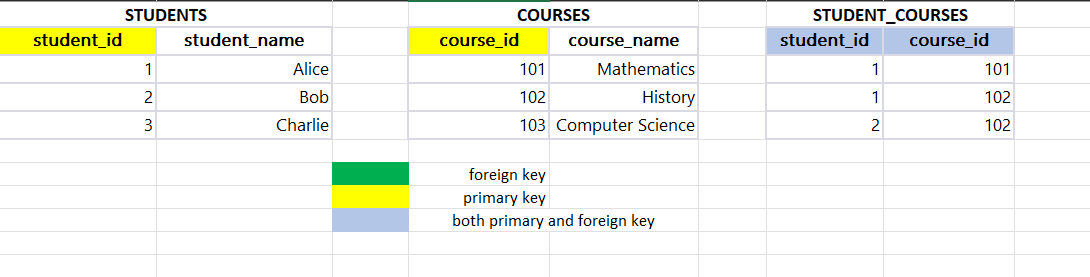
CREATE TABLE student_courses (
 student_id INT,
 course_id INT,
 PRIMARY KEY (student_id, course_id),
 FOREIGN KEY (student_id) REFERENCES students(student_id),
 FOREIGN KEY (course_id) REFERENCES courses(course_id)
);
1. STUDENTS
INSERT INTO Students (student_id, student_name) VALUES
(1, 'Alice'),
(2, 'Bob'),
(3, 'Charlie');
2. COURSES
INSERT INTO Courses (course_id, course_name) VALUES
(101, 'Mathematics'),
(102, 'History'),
(103, 'Computer Science');
3. STUDENT COURSES
INSERT INTO Student_Courses (student_id, course_id) VALUES
(1, 101),
(1, 102),
(2, 102);
Output
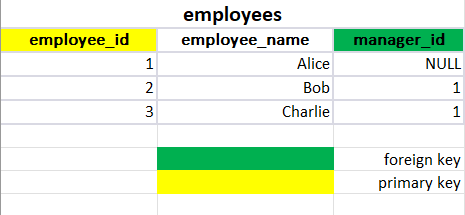
Definition: A table has a foreign key that references its primary key.
Setup: Include a foreign key column in the same table that references its primary key.
For example : A table employees with a column manager_id referencing the same table's employee_id.
CREATE TABLE employees (
 employee_id INT PRIMARY KEY,
 employee_name VARCHAR(50),
 manager_id INT,
 FOREIGN KEY (manager_id) REFERENCES employees(employee_id)
);
INSERT INTO Employees (employee_id, employee_name, manager_id) VALUES
(1, 'Alice', NULL),
(123, 'Bob', 1),
(3, 'Charlie', 1);
Output
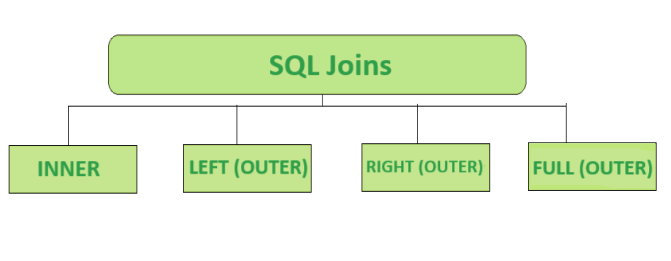
A join is a mechanism that combines rows from two or more tables based on a related column between them. The purpose of using joins is to retrieve data from multiple tables in a single result set. The common columns used for joining tables are usually primary and foreign keys. There are several types of joins in SQL
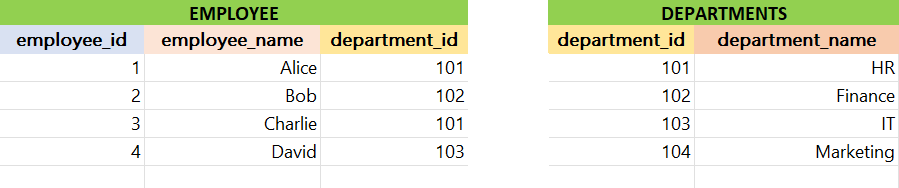
Consider the following database with the Employee and Department tables:
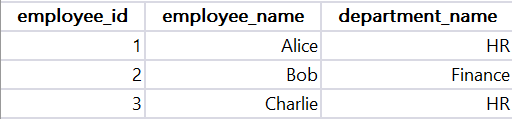
The INNER JOIN keyword returns only the rows where there is a match in both tables based on the specified condition, effectively filtering out non-matching rows from the result set.
Syntax
SELECT *
FROM table1
INNER JOIN table2 ON table1.column = table2.column;
Example:
SELECT employees.employee_id, employees.employee_name, departments.department_name
FROM employees
INNER JOIN departments ON employees.department_id = departments.department_id;
Output
Explanation:
The SQL query selects employee_id, employee_name, and department_name from employees and departments tables, joining them on department_id. It retrieves information about employees and their corresponding department names.
Returns all rows from the left table and the matching rows from the right table. If there is no match, NULL values are returned for columns from the right table.
Syntax
SELECT *
FROM table1
LEFT JOIN table2 ON table1.column = table2.column;
Example:
SELECT employees.employee_id, employees.employee_name, departments.department_name
FROM employees
LEFT JOIN departments ON employees.department_id = departments.department_id;
Output
Explanation:
The SQL query uses a LEFT JOIN to retrieve employee_id, employee_name, and department_name from employees and departments, showing all employees and their associated department names, including those without a match.
Returns all rows from the right table and the matching rows from the left table. If there is no match, NULL values are returned for columns from the left table.
Syntax
SELECT *
FROM table1
RIGHT JOIN table2 ON table1.column = table2.column;
Example:
SELECT employees.employee_id, employees.employee_name, departments.department_name
FROM employees
RIGHT JOIN departments ON employees.department_id = departments.department_id;
Output
Explanation:
The SQL query employs a RIGHT JOIN to fetch employee_id, employee_name, and department_name from employees and departments, displaying all departments and their corresponding employees, including unmatched departments without employees.
Returns all rows when there is a match in either the left or the right table. If there is no match, NULL values are returned for columns from the non-matching table.
Syntax
SELECT *
FROM table1
FULL JOIN table2 ON table1.column = table2.column;
Example:
SELECT employees.employee_id, employees.employee_name, departments.department_name
FROM employees
FULL JOIN departments ON employees.department_id = departments.department_id;
Output
Explanation:
The SQL query employs a FULL JOIN to retrieve employee_id, employee_name, and department_name from employees and departments, displaying all records from both tables, matching on department_id and including unmatched rows from both tables.
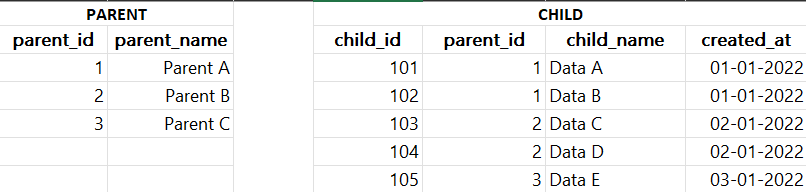
To select the last records in a one-to-many relationship, identifying the most recent entry for each parent record is crucial. Consider the below given database for performing the following methods:
Here are several methods to accomplish this:
The above SQL query retrieves records from a parent-child relationship in a SQL database. It employs a subquery to find the latest child record for each parent based on the 'created_at' timestamp.
Example:
SELECT *
FROM parent p
JOIN child c ON p.parent_id = c.parent_id
WHERE c.child_id = (
 SELECT child_id
 FROM child
 WHERE parent_id = p.parent_id
 ORDER BY created_at DESC
 LIMIT 1
);
Output
Explanation:
The main query then joins the parent and child tables, filtering the results to include only the rows where the child ID matches the one obtained from the subquery. This effectively selects the most recent child record for each parent in a one-to-many relationship, ensuring only the latest child entry per parent is included in the final result set.
The given SQL query retrieves the latest records from a one-to-many relationship between a "parent" and "child" table in a SQL database. It does so by joining the "parent" and "child" tables based on the common parent_id, and additionally using a subquery to identify the maximum created_at timestamp for each parent_id in the "child" table.
Example
SELECT p.*, c.*
FROM parent p
JOIN child c ON p.parent_id = c.parent_id
JOIN (
 SELECT parent_id, MAX(created_at) AS max_created_at
 FROM child
 GROUP BY parent_id
) AS latest_child ON c.parent_id = latest_child.parent_id
 AND c.created_at = latest_child.max_created_at;
Output
Explanation:
The main join condition includes a comparison with the latest_child subquery, ensuring that only the rows with the maximum created_at for each parent_id are selected. The result set includes all columns from both the "parent" and "child" tables for the latest records in the one-to-many relationship.
In the given SQL query using a correlated subquery, it selects records from a one-to-many relationship between a parent and child table
Example
SELECT p.*, c.*
FROM parent p
JOIN child c ON p.parent_id = c.parent_id
WHERE c.created_at = (
 SELECT MAX(created_at)
 FROM child
 WHERE parent_id = p.parent_id
);
Output
Explanation:
The query retrieves all columns from the parent and child tables for rows where the child's creation timestamp is the maximum within each group of children sharing the same parent. Essentially, it returns the latest child record for each parent based on the "created_at" timestamp, providing a concise way to obtain the most recent child entry for each parent in the relationship
In the given example SQL query, the ROW_NUMBER() window function is used to assign a unique row number to each record in the result set based on the descending order of the "created_at" column within each partition defined by the "parent_id."
Example
WITH RankedChild AS (
 SELECT
 p.*,
 c.*,
 ROW_NUMBER() OVER (PARTITION BY p.parent_id ORDER BY c.created_at DESC) AS rn
 FROM parent p
 JOIN child c ON p.parent_id = c.parent_id
)
SELECT *
FROM RankedChild
WHERE rn = 1;
Output
Explanation:
The query joins the "parent" and "child" tables on the "parent_id" and selects all columns from both tables along with the calculated row number. The final output, obtained by filtering rows where the row number (rn) is equal to 1, retrieves the latest records for each parent in a one-to-many relationship, effectively selecting the most recently created child record for each parent.
The given SQL query retrieves records from a one-to-many relationship between a "parent" table (denoted as p) and a "child" table (denoted as c). It uses a LEFT JOIN to match rows from the parent table with corresponding rows in the child table based on the parent_id.
Example
SELECT p.*, c.*
FROM parent p
LEFT JOIN child c ON p.parent_id = c.parent_id
LEFT JOIN child c2 ON p.parent_id = c2.parent_id AND c.created_at < c2.created_at
WHERE c2.parent_id IS NULL;
Output
Explanation:
Additionally, it employs a self-join on the child table (c2) to identify the latest records by comparing their created_at timestamps. The WHERE clause ensures that only rows with no later child records (c2.parent_id IS NULL) are included, effectively selecting the latest records for each parent in the one-to-many relationship.
In conclusion, Selecting the last records in a one-to-many relationship using SQL joins can be approached in various ways. We can use subqueries with LIMIT and ORDER BY, use MAX in subqueries, employ correlated subqueries, utilize the ROW_NUMBER() window function, or employ a LEFT JOIN with a condition. Each method aims to retrieve the latest records from the related table, whether it's based on timestamps, maximum values, or window functions. The choice depends on our specific needs, database structure, and performance considerations.

-JOIN-output.png)
-JOIN-output.png)
-JOIN.png)



-Window-Function-output.png)
