|
VOOZH | about |
|
VOOZH | about |
The DEFAULT constraint in SQL automatically assigns a predefined value to a column when no value is provided during insertion. It helps maintain consistency and reduces the need to specify values for every column in an INSERT query.
Query:
CREATE TABLE Geeks (
 ID INT NOT NULL,
 Name VARCHAR(255),
 Age INT,
 Location VARCHAR(255) DEFAULT 'London'
);
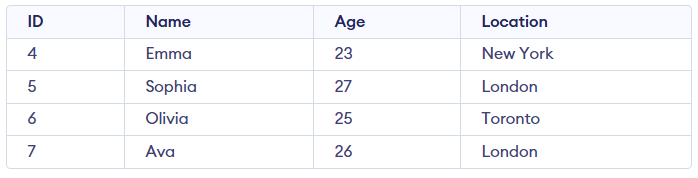
INSERT INTO Persons (ID, Name, Age, Location) VALUES
(4, 'Emma', 23, 'New York'),
(5, 'Sophia', 27),
(6, 'Olivia', 25, 'Toronto'),
(7, 'Ava', 26);
Output:
Syntax :
CREATE TABLE table_name (
 column1 datatype DEFAULT default_value,
 column2 datatype DEFAULT default_value
);
If you no longer want a column to use a default value, you can drop the DEFAULT constraint. This will only apply to new rows and will not affect existing data in the table.
Syntax:
ALTER TABLE tablename
ALTER COLUMN columnname
 DROP DEFAULT;
Query:
ALTER TABLE Geeks
ALTER COLUMN Location
DROP DEFAULT;

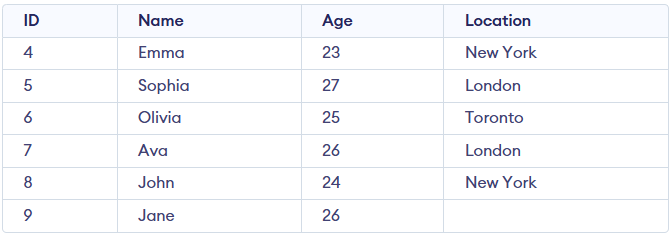
--Let us add 2 new rows in the Geeks table
INSERT INTO Geeks VALUES (8, 'John', 24, 'New York');
INSERT INTO Geeks VALUES (9, 'Jane', 26,NULL);

Select * from Geeks;
Output:
Note: Dropping the default constraint will not affect the current data in the table, it will only apply to new rows.