Renaming a view in SQL helps maintain clarity and consistency when database structures or business needs change, without affecting existing dependencies.
Keeps view names aligned with updated business terminology.
Improves database structure and readability.
Preserves existing dependencies like permissions and stored procedures.
Renaming a View in SQL Server
The SQL RENAME VIEW command changes the name of an existing view without affecting its structure, data, or dependent objects such as other views, permissions, and stored procedures.
SQL does not have a universal RENAME VIEW command, but views can be renamed using database-specific methods.
Using sp_rename in SQL Server to rename the existing view directly.
Syntax:
EXEC sp_rename 'old_view_name', 'new_view_name';
sp_rename system stored procedure is used to rename a view in SQL.
old_view_name denotes the current name of the view which is you want to rename the view in SQL.
new_view_name denotes the new name of the view.
Example: Renaming a View in SQL Server
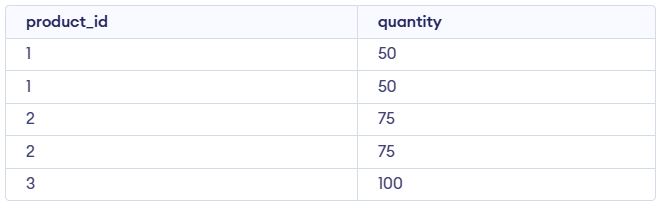
Let us use the sample Sales table given below, which contains two columns: product_id and quantity to create a view and then rename it. The product_id represents different products, and the quantity represents the number of units sold for each product.