|
VOOZH | about |
|
VOOZH | about |
laptopsHow To Turn on Camera on Laptop Windows 10: Each Windows device comes with one dedicated Windows Camera. For Windows Laptops, the Camera is built within the monitor. For Windows Desktop, we have to attach an external camera device to utilize as a webcam as well as a normal one. The webcam feature is triggered by some online platforms whereas one application is used to Open Windows Camera for offline uses.
Table of Content
Camera app for laptops for Windows 10 not only serves to record videos or capture images. Rather, the Camera in the Window is used to capture QR Codes also. With new updates, the camera App for laptop is becoming a more powerful tool. However, to utilize this effective tool, we should know the way to Start a Camera in Windows.
In this article, a few handful methods will be discussed to How to turn on camera on laptop windows 10, Launch the camera app for laptop in Windows in no time without any errors.
Quick Preview to Open Camera in Windows:
- Search for the Camera application on the Windows Search Bar.
- Execute the application coming as the result.
- Or execute the command start microsoft.windows.camera in Command Prompt.
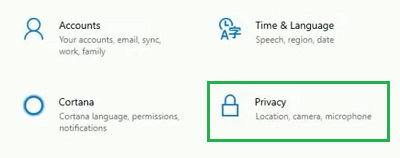
Step 1: Open Settings & Click on the Privacy option.
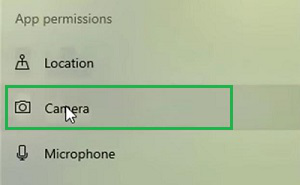
Step 2: From the left-hand side, click on the Camera option.
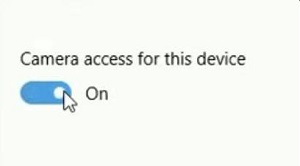
Step 3: Click on the Button to Enable or Disable the two simple cameras.
With these simple steps, we can easily enable or disable Camera Settings Windows 10 which is very necessary for using Camera App.
To Initiate windows 10 camera settings, the following methods should be executed one after another. We will start with the simple Camera Application methods which is too easy.
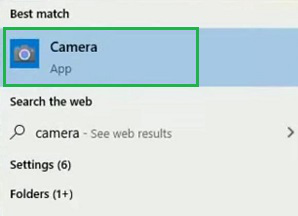
Step 1: On the Search Bar, search for the Camera application.
Step 2: Open the Camera application & click on the Capture Button to take a picture.
Congratulations! These two simple steps are enough to Launch Camera Service on Windows devices without consuming much time.
How to open camera in windows 10 command line: Open Command Prompt, and execute the following command. The Command will open the Camera Window on the device.
Command: start microsoft.windows.camera
Also Read
From the above discussion, we can conclude that two possible methods are present to how to turn on camera on laptop windows 10 with ease. However, we have to Enable Windows Camera Settings before going to utilize the Camera Application on Windows 10. Otherwise, the application will start malfunctioning.