|
VOOZH | about |
|
VOOZH | about |
We always come across incidents of accidents where drivers' Overspeed or lack of vision leads to major accidents. In winter, the risk of road accidents has a 40-50% increase because of the traffic signs' lack of visibility. So here in this article, we will be implementing Traffic Sign recognition using a Convolutional Neural Network. It will be very useful in Automatic Driving Vehicles.
A convolutional Neural Network is a Deep Learning network used to pick up features from the image. Initially, they take the input images and then find out the lines, gradients, shapes and borders from the image.
Then further, Convolutional Layers help in processing the outputs to capture eyes, faces, etc. CNN contains many convolutional layers assembled on top of each other, each one competent of recognizing more sophisticated shapes. With two or three convolutional layers it is viable to recognize handwritten digits and with 25 layers it is possible to differentiate human faces.
Here we will be using this concept for the recognition of traffic signs.
The dataset has 58 classes of Traffic Signs and a label.csv file. The folder is in zip format. To unzip the dataset, we will run the code below.
Data visualization means the visualization of data to understand the key features of the dataset.
Once we load the dataset, now let's visualize some random images from the different folders. For that, we will use plt.imshow() command.
Output :
Let's see one more image.
Output :
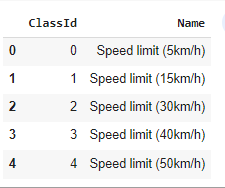
Label File - This file includes the 58 rows and 2 columns. The columns contains the class id and the name of the symbol. And the rows depicts the 58 different classes id and names.
Now, Let's see the label file by printing the top 5 rows.
Output:
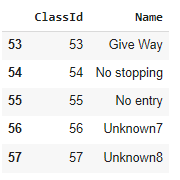
Let's see the last 5 classes from the label file
Output:
In this section, we will split the dataset into train and val set. Train set will be used to train the model and val set will be use to evaluate the performance of our model.
Output:
Found 4170 files belonging to 58 classes.
Using 3336 files for training.
Found 4170 files belonging to 58 classes.
Using 834 files for validation.
Once we split the dataset, Let's create the list of the class names and print few images along with their class names.
Let's visualize the train dataset and print 25 images from the dataset.
Output:
Sometimes the data is limited and we the model is not performing well with limited data. For this method, we use Data Augmentation. It is the method to increase the amount and diversity in data. We do not collect new data, rather we transform the already present data.
The model will contain the following Layers:
Let's print the summary of the model.
Output :
To understand the huge number of parameters and complexity of the model which helps us to achieve a high-performance model let's see the plot_model.
Output :
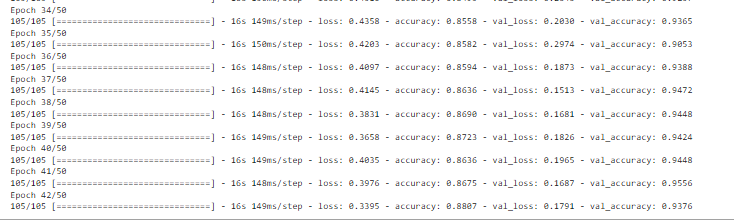
Now we will train our model, the model is working fine on epochs = 50, but you can perform hyperparameter tuning for better results.
We can also use callback function for early stopping the model training.
Output:
The above image shows the last epochs of the model.
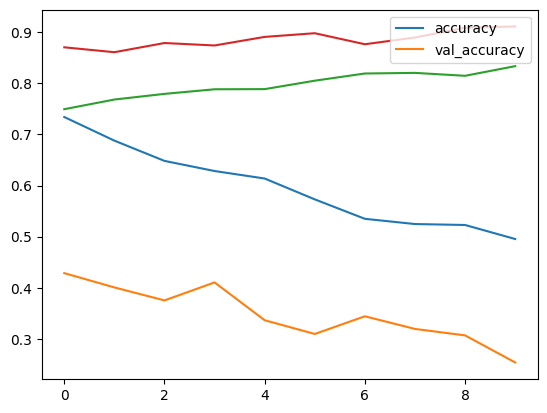
Let’s visualize the training and validation accuracy with each epoch.
Output :
CNN model is performing very well with these layers. Further we can include more traffic and danger sign to warn the drivers.
Colab Link: click here