|
VOOZH | about |
|
VOOZH | about |
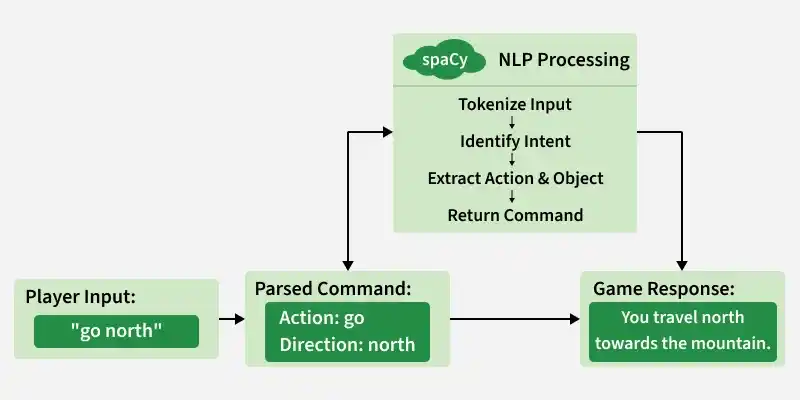
Text based adventure games allow players to explore stories by typing commands instead of clicking buttons. Here, we build a simple game where a player navigates a fictional forest and makes choices that affect the outcome. To understand this, we combine basic game design concepts with Natural Language Processing (NLP) using the SpaCy library.
To build this game, we focus on the following main elements:
Run the following commands in your command prompt
pip install spacy
python -m spacy download en_core_web_sm
We begin by loading the SpaCy model, which enables natural language understanding. This allows us to:
We create a class Game that will contain all the game logic. The constructor initializes the starting state and loads the SpaCy model.
We define a method to process player input. This method checks if important keywords are present and returns the base form of the word.
The start method introduces the story and asks the player to choose a direction.
Each direction has its own method. These methods present a scenario and determine the outcome.
North path
East path
West path
South Path
After the outcome, the game displays a result and asks if the player wants to play again.
Create an object of the Gameclass and start it.
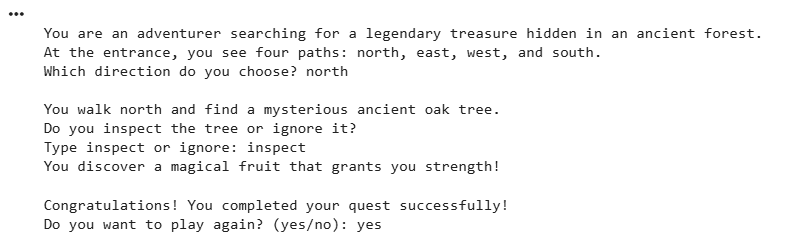
Output:
Download the full code from here