|
VOOZH | about |
|
VOOZH | about |
Natural language processing (NLP) is an area of computer science and artificial intelligence concerned with the interactions between computers and human (natural) languages, in particular how to program computers to process and analyze large amounts of natural language data. It is the branch of machine learning which is about analyzing any text and handling predictive analysis.
Scikit-learn is a free software machine learning library for the Python programming language. Scikit-learn is largely written in Python, with some core algorithms written in Cython to achieve performance. Cython is a superset of the Python programming language, designed to give C-like performance with code that is written mostly in Python.
Let's understand the various steps involved in text processing and the flow of NLP.
This algorithm can be easily applied to any other kind of text like classify a book into Romance, Friction, but for now, let's use a restaurant review dataset to review negative or positive feedback.
Step 1: Import dataset with setting delimiter as '\t' as columns are separated as tab space. Reviews and their category(0 or 1) are not separated by any other symbol but with tab space as most of the other symbols are is the review (like $ for the price, ....!, etc) and the algorithm might use them as a delimiter, which will lead to strange behavior (like errors, weird output) in output.
To download the Restaurant_Reviews.tsv dataset used, click here.
Step 2: Text Cleaning or Preprocessing
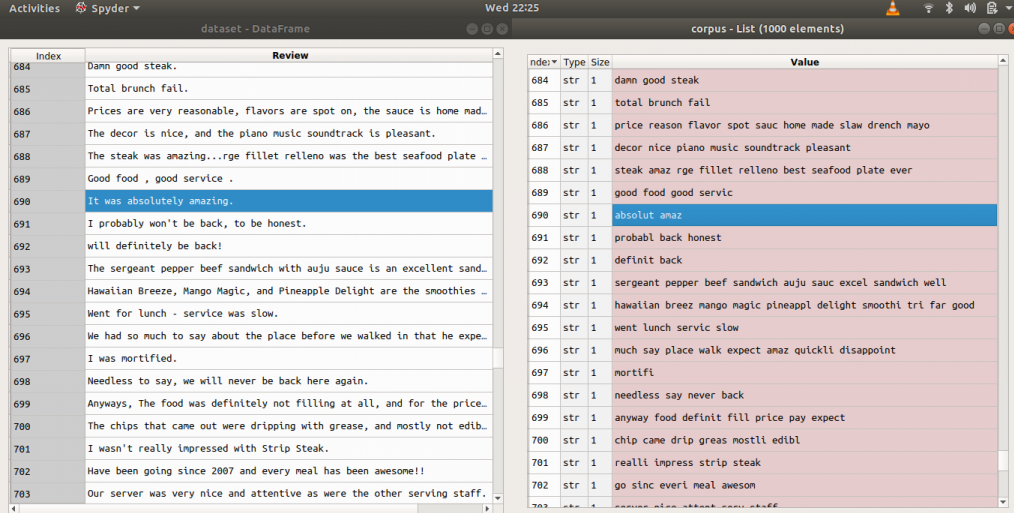
Examples: Before and after applying above code (reviews = > before, corpus => after)
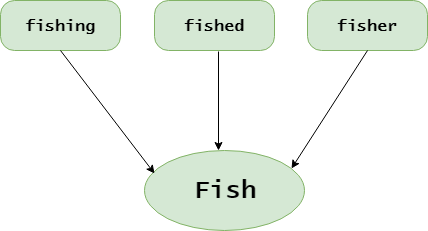
👁 ImageStep 3: Tokenization, involves splitting sentences and words from the body of the text.
Step 4: Making the bag of words via sparse matrix
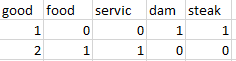
Examples: Let's take a dataset of reviews of only two reviews
Input : "dam good steak", "good food good service"👁 Image
Output :
For this purpose we need CountVectorizer class from sklearn.feature_extraction.text.
We can also set a max number of features (max no. features which help the most via attribute "max_features"). Do the training on the corpus and then apply the same transformation to the corpus ".fit_transform(corpus)" and then convert it into an array. If the review is positive or negative that answer is in the second column of the dataset[:, 1]: all rows and 1st column (indexing from zero).
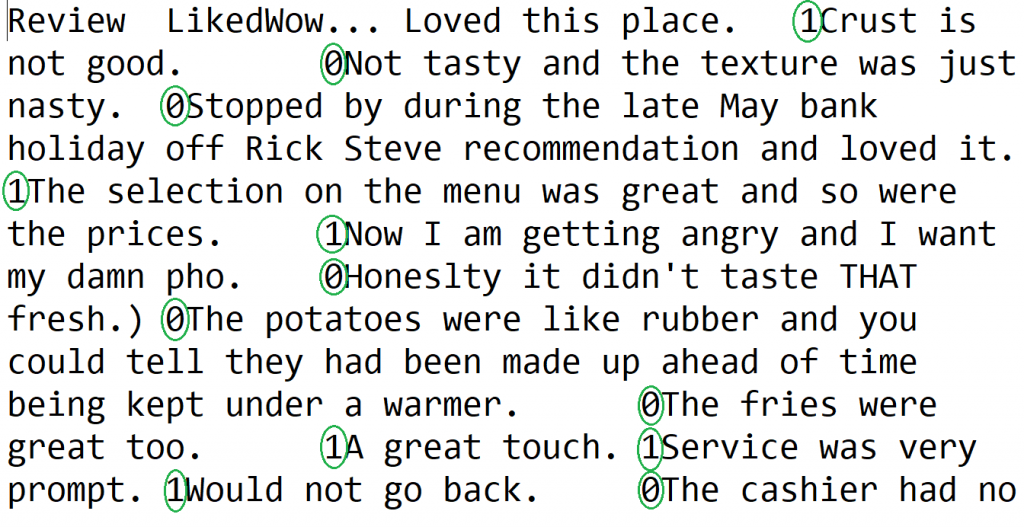
👁 ImageDescription of the dataset to be used:
- Columns separated by \t (tab space)
- First column is about reviews of people
- In second column, 0 is for negative review and 1 is for positive review
Step 5: Splitting Corpus into Training and Test set. For this, we need class train_test_split from sklearn.cross_validation. Split can be made 70/30 or 80/20 or 85/15 or 75/25, here I choose 75/25 via "test_size".
X is the bag of words, y is 0 or 1 (positive or negative).
Step 6: Fitting a Predictive Model (here random forest)
Step 7: Predicting Final Results via using .predict() method with attribute X_test
Output :
array([0, 0, 0, 0, 0, 1, 1, 1, 0, 0, 0, 0, 1, 0, 0, 1, 0, 0, 1, 0, 1, 0,
 1, 1, 1, 1, 0, 0, 1, 1, 1, 0, 0, 1, 1, 1, 0, 1, 0, 1, 1, 0, 1, 0,
 1, 0, 0, 1, 0, 1, 1, 0, 0, 0, 0, 0, 1, 1, 0, 0, 1, 0, 0, 1, 0, 0,
 0, 0, 0, 0, 1, 0, 0, 0, 0, 1, 0, 0, 1, 0, 0, 0, 1, 1, 0, 1, 1, 0,
 1, 1, 1, 0, 1, 1, 0, 1, 0, 0, 0, 0, 1, 0, 1, 1, 0, 1, 0, 0, 0, 0,
 0, 0, 1, 0, 0, 1, 1, 1, 0, 1, 0, 1, 0, 0, 1, 1, 0, 1, 1, 0, 1, 1,
 1, 0, 1, 1, 1, 0, 1, 0, 0, 1, 1, 1, 1, 0, 0, 0, 0, 0, 1, 1, 1, 1,
 0, 0, 0, 1, 0, 0, 0, 0, 1, 0, 0, 0, 0, 1, 0, 0, 1, 0, 0, 0, 0, 0,
 1, 1, 0, 1, 1, 1, 1, 1, 1, 0, 0, 1, 1, 1, 0, 0, 0, 0, 0, 0, 0, 1,
 1, 1, 0, 1, 0, 0, 0, 1, 0, 0, 0, 0, 0, 1, 0, 1, 0, 1, 0, 1, 0, 1,
 0, 1, 0, 0, 1, 1, 0, 0, 0, 0, 0, 1, 1, 1, 0, 0, 1, 0, 0, 0, 0, 1,
 0, 0, 0, 1, 0, 0, 1, 1])
Note: Accuracy with the random forest was 72%.(It may be different when performed an experiment with different test sizes, here = 0.25).
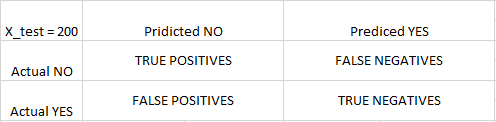
Step 8: To know the accuracy, a confusion matrix is needed.
Confusion Matrix is a 2X2 Matrix.
TRUE POSITIVE : measures the proportion of actual positives that are correctly identified.
TRUE NEGATIVE : measures the proportion of actual positives that are not correctly identified.
FALSE POSITIVE : measures the proportion of actual negatives that are correctly identified.
FALSE NEGATIVE : measures the proportion of actual negatives that are not correctly identified.
Note: True or False refers to the assigned classification being Correct or Incorrect, while Positive or Negative refers to assignment to the Positive or the Negative Category
👁 ImageOutput :
array([[102, 28],
 [ 41, 79]])
Get the complete notebook and dataset link here:
Notebook link : click here.
Dataset link : click here