Natural Language Processing (NLP) has transformed models like BERT which can understand language context deeply by looking at words both before and after a target word. While BERT is pre-trained on vast amounts of general text making it adapt it to specific tasks like sentiment analysis that requires fine tuning. This process customizes BERT’s knowledge to perform well on domain-specific data while saving time and computational effort compared to training a model from scratch. Using Hugging Face’s transformers library, we will fine tune a pre-trained BERT model for binary sentiment classification using transfer learning.
Fine-Tuning BERT Model for Sentiment Analysis using Transfer Learning
1. Installing and Importing Required Libraries
First, we will install the Hugging Face transformers library. The transformers library from Hugging Face provides pre-trained models and tokenizers.
!pip install transformers
We are importing PyTorch for tensor operations and model training.
DataLoader and TensorDataset help load and batch data efficiently during training.
torch.nn.functional provides functions like softmax for calculating prediction probabilities.
AdamW is the optimizer suited for transformer models.
BertTokenizer converts text into tokens that BERT can understand.
BertForSequenceClassification loads the BERT model adapted for classification tasks.
2. Loading the Pre-Trained BERT Model and Tokenizer
We load thebert-base-uncased model and its tokenizer. The tokenizer converts raw text into input IDs and attention masks which BERT requires.
BertTokenizer.from_pretrained(): Prepares text for BERT input.
BertForSequenceClassification.from_pretrained(): Loads BERT configured for classification tasks with two output labels like positive and negative.
Move the model to GPU if available:
3. Preparing the Training Dataset
We create a small labeled dataset for sentiment analysis. Here:
1 represents positive sentiment
0 represent negative sentiment.
4. Tokenizing the Dataset
The tokenizer processes text into fixed-length sequences, adding padding and truncation as needed.
padding=True: Ensures all input sequences have the same length.
truncation=True: Shortens long sentences beyond max_length=128.
5. Creating a DataLoader for Efficient Training
Data is wrapped in TensorDataset and loaded into DataLoader to enable mini-batch training which improves training efficiency and stability.
TensorDataset(): Combines input IDs, attention masks and labels into a dataset.
DataLoader(): Loads data in mini-batches to improve efficiency.
6. Defining the Optimizer
We use the AdamW optimizer which works well with transformer models.
7. Training the model
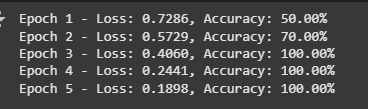
The training loop iterates over batches, computing loss and gradients, updating model weights and tracking accuracy.
optimizer.zero_grad(): Clears gradients before each batch.
model(...): Runs forward pass and calculates loss.
loss.backward(): Backpropagates the error.
optimizer.step(): Updates model weights based on gradients.
We can save the model using torch.save() function. The model’s state dictionary is saved and can be reloaded later for inference or further training.
Saving the model:
Loading the fine-tuned model:
8. Creating test data for Evaluation
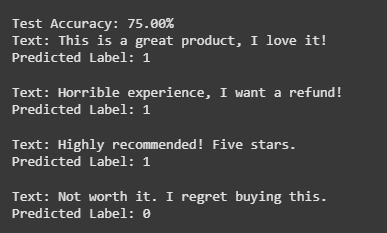
We prepare a test dataset and run the fine-tuned model to measure accuracy and make predictions on new text samples.
torch.tensor([...]).to(device) converts the label list into a tensor and moves it to the computing device like CPU or GPU.
tokenizer(test_texts, padding=True, truncation=True, max_length=128, return_tensors='pt') tokenizes the test texts.
encoded_test['input_ids'] extracts token IDs representing each word or subword.
encoded_test['attention_mask'] extracts attention masks indicating which tokens should be attended to (1) and which are padding (0).
9. Making Predictions and Evaluating Performance
We set the model to evaluation mode using model.eval() to disable training-specific layers like dropout. Accuracy is calculated by comparing predicted labels to true labels and computing the percentage correct. Each test text and its predicted label are printed in a loop for review.
torch.no_grad() disables gradient calculations for faster and more memory-efficient inference.
The model processes inputs with model(input_ids=..., attention_mask=...) to produce output logits.
torch.argmax(outputs.logits, dim=1) selects the class with the highest score as the prediction.