|
VOOZH | about |
|
VOOZH | about |
The role of social media in public opinion has been profound and evident since it started gaining attention. Social media allows us to share information in a great capacity and on a grand scale. Just after the news of a possible Russia-Ukraine war netizens from across the globe started flooding the platform with their opinions. Analysis of these opinions can help us to understand the thinking of the public on different events before and during the war with the aim of understanding the sentiment of people from all over the world during these events.
In this article we are going to see how we can perform the Twitter sentiment analysis on the Russia-Ukraine War using Python.
Here we will import pandas, scikit learn, NLTK and RegEx.
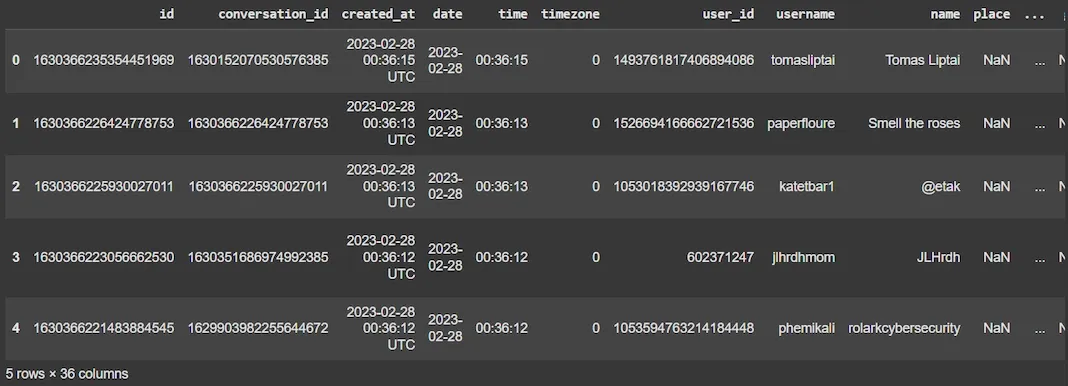
We will loads the CSV dataset and displays the first few rows to understand its structure. You can download daaset from here.
Output:
We will cleans the dataset by removing unnecessary columns, handling missing values and dropping duplicates to ensure the data is ready for analysis.
df.drop(columns=[]): Removes specified columns from the DataFrame.df.dropna(subset=['tweet']): Removes rows where the 'tweet' column has missing values.df.drop_duplicates(subset=['tweet']): Removes duplicate rows based on the 'tweet' column.df_cleaned.info(): Displays the cleaned dataset information to verify the changes.Output:
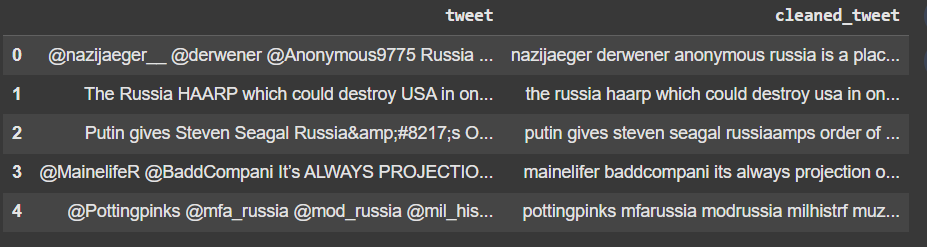
We will perform text preprocessing on the tweets including converting to lowercase, removing URLs and special characters and normalizing spaces.
re.sub(r'http\S+|www\S+', '', text): Removes URLs from the text.re.sub(r'[^a-zA-Z\s]', '', text): Removes non-alphabetic characters and numbers.' '.join(text.split()): Removes extra spaces by splitting the text into words and joining them back together.df_cleaned['tweet'].apply(alternative_preprocess_text): Applies the preprocessing function to each tweet in the DataFrame.Output:
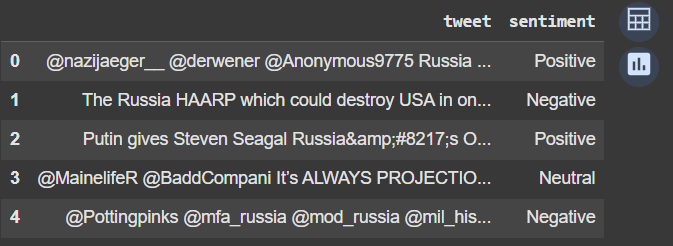
We will use VADER for sentiment analysis to classify the sentiment of each tweet into Positive, Negative or Neutral.
SentimentIntensityAnalyzer(): Initializes the VADER Sentiment Analyzer.sia.polarity_scores(text)['compound']: Returns the compound sentiment score for the text.categorize_sentiment(): Classifies the sentiment based on VADER's compound score (Positive if score > 0.05, Negative if score < -0.05, else Neutral).df_cleaned['cleaned_tweet'].apply(categorize_sentiment): Applies the sentiment classification function to each cleaned tweet.Output:
We will prepare the data for model training, trains a Naive Bayes classifier and evaluates its performance.
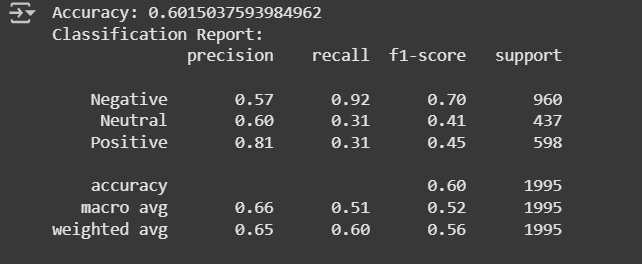
train_test_split(X, y): Splits the data into training and testing sets.TfidfVectorizer(max_features=5000): Converts the text data into numerical features using TF-IDF (with a limit of 5000 features).classifier.fit(X_train_tfidf, y_train): Trains the Naive Bayes classifier on the training data.accuracy_score(y_test, y_pred): Calculates the accuracy of the classifier on the test data.classification_report(y_test, y_pred): Generates a detailed classification report including precision, recall, and F1-score.Output:
Model has an accuracy of 60.15%. It performs well in detecting Negative tweets (high recall) but struggles with Neutral and Positive tweets (low recall). Precision for Positive tweets is high, but recall is low, meaning many positive tweets are missed. Wed can further fine tune it.
Output:
Sentiment of the new tweet: Positive
We can see that our model is working fine.
Sentiment analysis offers valuable insights into understanding public opinion and emotions from text data. By using machine learning techniques we can effectively classify sentiments expressed in tweets or other social media content. While the current model provides a strong foundation continuous improvements and exploration of more advanced methods will enhance its ability to accurately classify sentiments across diverse contexts making it a powerful tool for various applications including social media monitoring, customer feedback analysis and brand sentiment tracking.