Using CountVectorizer to Extracting Features from Text
Last Updated : 19 Jan, 2026
CountVectorizer is used to transform a given text into a vector based on the frequency (count) of each word that occurs in the entire text. This is helpful when we have multiple such texts and we wish to convert each word in each text into vectors (for using in further text analysis)
Visualizing Count Vectorizer
CountVectorizer creates a matrix in which each unique word is represented by a column of the matrix and each text sample from the document is a row in the matrix. The value of each cell is nothing but the count of the word in that particular text sample.
document = [ "One Geek helps Two Geeks", "Two Geeks help Four Geeks", "Each Geek helps many other Geeks at GeeksforGeeks."]
at
each
four
geek
geeks
geeksforgeeks
help
helps
many
one
other
two
document[0]
0
0
0
1
1
0
0
1
0
1
0
1
document[1]
0
0
1
0
2
0
1
0
0
0
0
1
document[2]
1
1
0
1
1
1
0
1
1
0
1
0
There are 12 unique words in the document, represented as columns of the table.
There are 3 text samples in the document, each represented as rows of the table.
Every cell contains a number, that represents the count of the word in that particular text.
All words have been converted to lowercase.
The words in columns have been arranged alphabetically.
Implementation
Step 1: Import necessary libraries and define corpus
We will import numpy and scikit learn library and define our corpus as list of strings
Step 2: Define sklearn Vectorizer
We will define our sklearn vectorizer class, which can take the following hyper-parameters as input
ngram_range: controls whether single words, word pairs, or longer sequences are used as features.
stop_words: removes common, low-information words (e.g., “the”, “is”) from the vocabulary.
max_features: limits the vocabulary size to the most frequent terms to control dimensionality.
Step 3: Fit and Transform our documents using sklearn
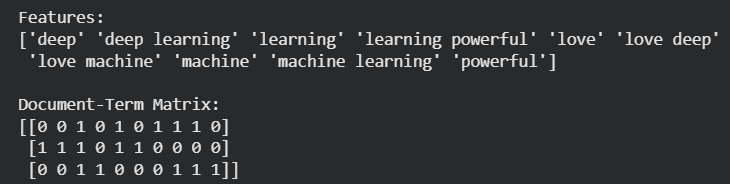
We will first fit our vectorizer to the data , so that it learns patterns and then use this fitted model to transform our data.