|
VOOZH | about |
|
VOOZH | about |
One of the major tasks that one aims to accomplish in Conversational AI is Natural Language Generation (NLG) which refers to employing models for the generation of natural language. In this article, we will get our hands on NLG by building an LSTM-based poetry generator.
Note: The readers of this article are expected to be familiar with LSTM. In order to get an in-depth insight into what LSTMs are you are recommended to read this article.
The dataset used for building the model has been obtained from Kaggle. The dataset is a compilation of poetries written by numerous poets present in the form of a text file. We can easily use this data to generate embeddings and subsequently train an LSTM model .
An excerpt from the dataset is shown below:
The text generator can be built in the following simple steps:
Step 1. Import Necessary Libraries
Foremost, we need to import the necessary libraries. We are going to use TensorFlow with Keras for building the Bidirectional LSTM.
In case any of the mentioned libraries are not installed, then just install it with pip install [package-name] command in the terminal.
Step 2. Loading the Dataset and Exploratory Data Analysis
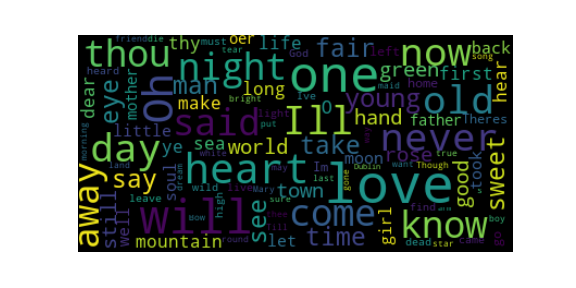
Now, we'll load our dataset using pandas. Further, we need to perform some Exploratory Data Analysis so that we get to know our data better. As we are dealing with text data, the best way to do so is by generating a word cloud.
Output :
Step 3. Creating the Corpus
Now, we have all our data present in this massive text file. However, it is not recommended to feed our model with all the data altogether as it would lead to a lesser accuracy. Thus, we will be splitting our text into lines so that we can use them to generate text embeddings for our model.
Output :
['stay, i said',
 'to the cut flowers.',
 'they bowed',
 'their heads lower.',
 'stay, i said to the spider,',
 'who fled.',
 'stay, leaf.',
 'it reddened,',
 'embarrassed for me and itself.',
 'stay, i said to my body.']
Step 4. Fitting the Tokenizer on the Corpus
In order to generate the embeddings later, we need to fit a TensorFlow Tokenizer on the entire corpus so that it learns the vocabulary.
Output :
Total Words: 3807
Step 5. Generating Embeddings/Vectorization
Now we will generate embeddings for each sentence in our corpus. Embeddings are vectorized representations of our text. Since we cannot feed Machine/Deep Learning models with unstructured text, this is an imperative step. Firstly, we convert each sentence to embedding using Keras' text_to_sequence() function. Then we compute the length of the longest embedding; finally, we pad all the embeddings to that maximum length with zeros so as to ensure embeddings of equal length.
This is how our text embeddings would look like:
array([[ 0, 0, 0, ..., 0, 0, 266],
[ 0, 0, 0, ..., 0, 266, 3],
[ 0, 0, 0, ..., 0, 0, 4],
...,
[ 0, 0, 0, ..., 8, 3807, 15],
[ 0, 0, 0, ..., 3807, 15, 4],
[ 0, 0, 0, ..., 15, 4, 203]], dtype=int32)
Step 6. Building the Bi-directional LSTM Model
By now, we are done with all the pre-processing steps that were required in order to feed the text to our model. Its time now that we start building the model. Since this is a use case of text generation, we will create a Bi-directional LSTM model as meaning plays an important role here.
The summary of the model is as follows:
Model: "sequential"
_________________________________________________________________
Layer (type) Output Shape Param #
=================================================================
embedding (Embedding) (None, 15, 100) 380800
bidirectional (Bidirectiona (None, 15, 300) 301200
l)
dropout (Dropout) (None, 15, 300) 0
lstm_1 (LSTM) (None, 100) 160400
dense (Dense) (None, 3807) 384507
dense_1 (Dense) (None, 3808) 14500864
=================================================================
Total params: 15,727,771
Trainable params: 15,727,771
Non-trainable params: 0
_________________________________________________________________
None
The model will work on a next-word-prediction-based approach wherein we will input a seed text, and the model will generate poetry by predicting the subsequent words. This is why we have used a softmax activation function which is generally used for multi-class classification use cases.
Step 7. Model Training
Having built the model architecture, we'll now train it on our pre-processed text. Here, we have trained our model for 150 Epochs.
The last few training epochs are shown below:
Epoch 145/150
510/510 [==============================] - 132s 258ms/step - loss: 3.3349 - accuracy: 0.8555
Epoch 146/150
510/510 [==============================] - 130s 254ms/step - loss: 3.2653 - accuracy: 0.8561
Epoch 147/150
510/510 [==============================] - 129s 253ms/step - loss: 3.1789 - accuracy: 0.8696
Epoch 148/150
510/510 [==============================] - 127s 250ms/step - loss: 3.1063 - accuracy: 0.8727
Epoch 149/150
510/510 [==============================] - 128s 251ms/step - loss: 3.0314 - accuracy: 0.8787
Epoch 150/150
We see that an accuracy score of 87% has been obtained, which is pretty decent.
It is recommended that you train the model on a GPU enabled machine. If your systems happens to not have a GPU, you can make use of Google Colab or Kaggle notebooks.
Step 8. Generating Text using the Built Model
In the final step, we will generate poetry using our model. As stated earlier, the model is based upon a next-word prediction approach - hence, we need to provide the model with some seed text.
Output :
The world seems bright and gay and laid them all from your lip and the
liffey from the bar blackwater white and free scholar vicar laundry laurel
Finally, we have built a model from scratch that generates poetry given an input seed text. The model can be made to generate even better results by using a larger training dataset and fiddling with the model parameters.