|
VOOZH | about |
|
VOOZH | about |
Online reviews are essential in our decision-making process for choosing where to eat, what to buy, and which services to use. But how do businesses interpret the significance of these reviews for their service quality? That's where sentiment analysis comes in.
This article provides an overview of sentiment analysis, common terms, and how Natural Language Processing (NLP) models are applied to restaurant reviews. By the end of this post, you'll have a thorough understanding of sentiment analysis, even if you're new to the concept.
Sentiment analysis, also known as opinion mining, is a method for identifying the positive, negative, or neutral tone of a piece of text. For instance, if you read a review saying, "The food was amazing and the service was excellent!" it's clearly positive. Conversely, a review stating, "The food was terrible and the service was slow" is negative. Sentiment analysis uses computer algorithms to automate this process.
Think of sentiment analysis as a superpower that enables computers to understand emotions in written text. Just as you can discern if someone is happy or sad from their tone of voice, sentiment analysis analyzes words and phrases to determine if a review is positive, negative, or neutral.
Imagine a giant word list that computers use to understand meanings. Positive words like "delicious" or "amazing" indicate a positive sentiment, while negative words like "disappointing" or "cold" indicate a negative sentiment. Sentiment analysis also considers phrases and emojis that convey emotions.
For example, a review saying, "The food was incredible!" would be positive, while "The service was slow and the food was bland." would be negative.
Here’s a simple example to illustrate sentiment analysis. Let's say we have the following reviews:
After preprocessing and analyzing these reviews, we might get the following results:
Review | Sentiment |
|---|---|
The food was great and the staff were friendly. | Positive |
I didn't like the food but the service was good. | Neutral |
Terrible experience. Will not come back. | Negative |
In this section, we are going to perform sentimental analysis of restaurant review dataset.
We'll start by importing the libraries needed for this project, such as pandas for handling data, sklearn for machine learning, and matplotlib for visualization.
Download the dataset and load it using pandas.
Output:
 Review Liked
0 Wow... Loved this place. 1
1 Crust is not good. 0
2 Not tasty and the texture was just nasty. 0
3 Stopped by during the late May bank holiday of... 1
4 The selection on the menu was great and so wer... 1
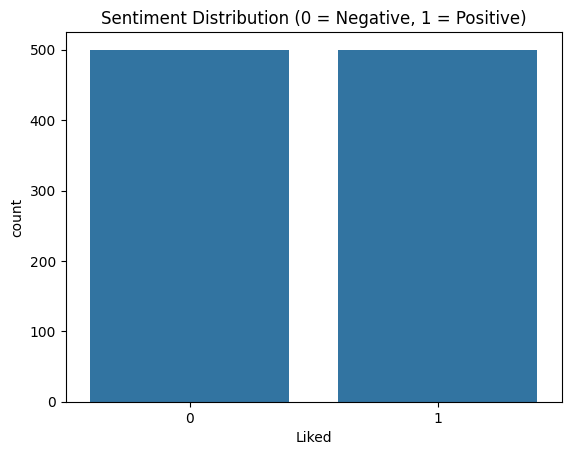
Let's visualize the sentiment distribution in our dataset to understand the balance of the classes.
Output:
This plot shows the distribution of positive and negative reviews.
We will use TfidfVectorizer to transform the text data into TF-IDF features. TF-IDF (Term Frequency-Inverse Document Frequency) helps in converting textual data into numerical features which can be used by machine learning models.
We will split the data into training and testing sets to evaluate our model's performance effectively.
We will use Logistic Regression for this example, which is a commonly used algorithm for binary classification tasks.
Output:
Let's evaluate our model using a classification report and confusion matrix to understand its performance.
Output:
 precision recall f1-score support

 0 0.80 0.84 0.82 152
 1 0.82 0.79 0.81 148

 accuracy 0.81 300
 macro avg 0.81 0.81 0.81 300
weighted avg 0.81 0.81 0.81 300
The classification report provides detailed metrics on the model's performance, such as precision, recall, and F1-score. The confusion matrix visualization helps in understanding the number of true positives, true negatives, false positives, and false negatives.
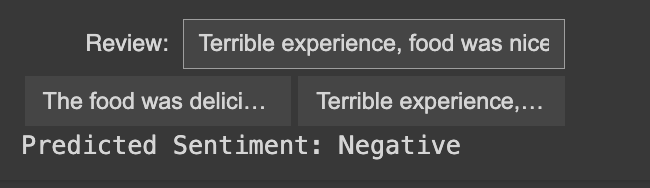
Now, let's create an interactive GUI where users can input a review and get real-time sentiment analysis predictions. We'll also provide buttons for sample reviews that users can click to test the model.
Output:
This section uses ipywidgets to create an interactive GUI:

.png)