VOOZH about

URL: https://www.geeksforgeeks.org/nlp/sentiment-analysis-on-imdb-movie-reviews/

⇱ Sentiment Analysis on IMDB Movie Reviews - GeeksforGeeks


  • Courses
  • Tutorials
  • Interview Prep

Sentiment Analysis on IMDB Movie Reviews

Last Updated : 23 Jul, 2025

Sentiment Analysis is a Natural Language Processing (NLP) technique used to determine the emotional tone behind text. In this article, we will explore how sentiment analysis on IMDB movie reviews to help us classify them as positive or negative.

👁 sentiment-analysis
Sentiment

IMDB movie reviews dataset is a common benchmark dataset for binary sentiment classification. Each review in the dataset is labeled as either positive or negative. You can download the dataset from kaggle which includes:

  • Size: 50,000 reviews (25,000 for training, 25,000 for testing)
  • Label Type: Binary (positive = 1, negative = 0)

Steps to Perform Sentiment Analysis

Below are the step by step procedure to do sentiment analysis in python:

Step 1: Install Necessary Libraries

Install required Python libraries:

  • Pandas: for managing data efficiently using data frames.
  • NumPy: for powerful array operations and numerical tasks.
  • Matplotlib: for creating visualizations to gain insights from the data.
  • Scikit-learn: machine learning library

Step 2: Load and Explore the Dataset

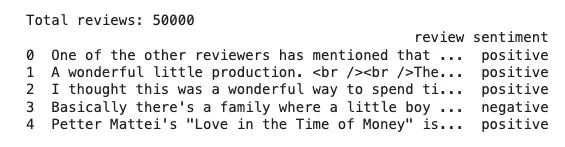
Dataset is in CSV format with columns review and sentiment. Use pandas to read the CSV file and inspect the structure, missing values and basic statistics.

Output:

👁 output
Loading and exploring dataset

Step 3: Preprocess the Data

Here we will do:

  • Lowercase conversion of text
  • Removing HTML tags and special characters
  • Remove extra spaces

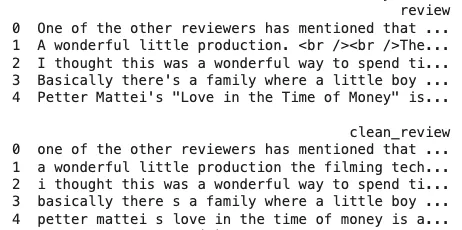
Clean the raw text data to make it uniform and suitable for vectorization and modeling.

Output:

👁 output
Before and after pre processing

Step 4: Convert Text to Numerical Vectors (TF-IDF)

  • Converts text into sequences of integers called vectors using tokenizer.
  • Pads sequences to make all reviews the same length (max_len=200) for LSTM input.

Step 5: Train-Test Split

Split the dataset into training and testing sets i.e 80 for training and 20% for testing to evaluate model performance on unseen data.

Step 6: Build the model

Defines an LSTM neural network as:

  • Embedding Layer: Turns word indices into dense vectors.
  • LSTM Layer: Learns sequential patterns in text.
  • Dense Layer: Outputs the final sentiment prediction (0 or 1).

Step 7: Compile the Model

Step 8: Train the model

  • Trains the model on the training data.
  • Runs for 5 epochs with a batch size of 64.
  • Uses 10% of the training data for validation during training.

Output:

👁 output
Training

Step 9: Evaluate the model

  • Makes predictions on test data.
  • Converts probabilities to binary predictions (> 0.5 = positive).
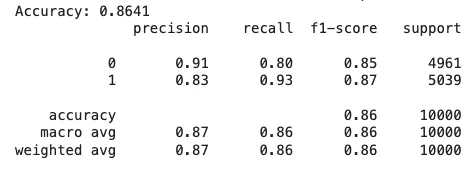
  • Prints overall accuracy and detailed classification report (precision, recall, F1-score).

Output:

👁 output
Model Performance

We can see that our model is working fine with 86.41% accuracy and we can further fine tune the model to increase its accuracy.

Step 10: Making predictions

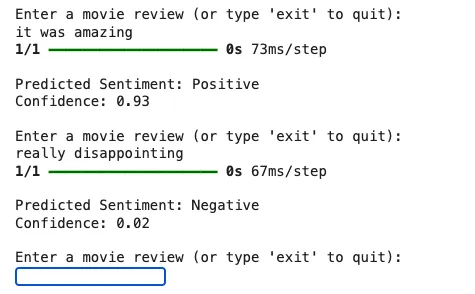
  • This loop takes user input a movie review, cleans and tokenizes it
  • Then uses the trained LSTM model to predict whether the sentiment is positive or negative and displays the result. It runs until the user types 'exit'.

Output:

👁 output
Model Predictions

We can see that our model is working fine making accurate predictions.

Similar Article

Comment
Article Tags:

Explore