|
VOOZH | about |
|
VOOZH | about |
Let's learn how to get the hour from the timestamp in Pandas DataFrame.
Pandas offers convenient tools to extract specific time components from timestamps in your data, such as the hour, which is useful for time-based analysis.
 timestamp hour
0 2024-11-29 08:45:32 8
1 2024-11-29 13:20:45 13
2 2024-11-29 18:10:10 18
You can also extract minutes, seconds and day of the week using:
To begin with, let's look at how to extract the hour from the current timestamp.
Current Timestamp: 2024-11-29 11:13:42.385191
Hour: 11
Here, we use pd.Timestamp.now() to get the current timestamp and then access the hour attribute to retrieve the hour.
You can also create a timestamp with a specific date and time and extract the hour.
Timestamp: 2020-07-21 06:30:44+05:30
Hour: 6
In this example, the timestamp is created with specific details, including the timezone. The hour attribute extracts the hour part from the timestamp.
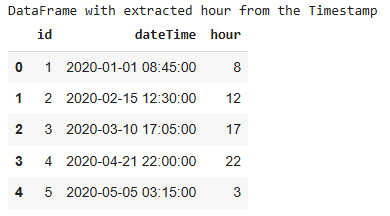
Often, timestamp data is read from CSV files. Here’s how to extract the hour from such data.
Dataset Link:xyz.csv
Output
This demonstrates how to read timestamp data from a CSV file, convert it to datetime format, and extract the hour from each timestamp.