|
VOOZH | about |
|
VOOZH | about |
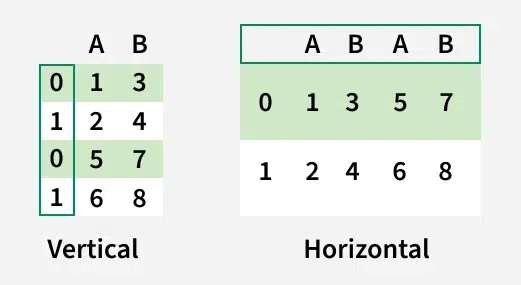
In real-world data the information is often spread across multiple tables or files. To analyze it properly we need to bring all that data together. This is where the pd.concat() function in Pandas comes as it allows you to combine two or more DataFrames in:
Output:
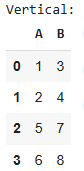
We can see that the vertically concatenated DataFrame has duplicate index. When axis=0 is used, Pandas stacks the rows one on top of the other but retains the original indices from each DataFrame. This can result in non-sequential indices (0, 1, 0, 1). Preserving index values from both DataFrames.
Output:
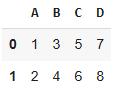
With horizontal concatenation (axis=1) the columns are combined side by side and you may see repeated column names like A and B. This horizontal arrangement might not make sense in cases like this discussed above as it can lead to ambiguous columns.
Generally horizontal concatenation is best suited for cases where:
Output:
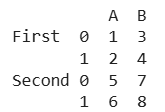
When concatenating DataFrames you can use the keys argument to create a hierarchical index also known as a MultiIndex. This helps you organize and distinguish the data more clearly by assigning a label to each DataFrame being concatenated. The resulting DataFrame will have a multi-level index that helps track the origin of each data point. This is useful when the labels are same or overlapping.
Output:
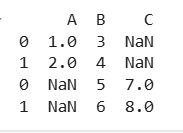
If the DataFrames being concatenated don’t have matching columns or indexes. Pandas will fill in missing values with NaN to maintain the structure of the resulting DataFrame.
Output:
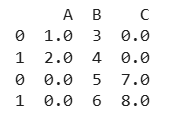
In this example Both df1 and df2 lack column C and column A respectively. Pandas adds NaN values to indicate data unavailability in the respective rows for missing spots. During Using the .fillna() function to replace NaN values with a specific value. This is useful if you have a default value to apply like 0, average or a string.
Output:
Here we filled NaN values with 0. This method is widely used as it gives us more control over missing values.
- Forward and Backward Fill Missing Values After Concatenation
- Drop Rows or Columns with Missing Values After Concatenation
- Concatenate with Inner Join to Avoid Missing Values