|
VOOZH | about |
|
VOOZH | about |
Converting a dictionary into a Pandas DataFrame is simple and effective. You can easily convert a dictionary with key-value pairs into a tabular format for easy data analysis. Lets see how we can do it using various methods in Pandas.
We can convert a dictionary into DataFrame using pd.DataFrame() function. In this method each key in the dictionary becomes a column label and the corresponding values forms data in those columns.
Output:
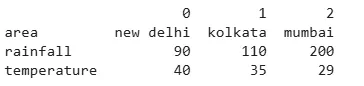
The pd.DataFrame.from_dict() method provides more flexibility and allows us to specify orientation of DataFrame using the orient parameter. This method helps us convert data into a dictionary-like format and control its structure.
Output:
When dictionaries have the lists with unequal lengths directly converting them to a DataFrame can lead to errors. In such cases we can first convert each key-value pair into separate Series and then combine them into a DataFrame. This method helps when dealing with inconsistent data.
Output:
As we continue working with Pandas these methods help us efficiently convert dictionaries into DataFrames.