|
VOOZH | about |
|
VOOZH | about |
Excel files often store related data across multiple sheets. Pandas provides a way to read all these sheets at once using the pd.read_excel() method. This approach allows us to load multiple sheets into Python and work with them as Pandas DataFrames.
Note: For this article a sample multiple sheets "multi_sheet.xlsx" is used, to download click here.
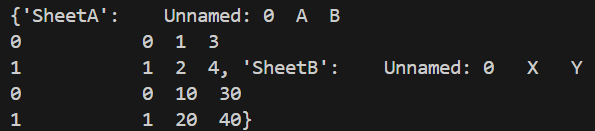
Example: This example shows how Pandas reads all sheets from an Excel file and stores them in a single object.
Output
Explanation:
The pd.read_excel() method is used to read Excel files in Pandas. When multiple sheets are read, it returns a dictionary instead of a single DataFrame. Below is the syntax:
pd.read_excel(excel_file, sheet_name=None)
Parameters:
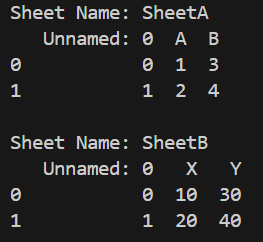
Example 1: This example reads all sheets from an Excel file and prints their contents one by one.
Output
Explanation:
Example 2: This example shows how to get sheet names and work with their DataFrames.
Output
Explanation: sheets.keys() returns all sheet names.
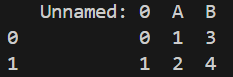
Example 3: This example demonstrates how to extract only one required sheet after loading all sheets.
Output
Explanation: