|
VOOZH | about |
|
VOOZH | about |
Sorting data is an important step in data analysis as it helps to organize and structure the information for easier interpretation and decision-making. Whether we're working with small datasets or large ones, sorting allows us to arrange data in a meaningful way.
Pandas provides the sort_values() method which allows us to sort a DataFrame by one or more columns in either ascending or descending order.
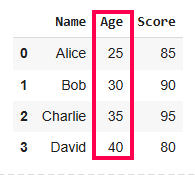
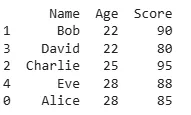
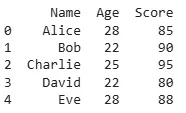
The sort_values() method in Pandas makes it easy to sort our DataFrame by a single column. By default, it sorts in ascending order but we can customize this.
Output:
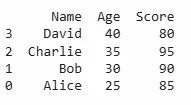
In this example, the DataFrame is sorted by the Age column in ascending order but here it is already sorted. If we need the sorting to be in descending order simply pass ascending=False:
Output:
When sorting by multiple columns, Pandas allows us to specify a list of column names. This is useful when we want to sort by one column like age and if there are ties, sort by another column like salary.
Output:
This will sort first by Age and if multiple rows have the same Age, it will then sort those rows by Salary.
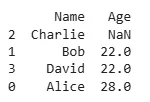
In real-world datasets, missing values (NaNs) are common. By default sort_values() places NaN values at the end. If we need them at the top, we can use the na_position parameter.
Output:
This will ensure that any rows with missing values in the Age column are placed at the top of the DataFrame.
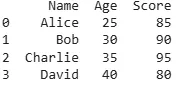
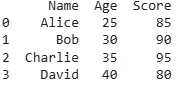
In addition to sorting by column values, we may also want to sort a DataFrame based on its index. This can be done using the sort_index() method in Pandas. By default, sort_index() sorts the DataFrame based on the index in ascending order.
Output:
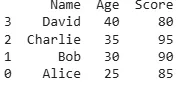
We can also sort by index in descending order by passing the ascending=False argument.
Output:
Pandas provides different sorting algorithms that we can choose using the kind parameter. Available options are:
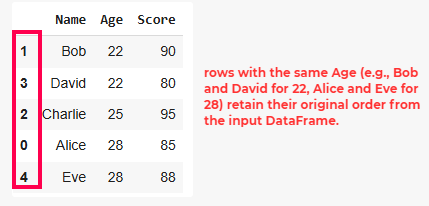
1. QuickSort (kind='quicksort'): It is a highly efficient, divide-and-conquer sorting algorithm. It selects a "pivot" element and partitions the dataset into two halves: one with elements smaller than the pivot and the other with elements greater than the pivot.
Output:
👁 Sort-Pandas-DataFrame2. MergeSort (kind='mergesort'): Divides the dataset into smaller subarrays, sorts them and then merges them back together in sorted order.
Output:
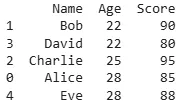
3. HeapSort (kind= 'heapsort'): It is another comparison-based sorting algorithm that builds a heap data structure to systematically extract the largest or smallest element and reorder the dataset.
Output:
Note: HeapSort being unstable, may not preserve this order and in some cases like the one above, it swaps rows with the same sorting key.
We can also apply custom sorting logic using the key parameter. This is useful when we need to sort strings in a specific way such as ignoring case sensitivity.
Output:
This ensures that names are sorted alphabetically without considering case differences.
Mastering data sorting in Pandas allows us to efficiently organize our data. With these techniques, we can make our analysis smoother and more manageable.