|
VOOZH | about |
|
VOOZH | about |
When working with large datasets, it's common to combine multiple DataFrames based on multiple columns to extract meaningful insights. Pandas provides the merge() function, which enables efficient and flexible merging of DataFrames based on one or more keys. This guide will explore different ways to merge DataFrames on multiple columns, including inner, left, right and outer joins.
Sometimes, the common columns are present but have different names. Instead of renaming them manually, we can specify the column names separately for each DataFrame using left_on and right_on.
Output
Explanation: The common columns are product_code in df1 and code in df2, as well as store_location in df1 and store in df2. The inner join returns only rows where both columns match in both DataFrames.
The merge() function in Pandas is used to combine two DataFrames based on one or more keys. The general syntax is:
import pandas as pd
merged_df = pd.merge(df1, df2, on=['column1', 'column2'], how='type_of_join')
If the column names match in both DataFrames, we can pass a list of column names in the on parameter.
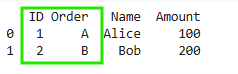
Output
Explanation: Since ID and Order exist in both DataFrames, they are used as keys since the inner join keeps only matching rows where both columns match in both DataFrames.
When merging, other columns may have the same names in both DataFrames. Pandas automatically appends _x and _y to distinguish them. We can customize the suffix names using the suffixes parameter.
Output
Explanation: The suffixes=('_df1', '_df2') ensures overlapping column names are differentiated aqnd this prevents confusion when both DataFrames have columns with identical names.
Here we will go through some examples to see the working of merge function based on multiple columns.
Let us consider two dataframes. We are basically merging the two dataframes using the two columns product_code and store_location.
Output
Explanation: In this case, we merge two DataFrames (df1 and df2) using the common columns product_code and store_location. The inner join keeps only the rows where both columns match in both DataFrames.
Let us consider two dataframes. We are basically merging the two dataframes using three columns and the join type is left.
 EmpID Dep Salary Bonus
0 101 HR 70000 5000.0
1 102 Finance 80000 6000.0
2 103 IT 90000 NaN
Explanation: Here, we merge df1 and df2 on EmployeeID and Department, but using a left join. This means all rows from the left DataFrame (df1) are retained, and if a match is found in df2, corresponding values are added. If there is no match in df2, the new columns will have NaN (missing values).
Let us consider two dataframes. We are basically merging the two dataframes using three columns and the join type is right.
 EmpID Dep Salary Bonus
0 101 HR 70000.0 5000
1 102 Finance 80000.0 6000
2 104 IT NaN 7000
Explanation: Similar to the left join, but this time a right join is performed. All rows from the right DataFrame (df2) are retained, and only matching rows from df1 are included. If there is no match in df1, the missing values are filled with NaN.
Let us consider two dataframes. We are basically merging the two dataframes using three columns and the join type is outer.
 EmpID Dep Salary Bonus
0 101 HR 70000.0 5000.0
1 102 Finance 80000.0 6000.0
2 103 IT 90000.0 NaN
3 104 IT NaN 7000.0
Explanation: The outer join keeps all rows from both DataFrames (df1 and df2), merging based on common columns EmpID and Dep. If a match is found, corresponding values are added. If a row is present in only one DataFrame, NaN is used for missing values in the other DataFrame.
Merging DataFrames based on multiple columns has several benefits: