|
VOOZH | about |
|
VOOZH | about |
iterrows() method in Pandas is a simple way to iterate over rows of a DataFrame. It returns an iterator that yields each row as a tuple containing the index and the row data (as a Pandas Series). This method is often used in scenarios where row-wise operations or transformations are required. Example:
Index: 0, Name: Aman, Age: 25
Index: 1, Name: Raj, Age: 32
Explanation: This code uses iterrows() to iterate over each row of the DataFrame and prints the index, Name, and Age for each row.
DataFrame.iterrows()
Parameters: It does not take any parameters.
Return Value: It returns an iterator that yields each row as a tuple containing the index and the row data (as a Pandas Series).
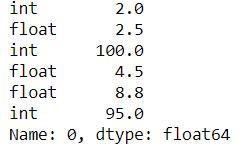
Let's understand how to iterate over the rows of DataFrame using iterrows() method of Pandas library. In the below example, we use Pandas DataFrame.iterrows() to iterate over numeric DataFrame rows:
Output:
👁 Pandas DataFrame iterrows example outputExplanation: This code creates a DataFrame and uses iterrows() to get the first row as a Series. next(df.iterrows())[1] retrieves and prints the first row of the DataFrame.
In the example, we iterate over the rows involving multiple columns using Pandas DataFrame.iterrows() function.
Product A generated $1000 in sales.
Product B generated $1000 in sales.
Product C generated $3000 in sales.
Explanation: This code iterates through each row of the DataFrame, calculates the total sales (Price * Quantity) for each product, and prints the result.
We can also, add the new column in this case we'll add 'Category' column using df.at[index, 'Category'] to assign a value for each row based on a condition.
 Name Age Category
0 Aman 25 Junior
1 Raj 32 Senior
2 Ayush 37 Senior
Explanation: This code iterates through each row of the DataFrame, checks the Age, and assigns a Category (Senior or Junior) based on the age.
In simple terms, iterrows() is a generator function. It generates a sequence of (index, row) pairs as you loop through your DataFrame. The index is the row label (or the row number if no custom index is set), and row is a Series object where each value corresponds to a column in that row. Behind the scenes, iterrows() works by iterating over the DataFrame one row at a time:
Related Articles: