|
VOOZH | about |
|
VOOZH | about |
The Pandas dt.round() method rounds off the DateTime values in a series to a certain frequency level.
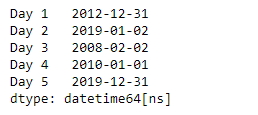
Output :
Syntax: Series.dt.round(freq, ambiguous='raise', nonexistent='raise')
Parameter:
- freq: The frequency level to round the index
- ambiguous: It determines whether the time should be interpreted as wall time (default), the version of the time that was earlier, the version of the time that was later, or raise an error if ambiguous.
- nonexistent: It determines whether the time should be shifted forward to the closest existing time, shifted backward to the closest existing time, return NaT, or raise an error if nonexistent.
Returns: DatetimeIndex, TimedeltaIndex, or Series of the same type.
To round off the DateTime values in a series to a certain frequency level we use the dt.round method of the Pandas library in Python.
Let's understand it better with an example:
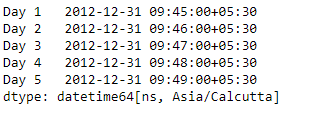
Use the Series.dt.round() function to round the DateTime data of the given series object to the specified frequency.
Output :
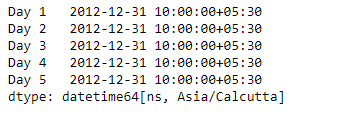
Now we will use the dt.round() function to round the datetime values in the given series object to Hourly frequency.
Output :
👁 datetime rounded to hourly frequency
As we can see in the output, the dt.round() function has successfully rounded the DateTime values in the given series object to the specified frequency.