|
VOOZH | about |
|
VOOZH | about |
The dt.strftime() method converts the datetime objects in the Pandas Series to a specified date format.
The function returns an index of formatted strings specified by date_format, which supports the same string format as the Python standard library.
Output:
👁 dt.strftime output exampleSyntax: Series.dt.strftime(Date_Format)
Parameter
- date_format : Date format string (e.g. “%Y-%m-%d”)
Returns: NumPy ndarray of formatted string
To change the date format of DateTime objects in a Pandas Series we use the dt.strftime method of the Pandas library in Python.
To understand it better, let us look at some example
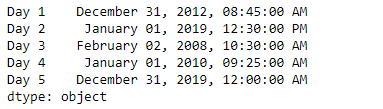
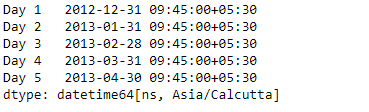
Output:
Now we will use the Series dt.strftime() function to convert the dates in the series object to the specified format.
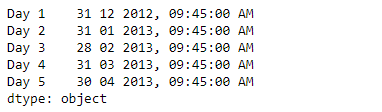
Output :
👁 date format changed after dt.strftime
As we can see in the output, the dt.strftime() function has successfully converted the dates in the given series object to the specified format.