Series.dt can be used to access the values of the series as datetimelike and return several properties. Pandas
Series.dt.is_leap_year attribute return a boolean indicator if the date belongs to a leap year.
Syntax: Series.dt.is_leap_year
Parameter : None
Returns : numpy array
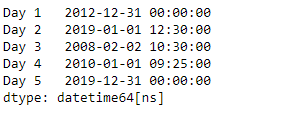
Example #1: Use
Series.dt.is_leap_year attribute to check if the dates in the underlying data of the given series object belongs to a leap year.
Output :
👁 Image
Now we will use
Series.dt.is_leap_year attribute to check if the dates in the given series object belongs to a leap year.
Output :
👁 Image
As we can see in the output, the
Series.dt.is_leap_year attribute has successfully accessed and returned boolean values indicating whether the dates in the given series object belongs to a leap year.
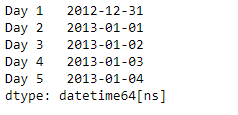
Example #2 : Use
Series.dt.is_leap_year attribute to check if the dates in the underlying data of the given series object belongs to a leap year.
Output :
👁 Image
Now we will use
Series.dt.is_leap_year attribute to check if the dates in the given series object belongs to a leap year.
Output :
👁 Image
As we can see in the output, the
Series.dt.is_leap_year attribute has successfully accessed and returned boolean values indicating whether the dates in the given series object belongs to a leap year.