Python is a great language for doing data analysis, primarily because of the fantastic ecosystem of data-centric python packages.
Pandas is one of those packages and makes importing and analyzing data much easier.
Pandas series is a One-dimensional ndarray with axis labels. The labels need not be unique but must be a hashable type. The object supports both integer- and label-based indexing and provides a host of methods for performing operations involving the index.
Pandas
Series.xs() function return a cross-section from the Series/DataFrame for the given key value.
Syntax:Series.xs(key, axis=0, level=None, drop_level=True)
Parameters :
key : Label contained in the index, or partially in a MultiIndex.
axis : Axis to retrieve cross-section on.
level : In case of a key partially contained in a MultiIndex, indicate which levels are used. Levels can be referred by label or position.
drop_level : If False, returns object with same levels as self.
Returns : Series or DataFrame
Example #1: Use
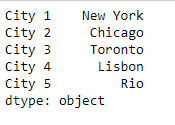
Series.xs() function to return a cross-section of the given Series object for the passed key value.
Output :
👁 Image
Now we will use
Series.xs() function to return the cross-section for the given series object.
Output :
👁 Image
As we can see in the output, the
Series.xs() function has returned 'Lisbon' as the cross-section for the given Series object.
Example #2 : Use
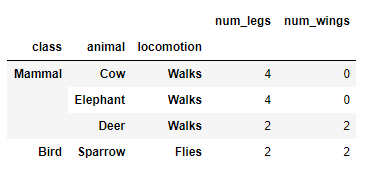
Dataframe.xs() function to return a cross-section of the given Dataframe object for the passed key value.
Output :
👁 Image
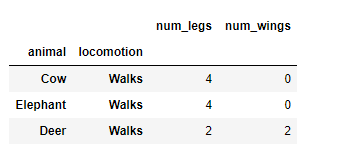
Now we will use
Dataframe.xs() function to return the cross-section for the given Dataframe object.
Output :
👁 Image
As we can see in the output, the
Dataframe.xs() function has returned the cross-section of the given Dataframe object for the passed key value.