|
VOOZH | about |
|
VOOZH | about |
Slicing a Pandas DataFrame is an important skill for extracting specific data subsets. Whether selecting rows, columns or individual cells, Pandas provides efficient methods such as iloc[]and loc[]. It focuses on using integer-based and label-based indexing to slice DataFrames effectively.
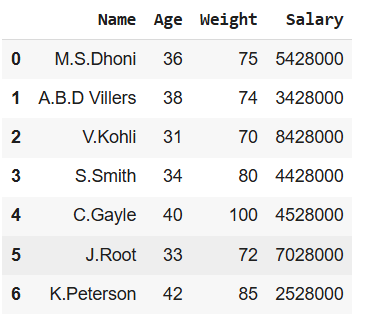
Let's import pandas library and create pandas dataframe from custom nested list.
Output:
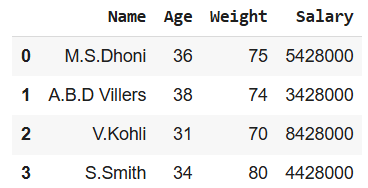
👁 creating_custom_dataframeThe iloc[] method in Pandas allows us to extract specific rows and columns based on their integer positions starting from 0. Each number represents a position in the DataFrame not the actual label of the row or column.
Row slicing means selecting a specific set of rows from the DataFrame while keeping all columns.
Output:
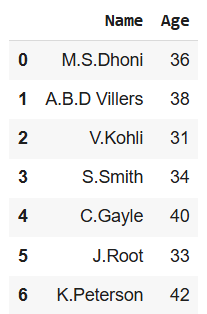
👁 slicing_using_ilocColumn slicing means selecting a specific set of columns from the DataFrame while keeping all rows.
Output:
👁 slicing_columnsIf you need a single value from a DataFrame you can specify the exact row and column position
Output:
Specific Cell Value: 8428000
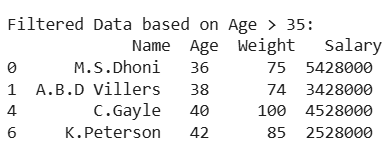
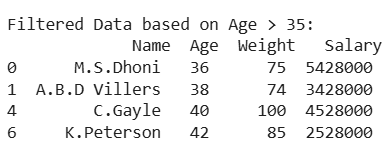
Instead of selecting rows by index we can use Boolean conditions (e.g., Age > 35) to filter rows dynamically.
Output:
👁 Screenshot-2025-03-15-095646Slicing can also be performed using the loc[] function in Pandas. Since loc[] is label-based, it selects data using row and column labels. As a result, when working with custom indices, it is important to reference the correct labels during selection.
With loc[] we can extract a range of rows by their labels instead of integer positions.
Output:
👁 slicing_using_locloc[] allows us to fetch a specific value based on row and column labels
Output:
Value of the Specific Cell (V.Kohli, Salary): 8428000