|
VOOZH | about |
|
VOOZH | about |
Spring Boot is a Java-based framework used to develop stand-alone, production-ready applications with minimal configuration. Introduced by Pivotal in 2014, it simplifies the development of Spring applications by offering embedded servers, auto-configuration, and fast startup. Many top companies, including Accenture, Netflix, Amazon, and Google, rely on it for its performance and ease of development.
In this guide, we provide comprehensive Spring Boot interview questions for both freshers and experienced developers. It covers essential topics such as Core Spring concepts, REST APIs, microservices, auto-configuration, embedded servers, monitoring, and error handling, helping you prepare for any Spring Interview Questions with confidence.
Table of Content
Spring Boot is built on top of the Spring framework to create stand-alone RESTful web applications with very minimal configuration and there is no need of external servers to run the application because it has embedded servers like Tomcat and Jetty etc.
To know more about Spring Boot, refer to this article – Introduction to Spring Boot
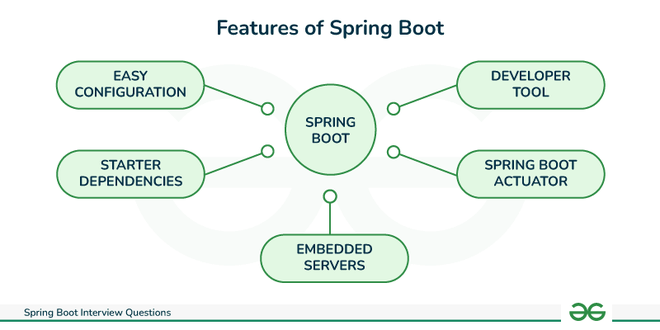
There are many useful features of Spring Boot. Some of them are mentioned below:
Spring Boot is a framework that creates stand-alone, production grade Spring based applications. So, this framework has so many advantages.
The key components of Spring Boot are listed below:
Here is a table that summarizes why we use Spring Boot over Spring framework.
Feature | Spring | Spring Boot |
|---|---|---|
Ease of use | More complex | Easier |
Production readiness | Less production-ready | More production-ready |
Scalability | Less scalable | More scalable |
Speed | Slower | Faster |
| Customization | Less Customizable | More Customizable |
To know more, refer to the article – Difference between Spring and Spring Boot
Here are the main steps involved in how Spring Boot works:
To know more about internal working of spring boot application, refer to this article – How Spring Boot Application works Internally?
Spring Boot provides many starter dependencies. Some of them which are used the most in the Spring Boot application are listed below:
A Spring application gets started by calling the main() method with @SpringBootApplication annotation in the SpringApplication class. This method takes a SpringApplicationBuilder object as a parameter, which is used to configure the application.
Example:
The @SpringBootApplication annotation combines three annotations. Those three annotations are: @Configuration, @EnableAutoConfiguration, and @ComponentScan .
@SpringBootApplication automatically configures the application based on the dependencies added during project creation and bootstraps the application by using run() method inside the main class of an application.
@SpringBootApplication = @Configuration + @EnableAutoConfiguration + @ComponentScan
Spring Initializer is a tool that helps us to create skeleton of spring boot project or project structure by providing a maven or gradle file to build the application. It set up the framework from scratch.
Spring Boot CLI is a command-line tool that can be used to create, run, and manage Spring Boot applications. It is a powerful tool that can help us to get started with Spring Boot quickly and easily. It is built on top of the Groovy programming language.
Most used CLI commands are:
To know more about Spring Boot Annotations, refer to this article – Spring Boot - Annotations
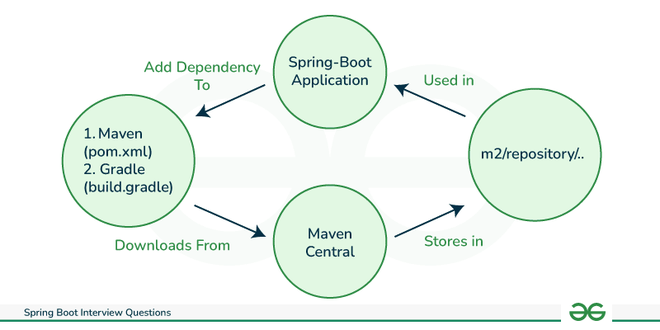
Spring Boot dependency management makes it easier to manage dependencies in a Spring Boot project. It makes sure that all necessary dependencies are appropriate for the current Spring Boot version and are compatible with it.
To create a web application, we can add the S pring Boot starter web dependency to our application.
👁 Spring Boot Dependency Management
To know more about Spring Boot Dependency Management, refer to this article – Spring Boot - Dependency Management
Yes, it is possible to change the port of the embedded Tomcat server in a Spring Boot application.
The simple way is to set the server. port property in your application's application.properties file. For example, to set the port to 8081, add the following property to the application.properties file:
server.port=8081Spring Boot Starters are a collection of pre-configured maven dependencies that makes it easier to develop particular types of applications. These starters include,
To use a Spring Boot starter dependency , we simply need to add it to our project's pom.xml file. For example, to add the Spring Boot starter web dependency, add the following dependency to the pom.xml file:
<dependency>
 <groupId>org.springframework.boot</groupId>
 <artifactId>spring-boot-starter-web</artifactId>
</dependency>
To know more about Spring Boot Starters, refer to this article – Spring Boot - Starters
The default port of the embedded Tomcat server in Spring Boot is 8080 . We can change the default port by setting the server.port property in your application's application.properties file.
Yes, we can disable the default web server in the Spring Boot application. To do this, we need to set the server.port property to "-1" in the application's application.properties file.
To disable a specific auto-configuration class in a Spring Boot application, we can use the @EnableAutoConfiguration annotation with the " exclude" attribute.
@EnableAutoConfiguration(exclude = {//classname})Yes, we can create a non-web application in Spring Boot. Spring Boot is not just for web applications. Using Spring Boot, we can create applications like Microservices, Console applications, and batch applications.
The flow of HTTPS requests through a Spring Boot application is as follows:
@RestController annotation is like a shortcut to building RESTful services. It combines two annotations:
It enables us to Define endpoints for different HTTP methods (GET, POST, PUT, DELETE), return data in various formats (JSON, XML, etc.) and map the request parameters to method arguments.
| Features | @Controller | @RestController |
|---|---|---|
Usage | It marks a class as a controller class. | It combines two annotations i.e. @Controller and @ResponseBody. |
Application | Used for Web applications. | Used for RESTful APIs. |
Request handling and Mapping | Used with @RequestMapping annotation to map HTTP requests with methods. | Used to handle requests like GET, PUT, POST, and DELETE. |
Note: Both annotations handle requests, but @RestController prioritizes data responses for building API.
Features | @RequestMapping | @GetMapping |
|---|---|---|
Annotations | @RequestMapping | @GetMapping |
Purpose | Handles various types of HTTP requests (GET, POST, etc.) | Specifically handles HTTP GET requests. |
Example | @RequestMapping(value = "/example", method = RequestMethod.GET) | @GetMapping("/example") |
Features | @SpringBootApplication | @EnableAutoConfiguration |
|---|---|---|
When to use | When we want to use auto-configuration | When we want to customize auto-configuration |
Entry point | Typically used on the main class of a Spring Boot application, serving as the entry point. | Can be used on any configuration class or in conjunction with @SpringBootApplication. |
Component Scanning | Includes @ComponentScan annotation to enable component scanning. | Does not perform component scanning by itself. |
Example | @SpringBootApplication public class MyApplication { public static void main(String[] args) { SpringApplication.run(MyApplication.class, args); } } | @Configuration @EnableAutoConfiguration public class MyConfiguration { } |
Spring Profiles are like different scenarios for the application depending on the environment.
@Profile annotation to clarify which config belongs to where. To use Spring Profiles, we simply need to define the spring.profiles.active property to specify which profile we want to use.
Feature | WAR | Embedded containers |
|---|---|---|
Packaging | Contains all of the files needed to deploy a web application to a web server. | It is a web application server included in the same JAR file as the application code. |
Configuration | Requires external configuration files (e.g., web.xml, context.xml) to define the web application. | Uses configuration properties or annotations within the application code. |
Security | Can be deployed to a web server that is configured with security features. | Can be made more secure by using security features that are provided by JRE. |
Spring Boot Actuator is a component of the Spring Boot framework that provides production-ready operational monitoring and management capabilities. We can manage and monitor your Spring Boot application while it is running.
Note: To use Spring Boot Actuator, we simply need to add the spring-boot-starter-actuator dependency to our project.
To know more about Actuator, refer to this article – Spring Boot Actuator
Below are the steps to enable actuator in Spring Boot Application:
Now we can access Actuator endpoints at URLs on the management port.
@ComponentScan annotation is used to tell Spring to scan a package and automatically detect Spring components, configurations, and services to configure. The @ComponentScan annotation can be used in the following ways:
To know more about @ComponentScan annotation, refer to this article – Spring @ComponentScan Annotation with Example
@RequestMapping: @RequestMapping is used to map HTTP requests to handler methods in your controller classes. It can be used at the class level and method level. It supports mapping by:
@RestController: @RestController is a convenience annotation that combines @Controller and @ResponseBody . It indicates a controller where every method returns a domain object instead of a view.
@RestController = @Controller + @ResponseBody
Yes, we can check the environment properties in our Spring Boot Application. The Environment object in a Spring Boot application can be used to check the environment's properties.
Configuration settings for the application, includes:
We can get the Environment instance by calling the getEnvironment() method.
To enable debugging log in Spring Boot Application, follow the below steps:
Using the actuator endpoint, the log level can also be changed at runtime.
Curl -X POST \http://localhost:8080/actuator/loggers/<logger-name>
\ -H 'content-type: application/json' \-d '{"configuredLevel": "DEBUG"}'
Dependency Injection (DI) is a design pattern that enables us to produce loosely coupled components. In DI, an object's ability to complete a task depends on another object. There three types of dependency Injections.
To know more about Dependency Injection, refer to the article – Spring Dependency Injection with Example - GeeksforGeeks
An IoC (Inversion of Control) Container in Spring Boot is essentially a central manager for the application objects that controls the creation, configuration, and management of dependency injection of objects (often referred to as beans), also referred to as a DI (Dependency Injection) container.
To know more about IOC Container, refer to the article – Spring - IoC Container
Features | Constructor Injection | Setter Injection |
|---|---|---|
Dependency | Dependencies are provided through constructor parameters. | Dependencies are set through setter methods after object creation. |
Immutability | Promotes immutability as dependencies are set at creation. | Dependencies can be changed dynamically after object creation. |
Dependency Overriding | Harder to override dependencies with different implementations. | Allows easier overriding of dependencies using different setter values. |
Thymeleaf is a Java-based server-side template engine used in Java web applications to render dynamic web pages. It is a popular choice for server-side templating in the Spring ecosystem, including Spring Boot.
To know more about Thymeleaf, refer to this article - Spring Boot - Thymeleaf with Example
Spring Data is a powerful framework that can be used to develop data-oriented applications. It aims to simplify the development of data-centric applications by offering abstractions, utilities, and integration with various data sources.
MVC stands for Model, View, and Controller. Spring MVC is a web MVC framework built on top of the Spring Framework. It provides a comprehensive programming model for building web applications.
An object that is managed by the Spring IoC container is referred to as a spring bean. A Spring bean can be any Java object.
An Inner Bean refers to a bean that is defined within the scope of another bean's definition. It is a way to declare a bean inside the configuration of another bean, without explicitly giving it a unique identifier.
To define an Inner Bean in Spring, we can declare it as a nested <bean> element within the configuration of the enclosing bean.
Bean wiring is a mechanism in Spring that is used to manage the dependencies between beans. It allows Spring to inject collaborating beans into each other. There are two types of Bean Wiring:
To know more about Autowiring, refer to the article – Spring - Autowiring
Spring Boot DevTools provides a number of development-time features and enhancements to increase developers' productivity and can be used for the following purposes:
To know more about Spring Boot DevTools, refer to the article – Spring Boot - DevTools
Below is the error we see if H2 is not present in the class path:
java.lang.ClassNotFoundException: org.h2.DriverTo connect an external database like MySQL or Oracle to a Spring Boot application using JDBC, we need to follow below steps:
To know more, refer to this article – Spring Boot - CRUD Operations using MySQL Database
Advantages of YAML file over Properties file:
Different ways to load YAML file in Spring Boot:
Spring Data REST is a framework that exposes Spring Data repositories as RESTful web services. It allows us to expose repositories as REST endpoints with minimal configuration by following Spring Data REST Technologies like Spring Data and Spring MVC .
To know more about Spring Data REST, Please Refer to this article- Spring - REST Controller
Here are the reasons why not to choose Spring Data REST:
Spring Boot automatically configures Hibernate as the default JPA implementation when we add the spring-boot-starter-data-jpa dependency to our project. This dependency includes the Hibernate JAR file as well as the Spring Boot auto-configuration for JPA.
To know more about Hibernate and JPA, Refer to below articles:
Below are the steps on how to deploy to a different server with Spring Boot: