|
VOOZH | about |
|
VOOZH | about |
WordPress is one of the most popular content management systems (CMS) in the world, making it easy for anyone to create and manage their own website. As you publish content, you might find that some posts become outdated or no longer relevant. In such cases, deleting posts is a necessary task to keep your website clean and user-friendly. This article will walk you through the steps to delete posts in WordPress, making the process implement.
Before diving into the steps, it's important to understand why you might want to delete posts. Here are a few reasons:
The basic tasks of handling WordPress content are adding/editing/deleting posts. You can delete posts from WordPress that you want to erase post anyway when you prefer to organize them. Let’s see the exact steps to Delete Posts in WordPress Easily and Quickly :
Access the WordPress login panel by adding /wp-login.php to your website's URL. Enter your username and password to sign in to the WordPress Dashboard.
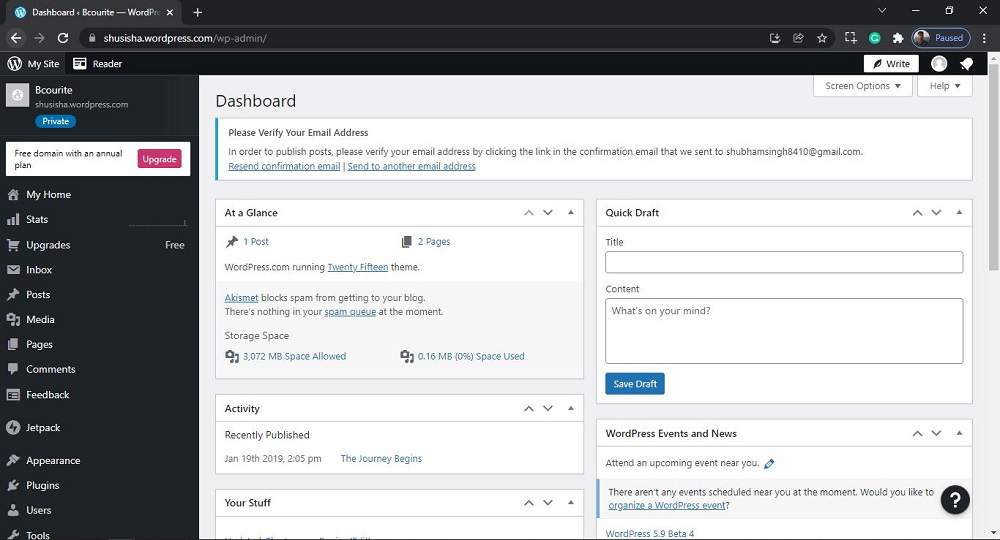
After login into WordPress, you will be able to see a dashboard like this:
From the dashboard, click on "Posts" in the left-hand menu. This will display a list of all your posts.
After clicking on All Posts, you will see a similar Post like this:
Click on the "more horiz" button for the selected post you want to delete then click on Trash to delete the Posts.
After clicking on Trash, pages will get deleted. you’ll see a Post trashed message. Both published and Trashed tabs will be updated :
That’s it, you have now successfully learned how to delete the posts from your WordPress website.
Also Read:
Deleting posts in WordPress is a routine part of website maintenance that can have significant benefits for your SEO and user experience. By following best practices and using the right tools, you can ensure that deleting posts has a positive impact on your site.
Always remember to monitor the effects of these changes and be proactive in managing redirects and updating internal links. This will help maintain a healthy, high-quality website that continues to rank well in search engines and provides value to your visitors.