
iPhone User Guide
- Welcome
-
-
- iPhone models compatible with iOS 26
- iPhone 11
- iPhone 11 Pro
- iPhone 11 Pro Max
- iPhone SE (2nd generation)
- iPhone 12 mini
- iPhone 12
- iPhone 12 Pro
- iPhone 12 Pro Max
- iPhone 13 mini
- iPhone 13
- iPhone 13 Pro
- iPhone 13 Pro Max
- iPhone SE (3rd generation)
- iPhone 14
- iPhone 14 Plus
- iPhone 14 Pro
- iPhone 14 Pro Max
- iPhone 15
- iPhone 15 Plus
- iPhone 15 Pro
- iPhone 15 Pro Max
- iPhone 16
- iPhone 16 Plus
- iPhone 16 Pro
- iPhone 16 Pro Max
- iPhone 16e
- iPhone 17
- iPhone 17 Pro
- iPhone 17 Pro Max
- iPhone Air
- iPhone 17e
- Setup basics
- Make your iPhone your own
- Take great photos and videos
- Keep in touch with friends and family
- Share features with your family
- Use iPhone for your daily routines
- Expert advice from Apple Support
-
- What’s new in iOS 26
-
- Adjust the volume
- Turn the iPhone flashlight on or off
- Silence iPhone
- Multitask with Picture in Picture
- Access features from the Lock Screen
- View Live Activities in the Dynamic Island
- Perform quick actions
- Search on iPhone
- Get information about your iPhone
- Manage storage on iPhone
- Travel with iPhone
-
- Change sounds and vibrations
- Use and customize the Action button
- Create a custom Lock Screen
- Change the wallpaper
- Use and customize Control Center
- Record audio and video
- Adjust the screen brightness and color balance
- Keep the iPhone display on longer
- Use StandBy
- Adjust iPhone display and text settings
- Change the name of your iPhone
- Change the date and time
- Change the language and region
- Change the default apps
- Change your default search engine
- Rotate your iPhone screen
- Customize sharing options
-
- Use the Camera Control
- Use the Camera Control to open another app
- Adjust the shutter volume
- Adjust HDR camera settings
- Record a video
- Take spatial photos and record spatial videos for Apple Vision Pro
- Change sound recording options
- Record ProRes video
- Record video in Cinematic mode
- Change video recording settings
- Save camera settings
- Customize the Main camera lens
- Change advanced camera settings
- View, share, and print photos
- Use Live Text
- Scan a QR code
-
-
- Create and edit events in Calendar
- Send invitations
- Reply to invitations
- Change how you view events
- Search for events
- Change Calendar settings
- Schedule or display events in a different time zone
- Keep track of events
- Use multiple calendars
- Use reminders
- Use the Holidays calendar
- Share iCloud calendars
- Compass
-
- Get started with FaceTime
- Create a FaceTime link
- Use FaceTime audio call tools
- Take a Live Photo
- Use Live Captions
- Use other apps during a call
- Make a Group FaceTime call
- Use SharePlay to watch, listen, and play together
- Share your screen in a FaceTime call
- Request or give remote control in a FaceTime call
- Collaborate on a document in FaceTime
- Use video conferencing features
- Hand off a FaceTime call to another Apple device
- Change the FaceTime video settings
- Change the FaceTime audio settings
- Leave a call or switch to Messages
- Block a FaceTime call and report it as spam
- Screen and filter calls
-
- Get started with the Apple Games app
- Set up your Game Center profile
- Find and download games
- Subscribe to Apple Arcade
- Connect with friends in the Apple Games app
- Play with friends in the Apple Games app
- Manage your game library
- Connect a game controller
- Change game-related settings
- Report a problem with a game
-
- Intro to Home
- Upgrade to the new version of Apple Home
- Set up accessories
- Control accessories
- Use Grid Forecast to plan your energy usage
- View electricity usage and rates
- Adaptive Temperature and Clean Energy Guidance
- Set up HomePod
- Control your home remotely
- Create and use scenes
- Use automations
- Set up security cameras
- Use Face Recognition
- Unlock your door with a home key on iPhone or Apple Watch
- Configure a router
- Invite others to control accessories
- Add more homes
-
- Get started with Maps
- Set your location and map view
-
- Set your home, work, or school address
- Use Maps
- Get driving directions
- Set up electric vehicle routing
- View a route overview or a list of turns
- Change or add stops to your route
- Get directions to your parked car
- Get walking directions
- Save walks or hikes
- Get transit directions
- Get cycling directions
- Book rides
- Download offline maps
-
- Search for places
- Find nearby attractions, restaurants, and services
- Explore airports or malls
- Get information about places
- View and manage Visited Places
- Add places and notes to your Places
- Share places
- Mark a location with a pin
- Rate places and add photos
- Explore places with guides
- Organize places with custom guides
- Clear location history
- Delete recent directions
- Report an issue with Maps
-
- Get started with Messages
- Set up Messages
- About iMessage
- Send and reply to messages
- Text via satellite
- Schedule a text message to send later
- Unsend and edit messages
- Keep track of messages
- Search
- Forward and share messages
- Group conversations
- Share screens
- Collaborate on projects
- Add backgrounds
- Use iMessage apps
- Poll people in a conversation
- Take and edit photos or videos
- Share photos, links, and more
- Send stickers
- Create and send Memoji
- React with Tapbacks
- Format text and animate messages
- Draw and handwrite messages
- Send and save GIFs
- Send and receive audio messages
- Share your location
- Turn read receipts on or off
- Stop, mute, and change notifications
- Screen and filter texts
- Report spam and block senders
- Delete messages and attachments
- Recover deleted messages
-
- Get started with Music
- Get music
-
-
- Play music
- Use the music player controls
- Play lossless audio
- Play Spatial Audio
- Listen to radio
- Play music together using SharePlay
- Play music together in the car
- Queue up your music
- Transition songs
- Shuffle or repeat songs
- Sing along with Apple Music
- Show song credits and lyrics
- Tell Apple Music what you enjoy
- Adjust the sound quality
-
- Get started with News
- Get News notifications and newsletters
- Use News widgets
- See news stories chosen just for you
- Read and share stories
- Read local news
- Follow your favorite teams with My Sports
- Listen to Apple News Today
- Search for channels, topics, stories, or recipes
- Save stories
- Clear your reading history
- Subscribe to individual news channels
-
- Get started with Notes
- Create and format notes
- Use Quick Notes
- Add drawings and handwriting
- Enter formulas and equations
- Add photos, video, and more
- Record and transcribe audio
- Scan text and documents
- Work with PDFs
- Add links
- Search notes
- Organize in folders
- Organize with tags
- Use Smart Folders
- Share and collaborate
- Export or print notes
- Lock notes
- Delete and recover notes
- Add or remove accounts
- Change the Notes view
- Change Notes settings
-
- Use passwords
- Find your password for a website or app
- Change the password for a website or app
- Remove a password
- Recover a deleted password
- Create a password for a website or app
- Show passwords in large text
- Use passkeys to sign in to websites and apps
- Sign in with Apple
- Share passwords
- Automatically fill in strong passwords
- See websites excluded from AutoFill
- Change weak or compromised passwords
- View your passwords and related information
- View password history
- Find and share your Wi-Fi password
- Share passwords securely with AirDrop
- Make your passwords available on all your devices
- Automatically fill in verification codes
- Automatically fill in SMS passcodes
- Sign in with fewer CAPTCHA challenges
- Use two-factor authentication
- Use security keys
- See your Mac FileVault recovery key
-
- Make a call
- Record and transcribe a call
- Change your Phone settings
- View and delete the call history
- Answer or decline incoming calls
- While on a call
- Share screens during a phone call
- Request or give remote control in a Phone call
- Have a conference or three-way call
- Set up Voicemail
- Check voicemail
- Change voicemail greeting and settings
- Select ringtones
- Make calls using Wi-Fi
- Set up call forwarding
- Set up call waiting
- Screen and block calls
-
- Get started with Photos
- Browse your photo library
- Browse your photo collections
- View photos and videos
- See photo and video information
- Sort and filter the photo library
- Back up and sync your photos and videos with iCloud
- Delete or hide photos and videos
- Search for photos and videos
- Get wallpaper suggestions
- Hide people, memories, and holidays
- Make stickers from your photos
- Duplicate and copy photos and videos
- Merge duplicate photos and videos
- Import and export photos and videos
- Print photos
-
- Get started with Podcasts on iPhone
- Find podcasts
- Watch and listen to podcasts
- View podcast transcripts
- Follow your favorite podcasts
- Rate or review podcasts
- Use the Podcasts widget
- Select your favorite Podcasts categories and channels
- Organize your podcast library
- Download, save, remove, and share podcasts
- Subscribe to podcasts
- Listen to subscriber-only content
- Change download settings
-
- Get started with Reminders
- Create reminders
- Make a grocery list
- Add details
- Complete items
- Delete and recover reminders
- Edit and organize a list
- Search your lists
- Organize multiple lists
- Tag items
- Use Smart Lists
- Share and collaborate
- Print a list
- Work with templates
- Add or remove accounts
- Change Reminders settings
-
- Get started with Safari
- Browse the web
- Search for websites
- See highlights
- Customize your Safari settings
- Change the layout
- Create multiple Safari profiles
- Listen to a webpage
- Bookmark a website
- Open as Web App
- Save pages to a Reading List
- Find links shared with you
- Download a PDF
- Annotate and save a webpage as a PDF
- Fill in forms
- Get extensions
- Clear your cache and cookies
- Enable cookies
- Shortcuts
- Tips
-
- About Apple Wallet
- Set up Apple Pay
- Use Apple Pay for contactless payments
- Use Apple Pay in apps and on the web
- Use Apple Cash
- Use Apple Card
- Add your ID
- Pay for transit
- Use digital keys
- Use passes, loyalty cards, tickets, and more
- Check your Apple Account balance
- Organize and search in Wallet
- Remove cards and passes
- Fill in payment information
- Change Wallet & Apple Pay settings
-
- Intro to Apple Intelligence
- Translate messages, calls, and conversations
- Use visual intelligence
- Create original images with Image Playground
- Create your own emoji with Genmoji
- Use Image Wand with Apple Intelligence
- Use Apple Intelligence with Siri
- Find the right words with Writing Tools
- Use ChatGPT with Apple Intelligence
- Summarize notifications and reduce interruptions
- Apple Intelligence and privacy
- Block access to Apple Intelligence features
-
- Get started with Screen Time
- Protect your vision health with Screen Distance
- Create, manage, and keep track of a Screen Time passcode
- Set schedules with Screen Time
- Block apps, app downloads, websites, and purchases
- Block calls and messages with Screen Time
- Check for sensitive images and videos
- Set up Screen Time for a child
- Respond to a Screen Time request
-
- Intro to Continuity
- Use AirDrop to send items to nearby devices
- Hand off tasks between devices
- Control your iPhone from your Mac
- Copy and paste between devices
- Stream video and audio from your iPhone
- Allow phone calls and text messages on your iPad and Mac
- Share your internet connection
- Use iPhone as a webcam
- Insert sketches, photos, and scans on Mac
- Start SharePlay instantly
- Connect iPhone and your computer with a cable
- Transfer files between devices
-
- Intro to CarPlay
- Connect to CarPlay
- Use your vehicle’s built-in controls
- Get turn-by-turn directions
- Report traffic incidents
- Change the map view
- View Live Activities
- Customize widgets
- Make phone calls
- Play music
- View your calendar
- Send and receive text messages
- Announce incoming text messages
- Play podcasts
- Play audiobooks
- Listen to news stories
- Control your home
- Use other apps with CarPlay
- Rearrange icons on CarPlay Home
- Change settings in CarPlay
-
- Get started with accessibility features
- Use accessibility features during setup
- Change Siri accessibility settings
- Quickly turn accessibility features on or off
- Share your Accessibility settings with another device
-
- Overview of accessibility features for vision
- Read or listen to text in apps with Accessibility Reader
- Zoom in
- View a larger version of text you’re reading or typing
- Change display colors
- Make text easier to read
- Customize onscreen motion
- Use iPhone more comfortably while riding in a vehicle
- Customize per-app visual settings
- Hear what’s on the screen or typed
- Hear audio descriptions
- Adjust CarPlay settings
-
- Turn on and practice VoiceOver
- Change your VoiceOver settings
- Use VoiceOver gestures
- Operate iPhone when VoiceOver is on
- Control VoiceOver using the rotor
- Use the onscreen keyboard
- Write with your finger
- Keep the screen off
- Use VoiceOver with an external keyboard
- Use a braille display
- Type braille on the screen
- Use Braille Access with a braille display
- Customize gestures and keyboard shortcuts
- Use VoiceOver with a pointer device
- Get live descriptions of your surroundings
- Use VoiceOver in apps
-
- Overview of accessibility features for mobility
- Use AssistiveTouch
- Adjust how iPhone responds to your touch
- Back tap
- Use Reachability
- Auto-answer calls
- Turn off vibration
- Change Face ID and attention settings
- Use Voice Control
- Use Voice Control commands with CarPlay
- Adjust the side or Home button
- Adjust Camera Control settings
- Use Apple TV 4K Remote buttons
- Adjust pointer settings
- Adjust keyboard settings
- Control iPhone with an external keyboard
- Adjust AirPods settings
- Turn on Apple Watch Mirroring
- Control a nearby Apple device
- Control iPhone with the movement of your eyes
- Control iPhone with the movement of your head
-
- Overview of accessibility features for hearing
- Use hearing devices
- Use Live Listen
- Use sound recognition
- Get notified when your name is called
- Set up and use RTT and TTY
- Flash the indicator light or screen for notifications
- Adjust audio settings
- Play background sounds
- Display subtitles and captions
- Show transcriptions for Intercom messages
- Get live captions of spoken audio
- Play music as taps, textures, and more
- Get notified about sounds in CarPlay
-
- Control what you share
- Turn on Lock Screen features
- Block contacts
- Keep your Apple Account secure
- Create and manage Hide My Email addresses
- Protect your web browsing with iCloud Private Relay
- Use a private network address
- Use Advanced Data Protection
- Use Lockdown Mode
- Install Background Security Improvements
- Use Stolen Device Protection
- Receive warnings about sensitive content
- Use Contact Key Verification
-
- Important safety information
- Important handling information
- Find more resources for software and service
- FCC compliance statement
- ISED Canada compliance statement
- Ultra Wideband information
- Class 1 Laser information
- Apple and the environment
- Disposal and recycling information
- Unauthorized modification of iOS
- Copyright and trademarks
Take a selfie with your iPhone camera
Use the front-facing camera on your iPhone to take a selfie. You can take selfies in Photo mode or Portrait mode.
Take a selfie
Open Camera 👁 Image
on your iPhone.Tap 👁 the Camera Chooser Back-Facing button
to switch to the front-facing camera.Before taking the selfie, you can do any of the following:
Tap 👁 the Selfie Zoom Zoomed In button
to increase the field of view; tap 👁 the Selfie Zoom Zoomed Out button
to return to the original view.Tap 👁 the Change Aspect Ratio button
to rotate the frame from portrait to landscape on (supported models); tap 👁 the Change Aspect Ratio button
to return to portrait.
Tap the Shutter button, press either volume button, or click the Camera Control to take the selfie.
👁 The Camera screen in Photo mode. Within the camera frame, the subjects are taking a selfie.


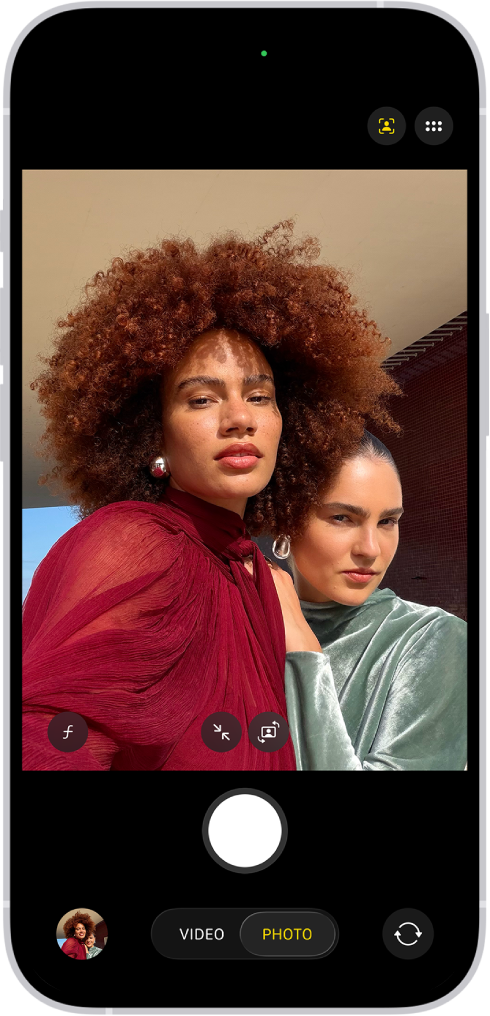
Automatically zoom or rotate the frame with Center Stage for photos
On iPhone 17, iPhone 17 Pro, iPhone 17 Pro Max, and iPhone Air, the camera frame can automatically zoom and rotate when faces are detected in a group selfie.
Tip: For best results, make sure everyone is looking at the camera and within 10 feet of it.
Open Camera 👁 Image
on your iPhone.Tap 👁 the Camera Chooser Back-Facing button
to switch to the front-facing camera.To make adjustments, tap 👁 the Chrome Auto Smart Framing Label On Off button
, then turn the following on or off:Auto Zoom: Automatically expands the frame when a face is detected at the edge of the frame.
Auto Rotate: Automatically rotates the frame to landscape to accommodate more people in the frame.
Tap the Shutter button, press either volume button, or click the Camera Control to take the selfie.

When you first use Center Stage for photos, Auto Zoom is on and Auto Rotate is off. Changes you make to these settings are saved.
Note: If you tap 👁 the Selfie Zoom Zoomed In button
or 👁 the Selfie Rotate button
to manually zoom or rotate the frame, the Center Stage settings you selected turn off. To turn them back on, repeat the steps above.
Mirror the front camera
To take a selfie that captures the shot as you see it in the front-facing camera frame, rather than reversing it, go to Settings 👁 Image
> Camera, then turn on Mirror Front Camera.
