|
VOOZH | about |
|
VOOZH | about |
In the age of AI, many of our tasks have been automated especially after the launch of ChatGPT. One such tool that uses the power of ChatGPT to ease data manipulation task in Python is PandasAI. It leverages the power of ChatGPT to generate Python code and executes it. The output of the generated code is returned. Pandas AI helps performing tasks involving pandas library without explicitly writing lines of code. In this article we will discuss about how one can use Pandas AI to simplify data manipulation.
Using generative AI models from OpenAI, Pandas AI is a pandas library addition. With simply a text prompt, you can produce insights from your dataframe. It utilises the OpenAI-developed text-to-query generative AI. The preparation of the data for analysis is a labor-intensive process for data scientists and analysts. Now they can carry on with their data analysis. Data experts may now leverage many of the methods and techniques they have studied to cut down on the time needed for data preparation thanks to Pandas AI. PandasAI should be used in conjunction with Pandas, not as a substitute for Pandas. Instead of having to manually traverse the dataset and react to inquiries about it, you can ask PandasAI these questions, and it will provide you answers in the form of Pandas DataFrames. Pandas AI wants to make it possible for you to visually communicate with a machine that will then deliver the desired results rather than having to program the work yourself. To do this, it uses the OpenAI GPT API to generate the code using Pandas library in Python and run this code in the background. The results are then returned which can be saved inside a variable.
Execute the following command in your jupyter notebook to install pandasai library in python
!pip install -q pandasai
Import pandasai library in python
Make a dataframe using a dictionary with dummy data
Output:
Output:
Prompt 1: Finding index of a value
Output:
6
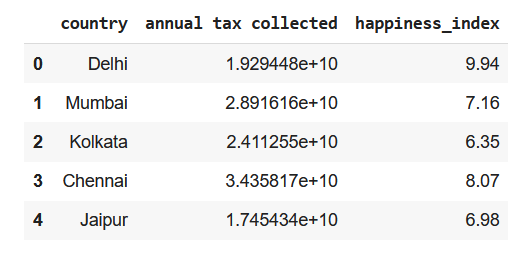
Prompt 2: Using Head() function of DataFrame
Output:
 country annual tax collected happiness_index
0 Delhi 1.929448e+10 9.94
1 Mumbai 2.891616e+10 7.16
2 Kolkata 2.411255e+10 6.35
3 Chennai 3.435817e+10 8.07
4 Jaipur 1.745434e+10 6.98
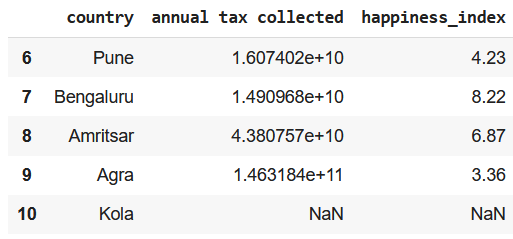
Prompt 3: Using Tail() function of DataFrame
Output:
 country annual tax collected happiness_index
6 Pune 1.607402e+10 4.23
7 Bengaluru 1.490968e+10 8.22
8 Amritsar 4.380757e+10 6.87
9 Agra 1.463184e+11 3.36
10 Kola NaN NaN
Prompt 4: Using describe() function of DataFrame
Output:
 annual tax collected happiness_index
count 1.000000e+01 10.000000
mean 3.570575e+10 6.728000
std 4.010314e+10 1.907149
min 1.181205e+10 3.360000
25% 1.641910e+10 6.162500
50% 2.170352e+10 6.925000
75% 3.299767e+10 7.842500
max 1.463184e+11 9.940000
Prompt 5: Using the info() function of DataFrame
Output:
<class 'pandas.core.frame.DataFrame'>
Index: 11 entries, 0 to 10
Data columns (total 3 columns):
 # Column Non-Null Count Dtype
--- ------ -------------- -----
 0 Country 11 non-null object
 1 annual tax collected 11 non-null float64
 2 happiness_index 11 non-null float64
dtypes: float64(2), object(1)
memory usage: 652.0+ bytes
Prompt 6: Using shape attribute of dataframe
Output:
(11, 3)
Prompt 7: Finding any duplicate rows
Output:
There are no duplicate rows.
Prompt 8: Finding missing values
Output:
False
Prompt 9: Drop rows with missing values
Output:
False
Checking if the last has been removed row
Output:
Prompt 10: Print all column names
Output:
['country', 'annual tax collected', 'happiness_index']
Prompt 11: Rename a column
Output:
Index(['Country', 'annual tax collected', 'happiness_index'], dtype='object')
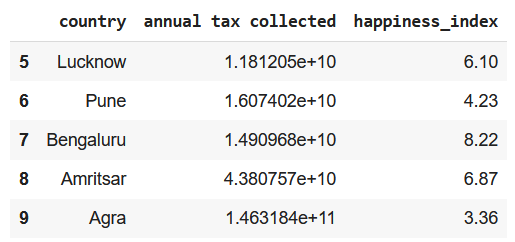
Prompt 12: Add a row at the end of the dataframe
Output:
 Country annual tax collected happiness_index
0 Delhi 1.929448e+10 9.94
1 Mumbai 2.891616e+10 7.16
2 Kolkata 2.411255e+10 6.35
3 Chennai 3.435817e+10 8.07
4 Jaipur 1.745434e+10 6.98
5 Lucknow 1.181205e+10 6.10
6 Pune 1.607402e+10 4.23
7 Bengaluru 1.490968e+10 8.22
8 Amritsar 4.380757e+10 6.87
9 Agra 1.463184e+11 3.36
10 A NaN NaN
Prompt 13: Replace the missing values
Output:
 Country annual tax collected happiness_index
10 A 0.0 0.0
Prompt 14: Calculating mean of a column
Output:
32459769130.545456
Prompt 15: Finding frequency of unique values of a column
Output:
Country
Delhi 1
Mumbai 1
Kolkata 1
Chennai 1
Jaipur 1
Lucknow 1
Pune 1
Bengaluru 1
Amritsar 1
Agra 1
A 1
Name: count, dtype: int64
Prompt 16: Dataframe Slicing
Output:
 Country happiness_index
0 Delhi 9.94
1 Mumbai 7.16
2 Kolkata 6.35
Prompt 17: Using pandas where function
Output:
 Country annual tax collected happiness_index
1 Mumbai 2.891616e+10 7.16
Prompt 18: Using pandas where function with a range of values
Output:
 Country annual tax collected happiness_index
6 Pune 1.607402e+10 4.23
9 Agra 1.463184e+11 3.36
Prompt 19: Finding 25th percentile of a column of continuous values
Output:
5.165
Prompt 20: Finding IQR of a column
Output:
2.45
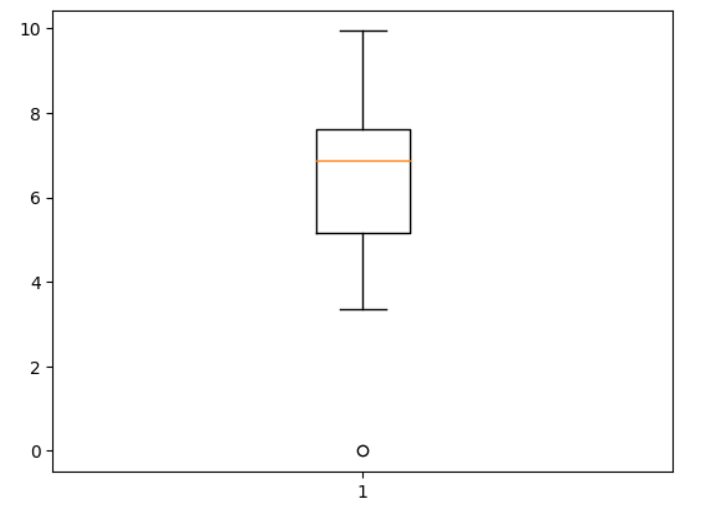
Prompt 21: Plotting a box plot for a continuous column
Output:
Prompt 22: Find outliers in a column
Output:
 Country annual tax collected happiness_index
0 Delhi 1.929448e+10 9.94
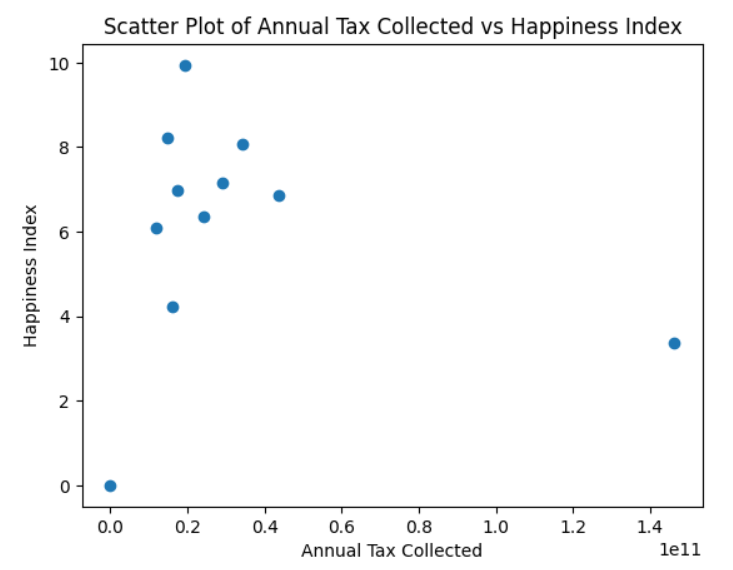
Prompt 23: Plot a scatter plot between 2 columns
Output:
Prompt 24: Describing a column/series
Output:
count 1.100000e+01
mean 3.245977e+10
std 3.953904e+10
min 0.000000e+00
25% 1.549185e+10
50% 1.929448e+10
75% 3.163716e+10
max 1.463184e+11
Name: annual tax collected, dtype: float64
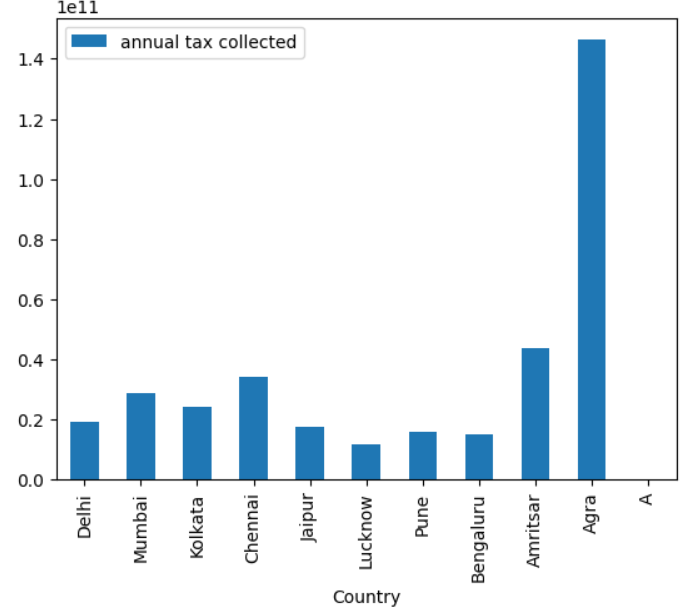
Prompt 25: Plot a bar plot between 2 columns
Output:
Prompt 26: Saving DataFrame as a CSV file and JSON file
These lines of code will save your DataFrame as a CSV file and JSON file.
Pros of Pandas AI
Cons of Pandas AI
1. Is Pandas AI replacing Pandas ?
No, Pandas AI is not meant to replace Pandas. Though Pandas AI can easily perform simple tasks, it still faces difficulty performing some complex tasks like saving the dataframe, making a correlation matrix and many more. Pandas AI is best for quick analysis, data cleaning and data manipulation but when we have to perform some complex functions like join, save dataframe, read a file, or create a correlation matrix we should prefer Pandas. Pandas AI is just an extension of Pandas, for now it cannot replace Pandas.
2. When to use Pandas AI ?
For simple tasks one could consider using Pandas AI, here you won't have to remember any syntax. All you have to do is design a very descriptive prompt and rest will be done by Open AI's LLM. But if you want to perform some complex tasks, you should prefer using Pandas.
3. How does Pandas AI work in the backend?
Pandas AI takes in the dataframe and your query as input and passes it to a collection of OpenAI's LLM's. Pandas AI uses ChatGPT's API in the backend to generate the code and executes it. The output after execution is returned to you.
4. Can PandasAI work without OpenAI's API?
Yes, other than ChatGPT you can also use Google's PaLm model, Open Assistant LLM and StarCoder LLM for code generation.
5. Which to use Pandas or PandasAI for Exploratory Data Analysis?
You can first try using PandasAI to check if the data is good to perform an in depth analysis, then you can perform an in-depth analysis using Pandas and other libraries.
6. Can PandasAI use numpy attributes or functions?
No, it does not have the ability to use numpy functions. All computations are performed either by using Pandas or in-built python functions in the backend.
In this article we focused on how to use PandasAI to perform all the major functionality supported by Pandas to perform a quick analysis on your dataset. By automating several operations, it without a doubt boosts productivity. It's important to keep in mind that even though PandasAI is a powerful tool, the Pandas library must still be used. PandasAI is therefore a beneficial addition that improves the capability of the pandas library and further increases the effectiveness and simplicity of dealing with data in Python.