|
VOOZH | about |
|
VOOZH | about |
itertuples() is a method that is used to iterate over the rows and return the values along with attributes in tuple format. It returns each row as a lightweight namedtuple, which is faster and more memory-efficient than other row iteration methods like iterrows(). Let us consider one sample example.
Pandas(Index=0, Name='Alice', Age=25, City='New York')
Pandas(Index=1, Name='Bob', Age=30, City='Los Angeles')
Pandas(Index=2, Name='Charlie', Age=35, City='Chicago')
From the output we can see that namedtuples have been returned for each row.
itertuples is a method in Pandas that is used to iterate over the rows of the dataframe and return lightweight namedtuples. By namedtuples we mean that we can access the element of the tuple by its field name. It is an alternative to iterrows() and is much more memory efficient.
Syntax:
DataFrame.itertuples(index=True, name='Pandas')
- DataFrame means name of the dataframe
- index= True will return the index of the row and it will be the first element of the tuple or namedtuple.
- name='Pandas' will return the rows in namedtuple format. If it is set to None, it will return plain tuples with no field names
Here we have a dataframe and we need to iterate over the rows. We will use itertuples and set the index to False.
Output:
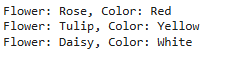
From the output we can see that the index has been excluded because we have set index=False. Since the default name is 'Pandas' it returns rows where the field names are basically column names.
We can also access a particular field in namedtuple while using itertuples. This can be done by using row variable followed by the dot operator and then the field name. Let us consider one example. Here we have a dataframe and we need to display the output in a proper format instead of namedtuple.
Output:
From the output we can see that using the column names we can extract the values from the namedtuple.
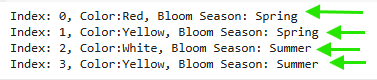
Now if we are setting name=None, then we are getting plain tuple as output. For plain tuple we can use indexing to access the values. By default the tuple indexing starts from 0.
Output:
From the output we can see that using the indexing, we can access the items of the tuple. But the drawback is in plain tuples we do not know the attribute names.
We can perform some operations using itertuples. Some of them include filtering, calculation, grouping and creating dictionary of rows.
itertuples means iterating through the rows and generating namedtuples. In namedtuples we can consider any attribute and apply comparison operator and filter those rows or items from the namedtuples. Below is the example that illustrates the same.
Output:
Here we have filtered the rows based on marks using the comparison operator.
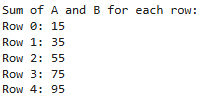
We can iterate over the rows and perform aggregate calculations as well. Here we will iterate over the dataframe and perform addition operation for each row.
Output:
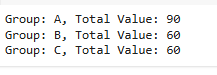
We can also group data based on particular column without using groupby and perform aggregation operations like min, max, count and sum. Let us consider an example.
Output:
In this we are iterating and for each group we are calculating the sum of the values. If the group name is not present in dictionary, we are creating a key which is basically our group name and default value as 0. Then we are updating the values accordingly.
We can also create a dictionary of rows. This technique is useful when we need to store the rows in JSON format.
Output:
From the output we can see that index is basically the key and the values comprises of different columns and its associated values. The structure is similar to the JSON format.