|
VOOZH | about |
|
VOOZH | about |
Filtering a Pandas DataFrame by column values is a common and essential task in data analysis. It allows to extract specific rows based on conditions applied to one or more columns, making it easier to work with relevant subsets of data. Let's start with a quick example to illustrate the concept:
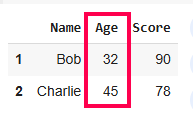
Output:
In this example, we filtered the DataFrame to show only rows where the "Age" column has values greater than 30. The result is a smaller DataFrame containing only the rows that meet this condition. This method is called is Boolean indexing as it create a boolean mask by applying conditions to the DataFrame and then use this mask to select rows. This method is powerful because it allows you to combine multiple conditions using logical operators and, or, and not.
Considering another example, imagine you have a DataFrame containing information about employees, and you want to filter out only those from the "Marketing" department.
Output:
In this example, we simply use df[column_name] == value to filter rows, and wrap it in df[...] to create a new filtered DataFrame.
loc[] AccessorTheloc[] accessor is another common method for filtering. The .loc[] method allows for more complex filtering, used to filter both rows and columns at the same time by specifying conditions for both axes. It allows to specify conditions directly within the square brackets.
Output:
 Name Score
1 Bob 90
2 Charlie 78
Here, we filter rows where "Age" is greater than 30 and select only the "Name" and "Score" columns from those filtered rows.
.isin()The .isin() method is useful when you want to filter rows based on whether a column's value exists in a list of values.
Output:
 Name Age Score
0 Alice 25 85
2 Charlie 45 78
This code filters the DataFrame to include only rows where the "Age" column has values of either 25 or 45.
.query()The .query() method allows you to filter a DataFrame using SQL-like syntax. This can be particularly useful when dealing with complex conditions.
Output:
 Name Age Score
2 Charlie 45 78
In this example, we use .query() to filter rows where "Age" is greater than 30 and "Score" is less than 90.
You can combine multiple conditions using logical operators:
These operators are applied element-wise to DataFrame columns, and the results are then used to index the DataFrame.
Output:
AND Operation Result:
 Name Age Score
2 David 28 88

OR Operation Result:
 Name Age Score
0 Bob 23 90
1 Charlie 45 78
2 David 28 88

NOT Operation Result:
 Name Age Score
0 Bob 23 90
This code filters the DataFrame to include only rows where both conditions are met: "Age" greater than 25 and "Score" greater than 80 for "and operation": , include rows where at least one of the conditions is met: either "Age" greater than 25 or "Score" greater than 80 for "OR operation" and filters the DataFrame to include only rows where "Age" is not greater than 25 for NOT operation.
Filtering a Pandas DataFrame by column value is a crucial skill in data analysis, and here are the key takeaways along with guidance on when to use each method:
| Method | When to Use |
|---|---|
| Boolean Indexing | Ideal for simple conditions (e.g., df[column] > value) filtering rows based on conditions applied to individual columns. |
| .loc[] Accessor | When you need to filter both rows and columns simultaneously. Apply conditions to rows and select specific columns. |
| .isin() | Best when checking if a column's value is in a list of specific values. Use when filtering rows based on membership in a list, series, or array. |
| .query() | Ideal for complex conditions written in a SQL-like syntax. |
| Logical Operators (AND, OR, NOT) | Use when combining multiple conditions to filter data. |