|
VOOZH | about |
|
VOOZH | about |
Data Analysis Expressions (DAX) in Power BI provides a set of functions that help us to calculate values such as counts, sums and averages. Whether we're working with entire tables or specific columns, DAX counting functions help us to quickly calculate the number of rows, distinct values or non-blank entries which makes them valuable for our data analysis.
Let’s apply Counting Functions to a dataset containing information on library supplies sold by a library manufacturer to different clients. The dataset includes details like order date, client name, product name and product unit.
You can download the dataset through following links:
We’ll use this data to see how DAX counting functions can aggregate data and provide insights into sales, clients and product quantities.
The COUNT function counts the number of rows in a column that contain numeric values. It only accepts a column as an argument.
Syntax:
COUNT(<column>)
Example:
Count = COUNT('SLS Order Details_Master'[Book Date (dd-mm-yyyy)])
Output:
The COUNTA function counts rows in a column that have non-blank values such as numbers or text. It returns a blank if there are no non-blank values in the column.
Syntax:
COUNTA(<column>)
Example:
CountA = COUNTA('SLS Order Details_Product Master'[Manufacturing Location])
Output:
The COUNTX function is used to evaluate an expression across a table and counts the number of rows where the result is a number. It's useful when we need to count rows based on an expression or condition such as when using filters to refine the data.
Syntax:
COUNTX(<table>, <expression>)
Alternatively we can use COUNTX with the FILTER function to apply conditions before counting the rows:
COUNTX(FILTER(<table>, <condition>), <expression>)
Example:
CountX = COUNTX(FILTER('SLS Order Details_Master', 'SLS Order Details_Master'[Unit Price (INR/Unit)] > 1000), [Product Quantity])
Output:
COUNTAX works similarly to COUNTA but it counts non-blank results when evaluating an expression over a table. It loops through rows and counts those where the expression does not return a blank result.
Syntax:
COUNTAX(<table>, <expression>)
Example:
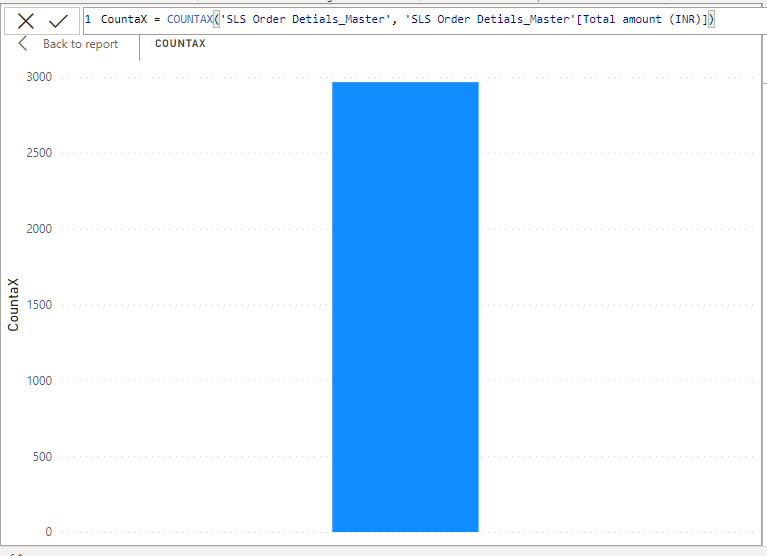
CountAX = COUNTAX('SLS Order Details_Master', 'SLS Order Details_Master'[Total amount (INR)])
Output:
The DISTINCTCOUNT function counts the number of unique (distinct) values in a column. It helps in identifying how many unique entries are present regardless of duplicates.
Syntax:
DISTINCTCOUNT(<column>)
Example:
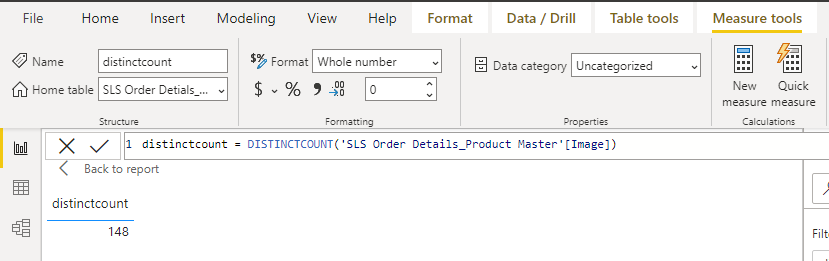
DistinctCount = DISTINCTCOUNT('SLS Order Details_Product Master'[Image])
Output:
The COUNTBLANK function counts the number of blank (empty) cells in a column. It does not count cells with zero as these are considered valid values.
Syntax:
COUNTBLANK(<column>)
Example:
CountBlank = COUNTBLANK('SLS Order Details_Product Master'[Product Manufacturer])
Output:
The COUNTROWS function counts the number of rows in a given table. It can also be used to count rows in a filtered table or result set.
Syntax:
COUNTROWS(<table>)
Example:
CountRows = COUNTROWS('SLS Order Details_Master')
Output: