|
VOOZH | about |
|
VOOZH | about |
Power BI help users to visualize and interpret data easily and DAX Math Functions helps us to perform mathematical operations on data such as creating custom calculations for our reports and dashboards. In this article, we’ll see some commonly used DAX Math Functions that can be applied to real-world datasets.
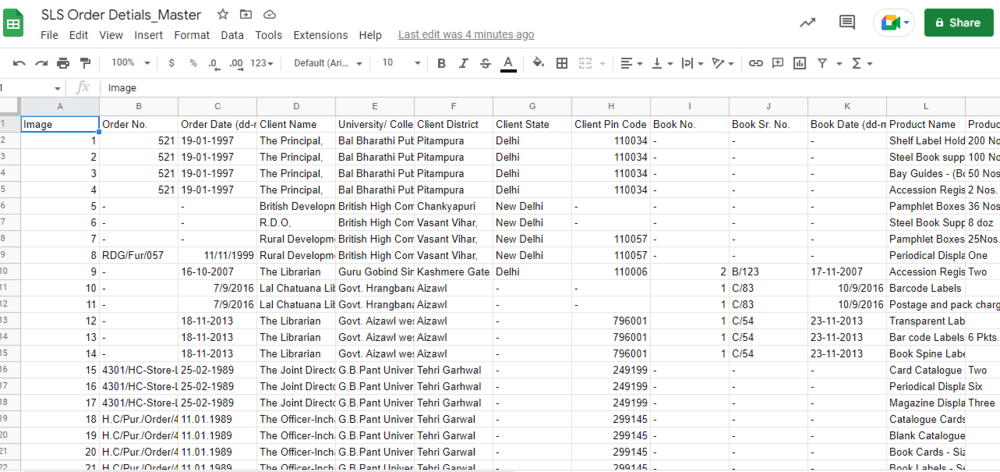
Let's practice some of the commonly used DAX Math Functions on a sample dataset of library supply companies. The screenshot of the dataset is given below:
You can download dataset from here.
Now go to the Power BI desktop to load the dataset from excel.
Let's now understand the important DAX math functions in detail:
The ABS function in DAX returns the absolute value of a number. This means it removes the sign of a number, converting negative numbers to positive ones while keeping positive numbers unchanged. Whether we're working with whole numbers or decimals, it checks that the result is always a non-negative value. It is useful when nested in other functions that require positive numbers.
Syntax:
ABS(<number>)
Example Use Case: Calculating the difference between the Sum of the Tax amount (INR) and the Sum of the Total amount (INR).
Example: ABS = ABS(572369.5499999996 - 6943454.36)
In this example the difference between 572369.55 and 6943454.36 is calculated and the absolute value of the result is returned. If the difference were negative, it would be converted into a positive value.
The CEILING function in DAX rounds a number up to the nearest integer or multiple of a specified significance. It’s useful when we need to ensure that a number is rounded up when dealing with quantities or pricing that needs to adhere to certain standards such as rounding to the nearest whole unit or predefined increment.
Syntax:
CEILING(<number>, <significance>)
Example: ceiling = CEILING(572369.5499999996, 0.01)
This rounds 572369.55 up to the nearest 0.01.
The CONVERT function allows us to transform an expression into a specific data type. This is helpful when we need to change the format of a value, for example converting a date into an integer or a number into text.
Syntax:
CONVERT(<Expression>, <Datatype>)
Example: convert = CONVERT(DATE(1997,12,23), INTEGER)
This converts the date December 23, 1997 into an integer.
The CURRENCY function is used to convert a value into a currency format which is important for financial reports and calculations.
Syntax: CURRENCY(<value>)
Example: currency = CURRENCY(23.44)
This returns the value 23.44 formatted as currency.
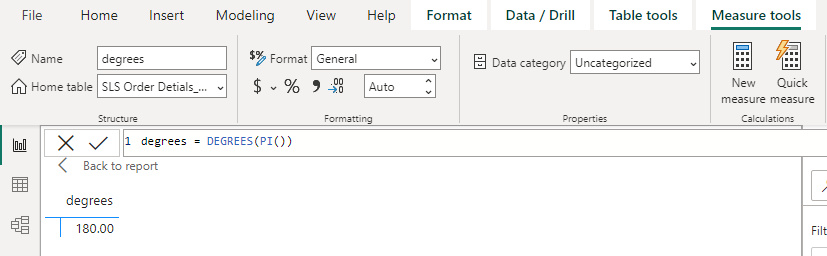
The DEGREES function converts an angle from radians to degrees. This is useful when we need to work with angle measurements that are not in radians
Syntax: DEGREES (angle)
Example: degrees = DEGREES(PI())
This converts the value of Pi () from radians to degrees.
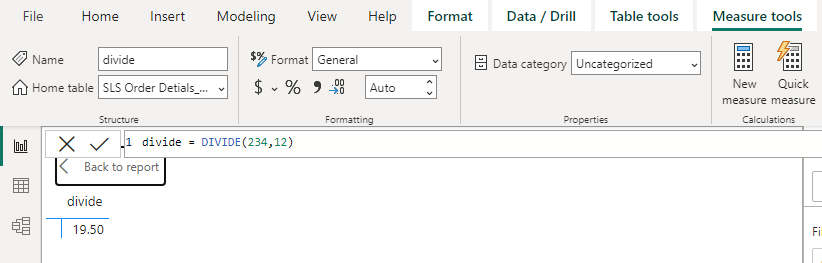
The DIVIDE function divides two numbers and returns a result. If the denominator is zero, it returns a blank value (or an alternate result, if provided).
Syntax:
DIVIDE(<numerator>, <denominator>, [<alternate result>])
Example: divide = DIVIDE(234,12)
This divides 234 by 12 and returns the result.
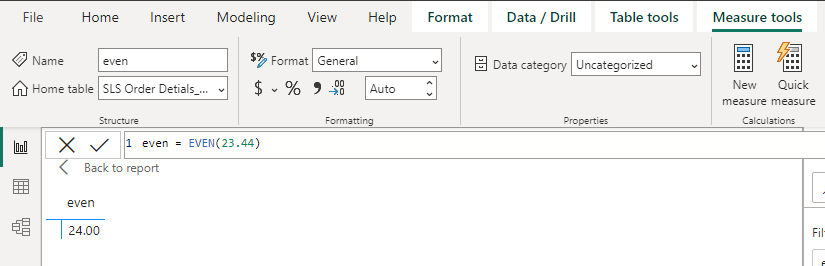
The EVEN function rounds a number to the nearest even integer. This can be helpful for certain calculations such as grouping items in pairs.
Syntax:
EVEN(<number>)
Example: even = EVEN(23.44)
This rounds 23.44 up to the nearest even number which is 24.
The EXP function returns the value of e raised to the power of the specified number. The constant e is approximately 2.71828 and is used in exponential growth and decay calculations.
Syntax:
EXP(<number>)
Example: exp = EXP(4)
This returns the value of e raised to the power of 4.
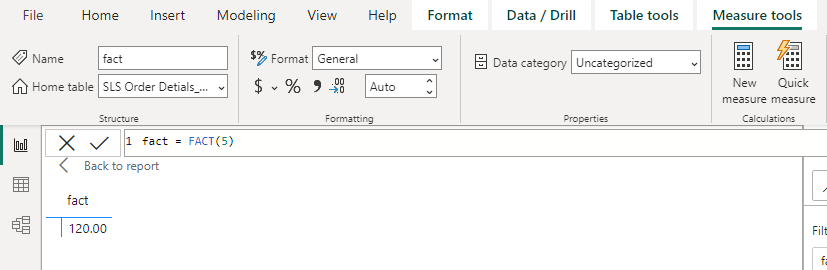
The FACT function returns the factorial of a number which is the product of all positive integers up to that number. This is useful in combinatorics, statistics and probability.
Syntax:
FACT(<number>)
Example: fact = FACT(5)
This returns the factorial of 5 which is 120 (5 * 4 * 3 * 2 * 1).
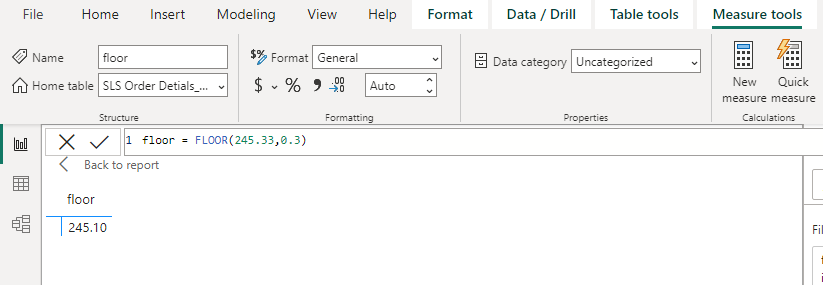
The FLOOR function rounds a number down to the nearest multiple of a specified significance. This is helpful when we want to ensure that values are rounded down such as when working with pricing or measurements.
Syntax:
FLOOR(<number>, <significance>)
Example: floor = FLOOR(245.33,0.3)
This rounds 245.33 down to the nearest multiple of 0.3.
The GCD function returns the greatest common divisor of two or more integers. This is useful for simplifying fractions or finding the largest number that divides both numbers without a remainder.
Syntax:
GCD(<number1>, [<number2>, ...])
Example: gcd = GCD(122,4)
This returns the greatest common divisor of 122 and 4 which is 2.
The INT function rounds a number down to the nearest integer. This is useful when we need to discard the decimal portion of a number.
Syntax:
INT(<number>)
Example: int = INT(55.44)
This rounds 55.44 down to 55.
The ISO.CEILING function behaves similarly to the CEILING function but follows ISO standards for rounding numbers. It rounds a number up to the nearest multiple of a specified significance.
Syntax:
ISO.CEILING(<number>, [<significance>])
Example: iso.ceiling = ISO.CEILING(2.999,0.2)
This rounds 2.999 up to the nearest multiple of 0.2.
The LCM function returns the least common multiple of two or more integers. This is useful when working with fractions that have different denominators.
Syntax:
LCM(<number1>, [<number2>, ...])
Example: lcm = LCM(45,56)
This finds the least common multiple of 45 and 56.
The LN function returns the natural logarithm of a number. The natural logarithm uses e (approximately 2.71828) as its base.
Syntax:
LN(<number>)
Example: ln = LN(0.004)
This returns the natural logarithm of 0.004.
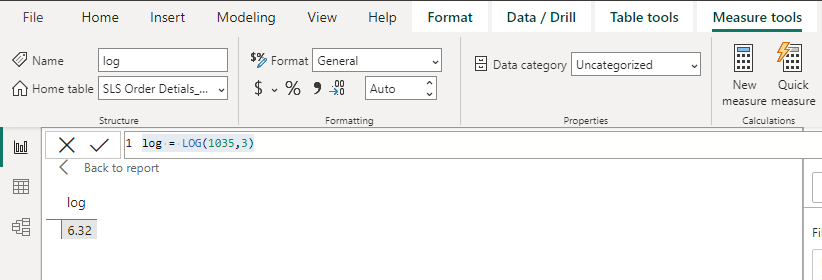
The LOG function returns the logarithm of a number to a specified base. If no base is provided, the function defaults to base 10. This function is useful when working with exponential data or scaling numbers in a logarithmic scale.
Syntax:
LOG(<number>, <base>)
Example: log = LOG(1035,3)
This returns the logarithm of 1035 to base 3.
The LOG10 function returns the base-10 logarithm of a number. It’s typically used when we want to scale or normalize data on a logarithmic scale with a base of 10.
Syntax:
LOG10(<number>)
Example: log10 = LOG10(1035)
This returns the base-10 logarithm of 1035.
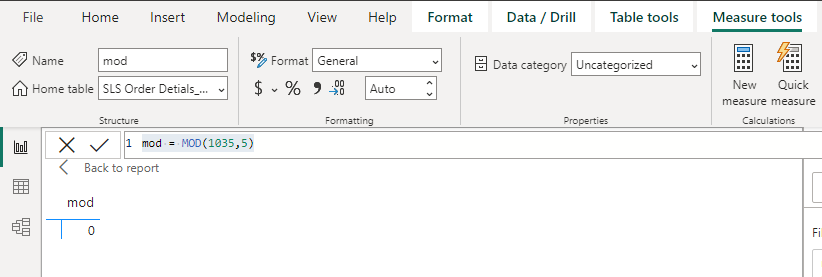
The MOD function returns the remainder after dividing a number by a divisor. It is useful when we need to calculate remainders or distribute items into groups.
Syntax:
MOD(<number>, <divisor>)
Example: mod = MOD(1035,5)
This returns the remainder when 1035 is divided by 5.
The MROUND function rounds a number to the nearest multiple of a specified value. This can be used to round prices, measurements or other values to a required standard.
Syntax:
MROUND(<number>, <multiple>)
Example: mround = MROUND(455.6,5)
This rounds 455.6 to the nearest multiple of 5.
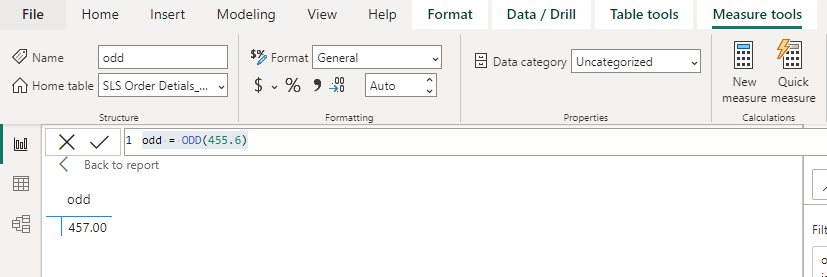
The ODD function rounds a number to the nearest odd integer. This can be helpful when dealing with objects or quantities that need to be in odd numbers.
Syntax:
ODD (number)
Example: odd = ODD(455.6)
This rounds 455.6 to the nearest odd number which is 457.
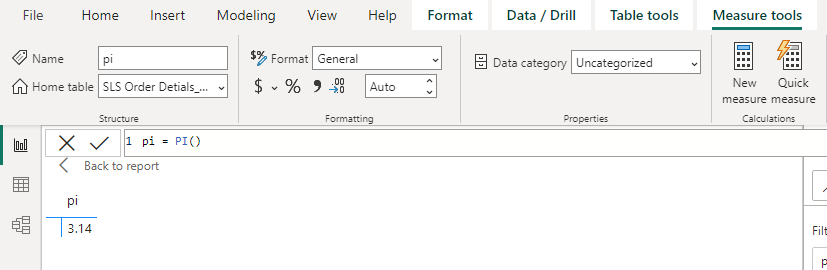
The PI function returns the value of Pi in decimal form with 15-digit precision. Pi is a constant used in various mathematical calculations such as those involving circles.
Syntax:
PI()
Example: pi = PI()
This returns the value of Pi approximately 3.14.
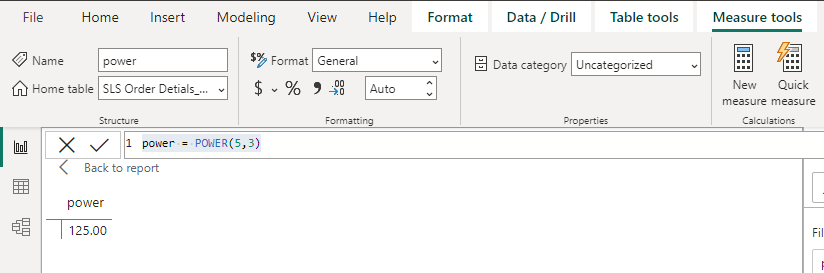
The POWER function raises a base number to a given exponent. It’s useful when we want to calculate exponential growth or other power-related operations.
Syntax:
POWER(<number>, <power>)
Example: power = POWER(5,3)
This returns 5 raised to the power of 3 (125).
The QUOTIENT function returns the integer part of a division. This is useful when we need to discard the remainder or fractional part from a division operation.
Syntax:
QUOTIENT(<numerator>, <denominator>)
Example: quotient = QUOTIENT(234,3)
This returns the integer part of 234 divided by 3 (78).
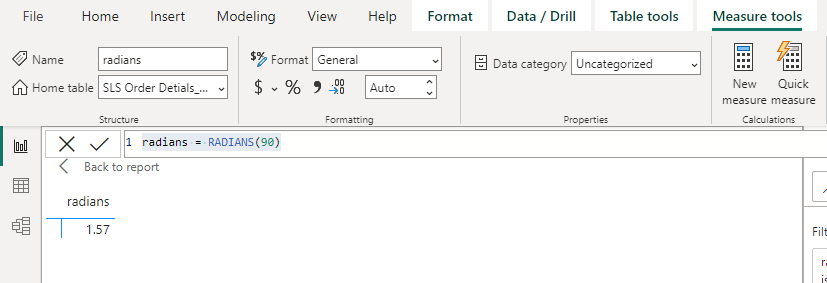
The RADIANS function converts an angle from degrees to radians which is necessary for various mathematical and trigonometric functions that work with radians.
Syntax:
RADIANS (angle)
Example: radians = RADIANS(90)
This converts 90 degrees to radians (approximately 1.57).
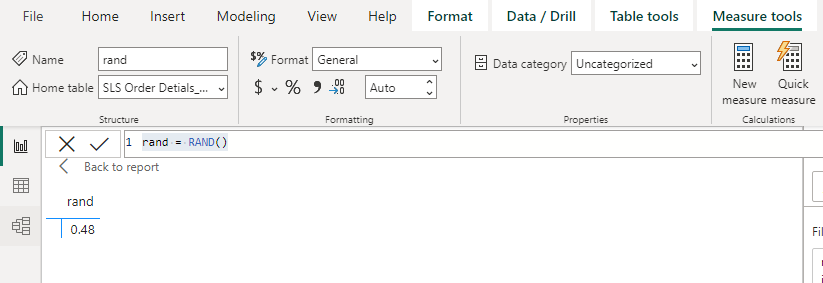
The RAND function generates a random number between 0 and 1. It’s useful for simulations, random data generation or testing.
Syntax:
RAND ()
To avoid mistakes like division by zero, the RAND function cannot return a value of zero.
Example: rand = RAND()
This generates a random number between 0 and 1 (e.g 0.48).
The RANDBETWEEN function generates a random integer between two specified values. It is useful when we need random integers for simulations or tests.
Syntax:
RANDBETWEEN(<bottom>, <top>)
Example: randbetween = RANDBETWEEN(23,44)
This generates a random integer between 23 and 44 i.e 31.
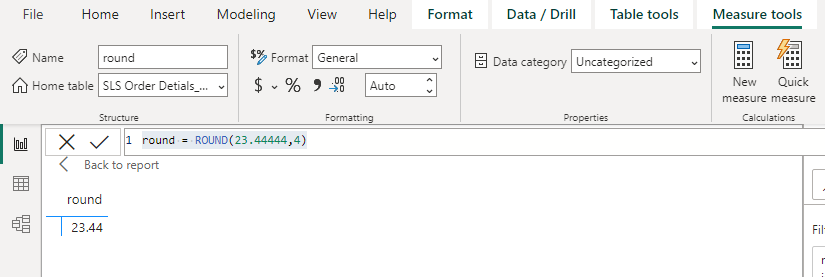
The ROUND function rounds a number to a specified number of digits. This is used in financial calculations to round prices, quantities or other data points to the nearest decimal place.
Syntax:
ROUND(<number>, <num_digits>)
Example: round = ROUND(23.44444,4)
This rounds 23.44444 to 4 decimal places (23.44).
The ROUNDDOWN function rounds a number down to the nearest specified digit. Unlike ROUND which rounds based on the decimal it will always round down toward zero.
Syntax:
ROUNDDOWN(<number>, <num_digits>)
Example: round down = ROUNDDOWN(23.44444,1)
This rounds 23.44444 down to 23.40.
The ROUNDUP function rounds a number up, away from zero, to the specified number of digits. It is useful when we need to ensure values are always rounded up.
Syntax:
ROUNDUP(<number>, <num_digits>)
Example: round up = ROUNDUP(23.44444,1)
This rounds 23.44444 up to 23.50.
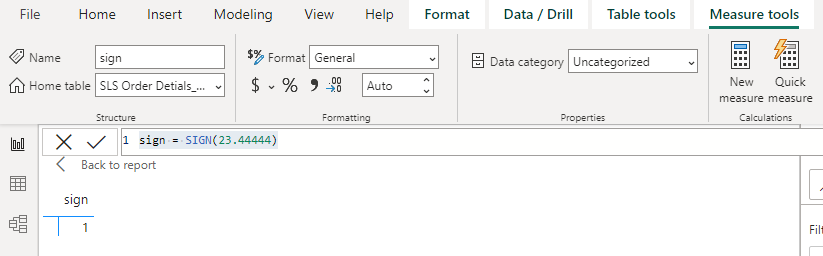
The SIGN function identifies the sign of a number. It returns 1 for positive numbers, 0 for zero and -1 for negative numbers.
Syntax:
SIGN(<number>)
Example: sign = SIGN(23.44444)
This returns 1 because the number is positive.
The SQRT function returns the square root of a number. This is helpful when working with geometric calculations or any situation requiring square roots.
Syntax:
SQRT(<number>)
Example: sqrt = SQRT(23.44444)
This returns the square root of 23.44444.
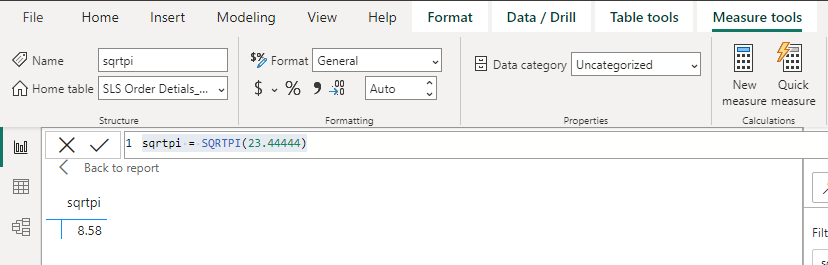
The SQRTPI function returns the square root of the product of a number and Pi. This is useful for certain geometric and statistical calculations.
Syntax:
SQRTPI (number)
Example: sqrtpi = SQRTPI(23.44444)
This returns the square root of 23.44444 * Pi i.e 8.58.
The TRUNC function removes the decimal portion of a number, truncating it to the specified number of digits. It is useful when we need to eliminate fractional values.
Syntax: TRUNC(<number>, <num_digits>)
Example: truncate = TRUNC(45.0000345,6)
This truncates 45.0000345 to 6 decimal places (45.00).
By mastering these DAX Math Functions we can enhance our data analysis capabilities in Power BI which helps in more precise calculations and better insights for our reports and dashboards.